
Build script generated virtual hosts and farm files not deployed in the Cloud Manager Build & Unit Testing Phase | Community
Skip to main content
Rohan_Garg
Community Advisor
Community Advisor
August 18, 2022
Solved

Build script generated virtual hosts and farm files not deployed in the Cloud Manager Build & Unit Testing Phase

  • August 18, 2022
  • 2 replies
  • 1338 views

Hi All,


I have the below scenario -

We are using a build script to generate the Virtual hosts and Farm files in our dispatcher folder.

STEP 1 - 

When running this deployment on cloud the virtual host and farm files are not listed in the CREATE_DISPATCHER_CONFIGURATION_ZIP phase as shown below - 


Begin stage: CREATE_DISPATCHER_CONFIGURATION_ZIP

adding: conf.d/enabled_vhosts/ (stored 0%)
adding: conf.d/enabled_vhosts/README (deflated 11%)


adding: conf.d/available_vhosts/ (stored 0%)
adding: conf.d/available_vhosts/default.vhost (deflated 48%)


adding: conf.dispatcher.d/available_farms/ (stored 0%)
adding: conf.dispatcher.d/available_farms/default.farm (deflated 58%)


adding: conf.dispatcher.d/enabled_farms/ (stored 0%)
adding: conf.dispatcher.d/enabled_farms/default.farm (stored 0%)
adding: conf.dispatcher.d/enabled_farms/README (deflated 7%)

STEP 2 -

When committing the files in the repo and deploying the below results are seen - 

Begin stage: CREATE_DISPATCHER_CONFIGURATION_ZIP

adding: conf.d/enabled_vhosts/ (stored 0%)
adding: conf.d/enabled_vhosts/brandA.vhost (stored 0%)
adding: conf.d/enabled_vhosts/README (deflated 11%)


adding: conf.d/available_vhosts/ (stored 0%)
adding: conf.d/available_vhosts/brandA.vhost (deflated 68%)
adding: conf.d/available_vhosts/default.vhost (deflated 48%)


adding: conf.dispatcher.d/available_farms/ (stored 0%)
adding: conf.dispatcher.d/available_farms/default.farm (deflated 58%)
adding: conf.dispatcher.d/available_farms/brandA.farm (deflated 63%)


adding: conf.dispatcher.d/enabled_farms/ (stored 0%)
adding: conf.dispatcher.d/enabled_farms/default.farm (stored 0%)
adding: conf.dispatcher.d/enabled_farms/README (deflated 7%)
adding: conf.dispatcher.d/enabled_farms/brandA.farm (stored 0%)


As seen the custom brandA farm file and virtual hosts files are picked and working as expected.


Why is this behavior so ?

I read a note on the link https://experienceleague.adobe.com/docs/experience-manager-cloud-manager/content/using/code-deployment.html?lang=en

Is it because the Cloud Manager expects the file to be committed in the repo ?

If so, then is it not possible to have script generated vhosts, farms, mappings deployed on the cloud ?


@arunpatidar , @sachin_arora_@lukasz-m , @santoshsai , @debal_das , @mohit_kbansal , @joerghoh , @kautuk_sahni 


Update - 

The Adobe Enterprise Support Team has the below response for this whole problem - 

The only way to update dispatcher configs is in code [1].
You first commit the code to the CMGR repo, then when you run a pipeline CMGR executes the maven commands and implements the code. If it isn't in the CMGR repo then it won't be in the code that CMGR builds

[1] https://github.com/adobe/aem-guides-wknd/tree/main/dispatcher


Thanks,

Rohan Garg
 

This post is no longer active and is closed to new replies. Need help? Start a new post to ask your question.
Best answer by Rohan_Garg

Hi All,


Based on the Adobe Enterprise Support Team response below, I think on-deploy-scripts are not supported on AEMaaCS.

The only way to update dispatcher configs is in code [1].
You first commit the code to the CMGR repo, then when you run a pipeline CMGR executes the maven commands and implements the code.
If it isn't in the CMGR repo then it won't be in the code that CMGR builds
[1] https://github.com/adobe/aem-guides-wknd/tree/main/dispatcher


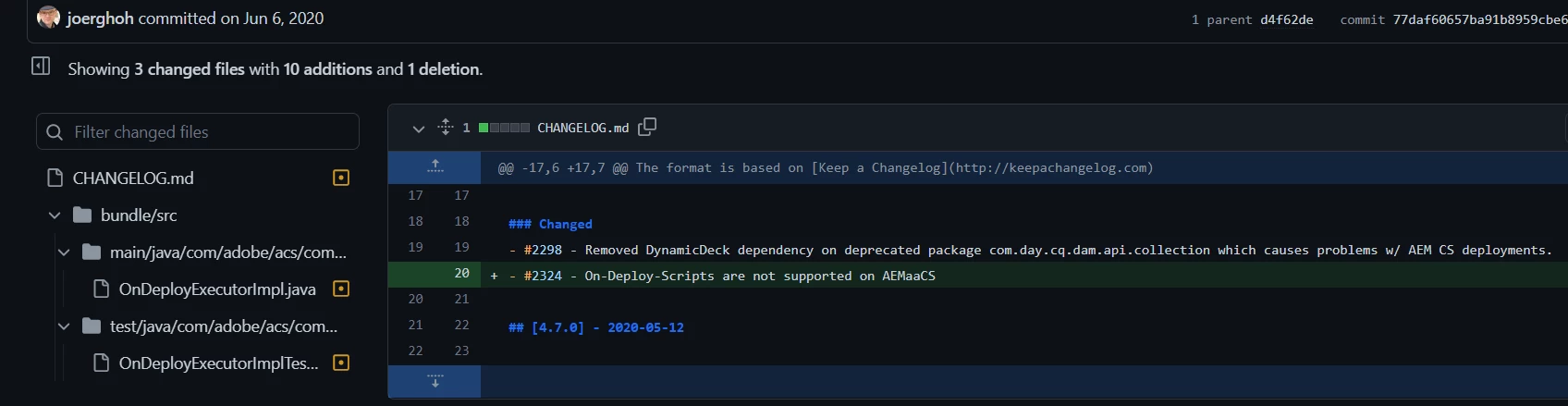
Also checking ACS AEM Commons repo for below URL, I see that Jörg_Hoh has updated the below  - 

https://github.com/joerghoh/acs-aem-commons/commit/77daf60657ba91b8959cbe694b4a8530035e86ee


2 replies

arunpatidar
Community Advisor
Community Advisor
August 19, 2022
Rohan_Garg
Community Advisor
Community Advisor
August 22, 2022

Hi Arun, Here's the result of the cloud validator  -


C\Users\rohan.garg\aem-sdk\dispatcher\aem-sdk-dispatcher-tools-2.0.91-windows\bin>validator.exe full -d ../out D:\DestPet\Branches\Dispatcher_BrandA\aemrepo\dispatcher\src
Cloud manager validator 2.0.34
2022/08/22 11:55:45 conf.d\available_vhosts\brandA.vhost:64: included file (conf.d\rewrites\brandA_rewrite.rules) does not match any known file

<IfModule mod_rewrite.c>
RewriteEngine on
Include conf.d/rewrites/rewrite.rules
Include conf.d/rewrites/brandA.rules //Line #64

As seen the cloud manager validator would gives error in this case as only 'rewrites' and 'variables' files can be specified as includes vhost configuration files.

arunpatidar
Community Advisor
Community Advisor
August 22, 2022

you can't have multiple rewrite rules file.


Add your rules in 

conf.d/rewrites/rewrite.rules


Arun Patidar
Rohan_Garg
Community Advisor
Rohan_GargCommunity AdvisorAuthorAccepted solution
Community Advisor
August 22, 2022

Hi All,


Based on the Adobe Enterprise Support Team response below, I think on-deploy-scripts are not supported on AEMaaCS.

The only way to update dispatcher configs is in code [1].
You first commit the code to the CMGR repo, then when you run a pipeline CMGR executes the maven commands and implements the code.
If it isn't in the CMGR repo then it won't be in the code that CMGR builds
[1] https://github.com/adobe/aem-guides-wknd/tree/main/dispatcher


Also checking ACS AEM Commons repo for below URL, I see that Jörg_Hoh has updated the below  - 

https://github.com/joerghoh/acs-aem-commons/commit/77daf60657ba91b8959cbe694b4a8530035e86ee