Build only ui.apps via Jenkins | Community
Skip to main content
Level 4
December 15, 2023
Solved

Build only ui.apps via Jenkins

  • December 15, 2023
  • 2 replies
  • 869 views

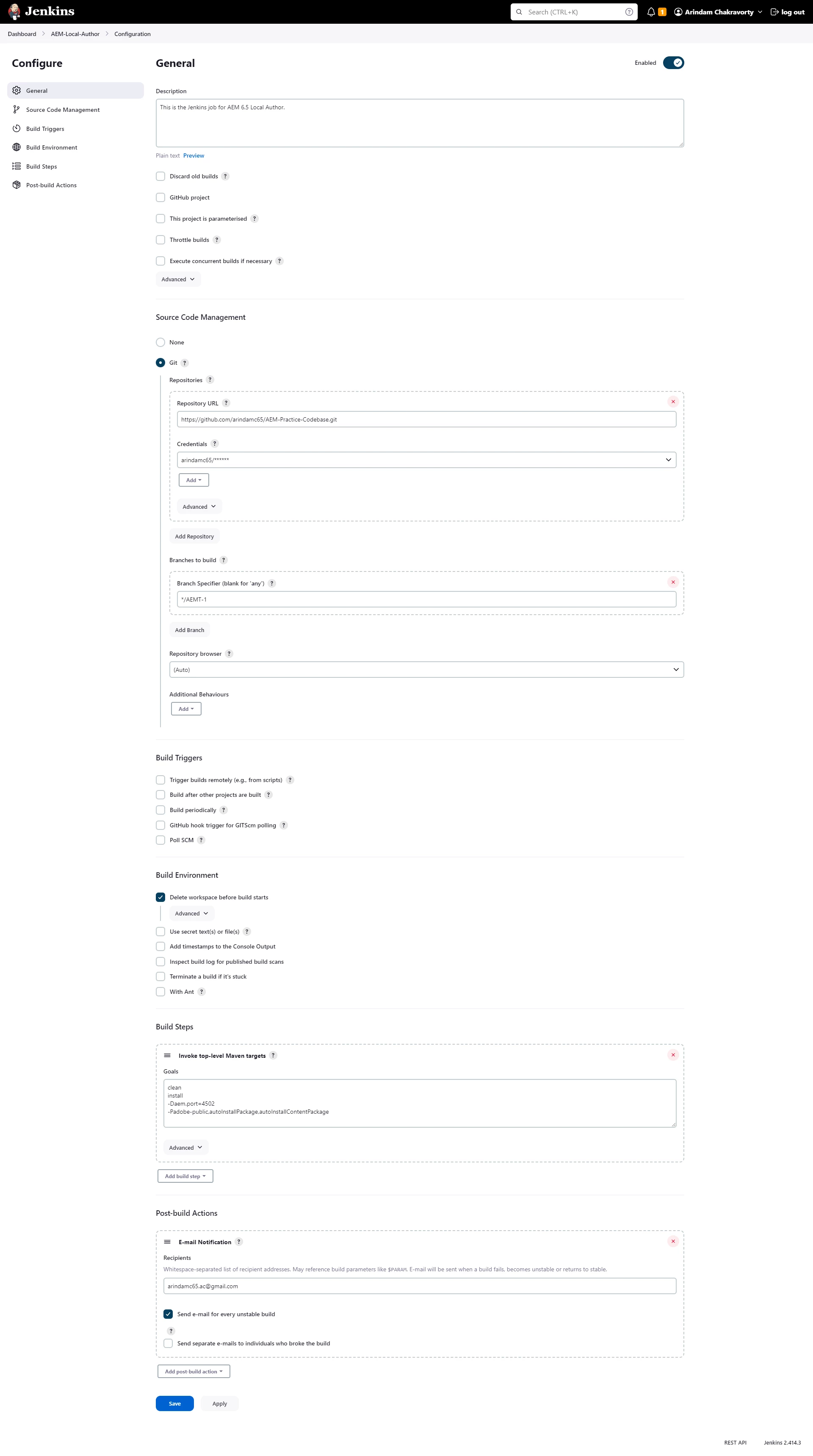
Hi, I've my Jenkins setup with my github repo, so when I click on Build Now it will build the entire project like core, ui.apps, ui.content etc. Now, my requirement is to modify the configuration so as to only build the ui.apps part from Jenkins. Can someone please help me with what changes I need to do? Attached is the
configuration of the Jenkins job.

This post is no longer active and is closed to new replies. Need help? Start a new post to ask your question.
Best answer by arunpatidar

Hi @arindam6600 

Please check this https://plugins.jenkins.io/git/#plugin-content-checkout-to-a-sub-directory 


Also here is the sample file yaml file 

pipeline { agent any stages { stage('Checkout from Git') { steps { script { // Define your Git repository URL def gitRepoUrl = '<your-git-repo-url>' // Checkout the master branch checkout([$class: 'GitSCM', branches: [[name: '*/master']], userRemoteConfigs: [[url: gitRepoUrl]]]) } } } stage('Navigate to Subfolder') { steps { script { // Define your subfolder name def subfolderName = '<subfolder-name>' // Change directory to the subfolder dir(subfolderName) { // Additional steps within the subfolder if needed } } } } stage('Run Maven Clean') { steps { script { // Run 'mvn clean' command sh 'mvn clean' } } } } }


2 replies

aanchal-sikka
Community Advisor
Community Advisor
December 15, 2023

@arindam6600 


The image is blury. 

I have not worked on Jenkins, but in general, if you want to build ui.apps, you can go to that folder and execute mvn clean install

Aanchal Sikka
Level 4
December 15, 2023

Yes, this I'm aware of this. But the use case is to do it via Jenkins.

arunpatidar
Community Advisor
arunpatidarCommunity AdvisorAccepted solution
Community Advisor
December 15, 2023

Hi @arindam6600 

Please check this https://plugins.jenkins.io/git/#plugin-content-checkout-to-a-sub-directory 


Also here is the sample file yaml file 

pipeline { agent any stages { stage('Checkout from Git') { steps { script { // Define your Git repository URL def gitRepoUrl = '<your-git-repo-url>' // Checkout the master branch checkout([$class: 'GitSCM', branches: [[name: '*/master']], userRemoteConfigs: [[url: gitRepoUrl]]]) } } } stage('Navigate to Subfolder') { steps { script { // Define your subfolder name def subfolderName = '<subfolder-name>' // Change directory to the subfolder dir(subfolderName) { // Additional steps within the subfolder if needed } } } } stage('Run Maven Clean') { steps { script { // Run 'mvn clean' command sh 'mvn clean' } } } } }


Arun Patidar