Best ways to query large AEM repository with query builder | Community
Skip to main content
Level 2
June 5, 2023
Solved

Best ways to query large AEM repository with query builder

  • June 5, 2023
  • 6 replies
  • 3859 views

Hello Everyone,


I'm looking for the best possible options to query AEM repository with query builder Query. I have a requirement to get all the assets from AEM DAM in JSON format. I have a big repository with Large assets of 400k in my AEM DAM instance.


AEM has a configurable limit on the number of nodes that can be visited in a single query run. By default, it is set to 100,000 nodes. I changed in System Console > OSGi Configuration > Apache Jackrabbit Query Engine Settings Service. The parameter name is queryLimitReads to 200k. I used the below query to fetch all assets under my site but the query is unable to run in AEM it throws error: "The query read or traversed more than 200000 nodes. To avoid affecting other tasks, processing was stopped."


p.hits=selective

p.limit=1000

p.offest=0

p.guessTotal=true

type=dam:Asset

path=/content/dam/mysite/

p.properties=jcr: content/cq:name  

orderby=@jcr:path


Any help or suggestion on resolving the error would be really helpful.

Any alternative options if you have please let me know.


This post is no longer active and is closed to new replies. Need help? Start a new post to ask your question.
Best answer by EstebanBustamante

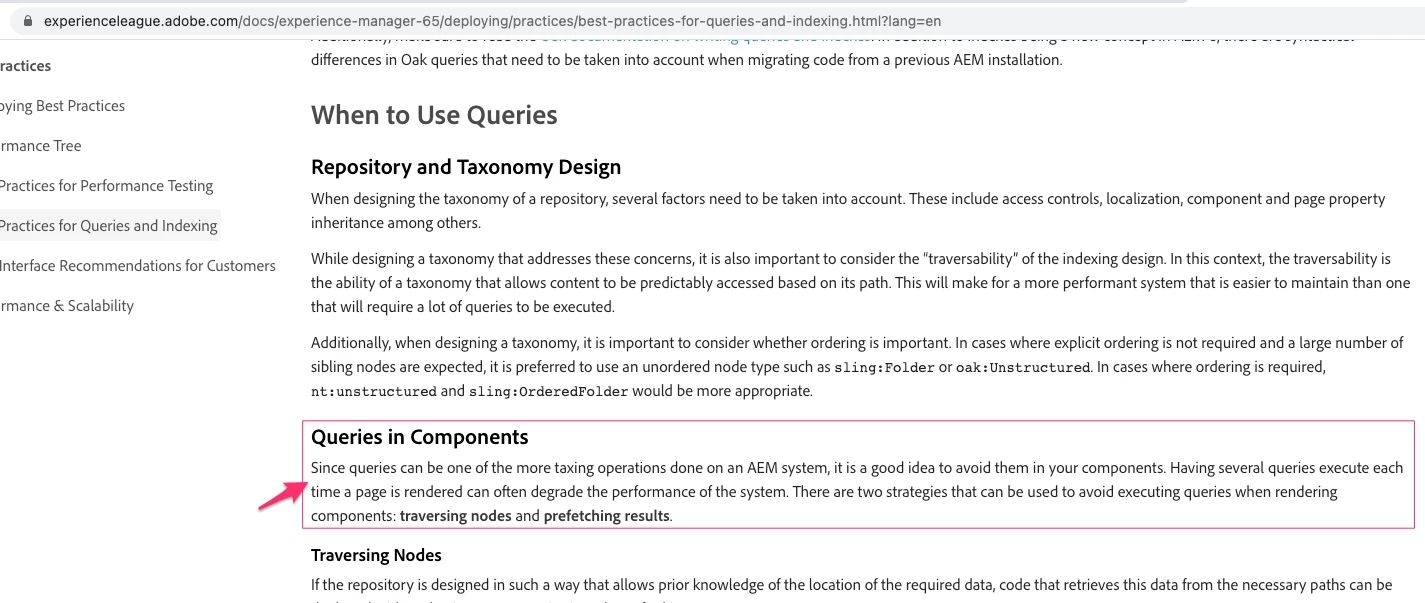
YES, it sounds to me that you can actually avoid the query if you really need all the assets' info. So, it is better to traverse the nodes for that, you could use one of the techniques I suggested. See below the best practice suggested in such scenarios


https://experienceleague.adobe.com/docs/experience-manager-65/deploying/practices/best-practices-for-queries-and-indexing.html?lang=en

6 replies

EstebanBustamante
Community Advisor and Adobe Champion
June 5, 2023

Always avoid as much as you can query builder, if you need all the assets listed you could safely traverse the repository instead.

Do it in small chunks and using multithreading, if you can deliver small pieces the better otherwise you could assemble small output pieces in a separate operation.


For the multithreading, you could use Bulk Workflow Manager or Managed Controlled Process

Esteban Bustamante
ArunaSAuthor
Level 2
June 5, 2023

Thank you @estebanbustamante

Do you mean, instead of querying all the assets we need to implement workflow or MCP process to crawl the repository to fetch all the assets?

EstebanBustamante
Community Advisor and Adobe Champion
EstebanBustamanteCommunity Advisor and Adobe ChampionAccepted solution
Community Advisor and Adobe Champion
June 6, 2023

YES, it sounds to me that you can actually avoid the query if you really need all the assets' info. So, it is better to traverse the nodes for that, you could use one of the techniques I suggested. See below the best practice suggested in such scenarios


https://experienceleague.adobe.com/docs/experience-manager-65/deploying/practices/best-practices-for-queries-and-indexing.html?lang=en

Esteban Bustamante
ManviSharma
Adobe Employee
Adobe Employee
June 5, 2023

Hi,


When you encounter the error message "The query read or traversed more than 200000 nodes. To avoid affecting other tasks, processing was stopped," it indicates that the configured query limit of 200,000 nodes has been exceeded. This limit is in place to prevent excessive resource consumption and potential performance issues.


Your use case requires fetching a large number of assets and you have assessed the impact on system resources, you can try increasing the query limit further. However, keep in mind that this can potentially impact system performance, so it's important to test and monitor the system behavior after making such changes.

DPrakashRaj
Community Advisor
Community Advisor
June 5, 2023

I think above issue occurs when the query is not using any indexing and it’s a traversal query. I believe jcr:content/cq:name is not a property in damAssetLucene indexing(available OOTB). If you have to specifically asked to add cq:name in query the you need to add indexes for that property in oak indexes. Once created the indexing you need to run the indexing so that it completes it then you should be able to get the query result.

you can also try with query that uses indexes. Aem provides you the console to check how optimize your query is. You can check there if it’s using any indexes or not

aanchal-sikka
Community Advisor
Community Advisor
June 6, 2023

Hello @arunas 


There are multiple areas where an improvement can be made:

  1. Indexes: Assure that "jcr: content/cq:name" is indexed
  2. Consider removing orderby, if you don't need it.
  3. Use tree traversal to generate results. Since, you not filtering results, a tree traversal might be more apt. 
    • Then you can avoid touching other system params and affecting system performance in long run
  4. The Json will be huge. Once you are able to compile the data, you will hit the block on the size of json returned. Consider breaking Json into multiple chunks. Then you would also be able to break query also in chunks
  5. Caching: Consider caching the json, if this query is generated frequently.
Aanchal Sikka
joerghoh
Adobe Employee
Adobe Employee
June 8, 2023
ArunaSAuthor
Level 2
June 8, 2023

Thanks, @joerghoh for the response.

It really helps me to export data into CSV. I'm looking to automate this process instead of manual clicks.

joerghoh
Adobe Employee
Adobe Employee
June 10, 2023

If you follow https://experienceleague.adobe.com/docs/experience-manager-cloud-service/content/assets/admin/metadata-import-export.html?lang=en, you should be able to capture the HTTP-Request, analyze its parameters and then call it from externally.

Or do you need the Java API to access this feature?