Best way to update core components | Community
Skip to main content
JakeCham
Level 6
December 21, 2023
Solved

Best way to update core components

  • December 21, 2023
  • 2 replies
  • 4342 views

Hi Team,


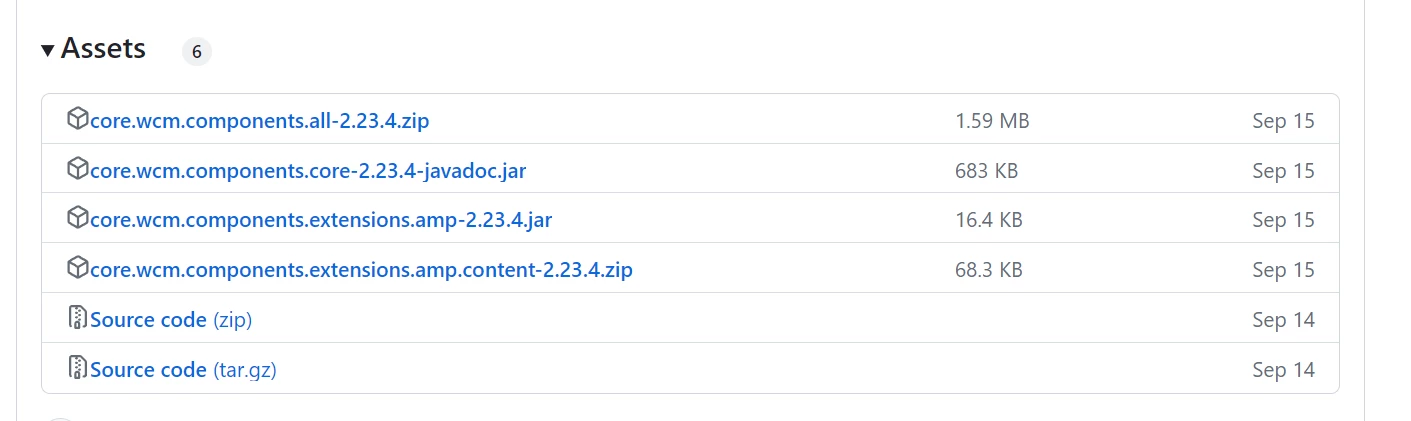
What is the best way to update core components .. Is  that through POM ? if so please guide me by showing pom changes .. If not through packMgr can we upload the package if so what is the exact folder I need to upload from below 

Thanks 

This post is no longer active and is closed to new replies. Need help? Start a new post to ask your question.
Best answer by SantoshSai

Hi @jakecham,


Kindle refer to the below steps to embed core components if it's first time in your project.

1. Add dependencies to parent pom xml

<dependencyManagement> <dependencies> ... <dependency> <groupId>com.adobe.cq</groupId> <artifactId>core.wcm.components.all</artifactId> <type>zip</type> <version>2.20.0</version> </dependency> </dependencies> </dependencyManagement>

2. Add dependencies to your target maven module.

In this example, we will target all/pom.xml

<dependencies> ... <dependency> <groupId>com.adobe.cq</groupId> <artifactId>core.wcm.components.core</artifactId> <scope>provided</scope> </dependency> </dependencies>

3. Configure com.day.jcr.vault’s <subPackages><subPackage> to target maven module

In this example, we will target all/pom.xml

<plugin> <groupId>com.day.jcr.vault</groupId> <artifactId>content-package-maven-plugin</artifactId> <extensions>true</extensions> <configuration> ... <subPackages> <subPackage> <groupId>com.adobe.cq</groupId> <artifactId>core.wcm.components.all</artifactId> <filter>true</filter> </subPackage> </subPackages> <targetURL>http://${crx.host}:${crx.port}/crx/packmgr/service.jsp</targetURL> </configuration> </plugin>


When you said to update, presumably it should be already in your project's pom in this case, find out the pom's as mentioned above and update to the latest version of core components as per need: https://github.com/adobe/aem-core-wcm-components/releases


Hope that helps!

Regards,

Santosh

2 replies

arunpatidar
Community Advisor
Community Advisor
December 21, 2023

Hi @jakecham 
Yes, it is recommned to not deploy anything manually in AEM.


Core components can be updated/install through POM. example : https://github.com/arunpatidar02/com.aemlab.junitapp/blob/6303332e9e02e78c9ecdedcac6c01b6ebc6192a6/all/pom.xml#L66 

Arun Patidar
JakeCham
JakeChamAuthor
Level 6
December 21, 2023

Hi @arunpatidar Thank you for replying! 


1. Should it be added inside org.apache.jackrabbit plugin ?
2. embedding below would be enough to download and build the latest core package ?

 <embedded>
<groupId>com.adobe.cq</groupId>
<artifactId>core.wcm.components.content</artifactId>
<type>zip</type>
<target>/apps/JunitApp-vendor-packages/application/install</target>
</embedded>

arunpatidar
Community Advisor
Community Advisor
December 21, 2023

Hi @arunpatidar 
I have added below, But core component doesn't get updated. Build is success though. Please guide 

 <plugin>
<groupId>org.apache.jackrabbit</groupId>
<artifactId>filevault-package-maven-plugin</artifactId>
<extensions>true</extensions>
<configuration>
<group>JunitApp</group>
<embeddeds>
<embedded>
<groupId>com.adobe.cq</groupId>
<artifactId>core.wcm.components.content</artifactId>
<type>zip</type>
<target>/apps/JunitApp-vendor-packages/application/install</target>
</embedded>
</embeddeds>
</configuration>
</plugin>

<dependencies>

<dependency>
<groupId>com.adobe.cq</groupId>
<artifactId>core.wcm.components.content</artifactId>
<type>zip</type>
</dependency>

</dependencies>


@jakecham 
Could you please check what dou you have inside /apps/JunitApp-vendor-packages/application/install?
You might have missed the filter changes

https://github.com/arunpatidar02/com.aemlab.junitapp/blob/6303332e9e02e78c9ecdedcac6c01b6ebc6192a6/all/src/main/content/META-INF/vault/filter.xml#L16 

Arun Patidar
SantoshSai
Community Advisor
SantoshSaiCommunity AdvisorAccepted solution
Community Advisor
December 21, 2023

Hi @jakecham,


Kindle refer to the below steps to embed core components if it's first time in your project.

1. Add dependencies to parent pom xml

<dependencyManagement> <dependencies> ... <dependency> <groupId>com.adobe.cq</groupId> <artifactId>core.wcm.components.all</artifactId> <type>zip</type> <version>2.20.0</version> </dependency> </dependencies> </dependencyManagement>

2. Add dependencies to your target maven module.

In this example, we will target all/pom.xml

<dependencies> ... <dependency> <groupId>com.adobe.cq</groupId> <artifactId>core.wcm.components.core</artifactId> <scope>provided</scope> </dependency> </dependencies>

3. Configure com.day.jcr.vault’s <subPackages><subPackage> to target maven module

In this example, we will target all/pom.xml

<plugin> <groupId>com.day.jcr.vault</groupId> <artifactId>content-package-maven-plugin</artifactId> <extensions>true</extensions> <configuration> ... <subPackages> <subPackage> <groupId>com.adobe.cq</groupId> <artifactId>core.wcm.components.all</artifactId> <filter>true</filter> </subPackage> </subPackages> <targetURL>http://${crx.host}:${crx.port}/crx/packmgr/service.jsp</targetURL> </configuration> </plugin>


When you said to update, presumably it should be already in your project's pom in this case, find out the pom's as mentioned above and update to the latest version of core components as per need: https://github.com/adobe/aem-core-wcm-components/releases


Hope that helps!

Regards,

Santosh
Santosh Sai
