Best secure way way to store credentials in AEM | Community
Skip to main content
maddy_23
Level 2
July 12, 2023
Solved

Best secure way way to store credentials in AEM

  • July 12, 2023
  • 5 replies
  • 4205 views

Hi All,

I want to save some credentials(assessKey/SecretId) for some third-party authentication, But not want to save in code or config files as it will be visible to all developers. 


I saw one blog  where the credentials get store as java System properties variables in start.bat script file like below 

and try to assess it in code using BundleContext.getProperty("aws.accessKeyId").

I want to know 

1. Is it good way to store the credentials.

2. I tried the same but not able to retrieve using below code. Demo is my SlingModel class. it returns null only

FrameworkUtil.getBundle(Demo.class).getBundleContext().getProperty("aws.accessKey");


This post is no longer active and is closed to new replies. Need help? Start a new post to ask your question.
Best answer by AsifChowdhury

Hi @maddy_23 

Here is a way to store sensitive data store into the system using Crypto Support.

Process 1:


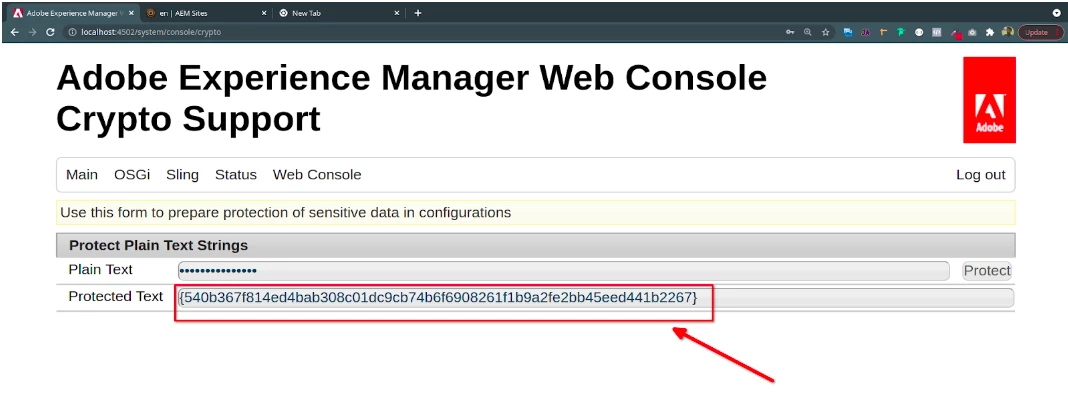
From “http://localhost:4502/system/console/crypto” we can write plain text and by clicking “protect” we will get a protected text.


NB: According to documentation, after 6.3 this value “plain text” & “protected text” will store in "/crx-quickstart/launchpad/felix/bundle<Id>/data" in the file system. To find the id we have to look for the bundle id of this "/system/console/bundles/com.adobe.granite.crypto.file"


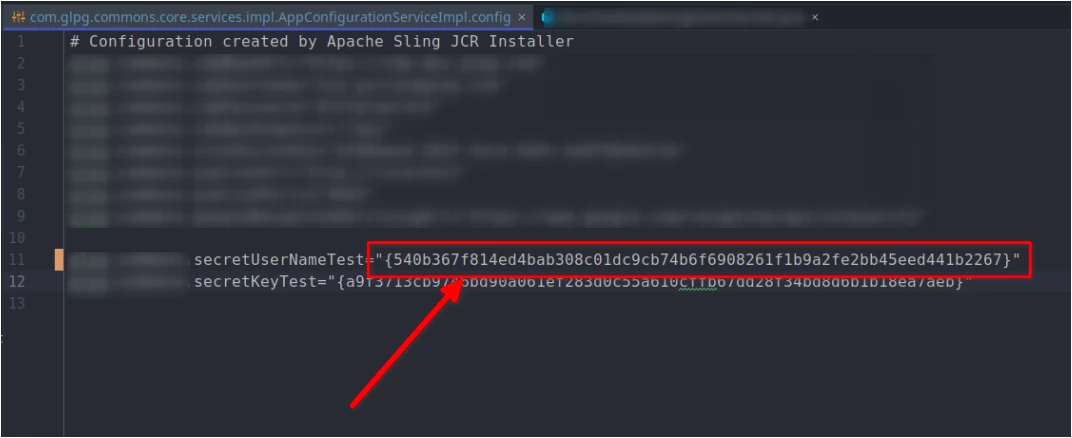
We can use this protected text in the appConfigurationService file.


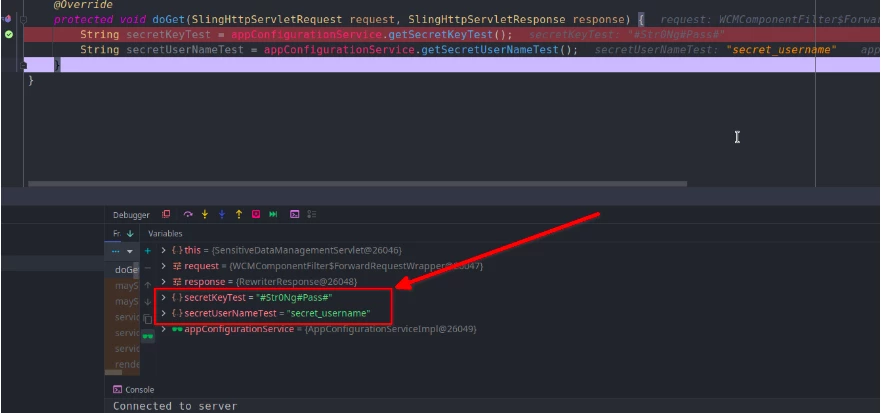
When we call for that we will get the plain text.


Process 2:

-> We have CryptoSupport interface from “com.adobe.granite.crypto.CryptoSupport


-> We can get protected text by “protectedText = cryptoSupport.protect(plainText)

-> We can set that “protectedText” into config file

-> When we call for any value we have to unprotect that value to get the plain text. We can do this by “plainText = cryptoSupport.unprotect(protectedText)


NB: Tested it with a servlet with some request parameters. We can maintain a separate file for the plain texts and only store the protected texts in configuration files.

Every time CryptoSupport will generate a unique protected text.

5 replies

Sudheer_Sundalam
Community Advisor
Community Advisor
July 12, 2023

@maddy_23 ,


Not sure about the very best way, but I would create an OSGI service with required fields to save the configuration.

You may use "passwordValue" as the property annotation parameter to obscure the password from plain sight.

@Property(label="password", description="user password", passwordValue=DEFAULT_PASSWORD )
public static final String PASSWORD = "xxx.password";

 Putting it all together:

1) Create an OSGI service with required text and password fields.

2) Get instance of this OSGI service in Sling Model/Servlet/Another Service.

3) Don't create a config.xml file under runmodes for this OSGI service.

4) You have to configure this service in each Author/Publish instance.


Note: This approach may not work in AEM as CS.

maddy_23
maddy_23Author
Level 2
July 12, 2023

@sudheer_sundalam  This is not recommended as we have update credential from configMgr console. 

Tanika02
Level 7
July 12, 2023

Hello @maddy_23 -


You are correct! Storing sensitive credentials, such as access keys or secret IDs, in code or config files is generally not recommended because it exposes them to all developers and potential security risks.


Recommended ApproachStoring credentials as environment variables is generally considered a better practice than hard-coding them in code or config files.

AEM as a Cloud Service : 

https://medium.com/slalom-technology/how-to-use-environment-variables-in-adobe-experience-manager-aem-as-cloud-service-1e9145d78c2c 


AEM on-premise : 

https://experienceleaguecommunities.adobe.com/t5/adobe-experience-manager/what-s-the-correct-way-of-storing-passwords-in-aem/m-p/310757 


Additionally,


The code you provided attempts to retrieve the value of the property "aws.accessKey" using the BundleContext.getProperty() method. However, it seems you have a typo in the property name. In the start.bat file screenshot you shared, the property is defined as "aws.accessKeyId," but in your code, you're trying to retrieve it as "aws.accessKey."


I hope this helps!


Regards,

Tanika 🙂 

maddy_23
maddy_23Author
Level 2
July 12, 2023

Thank you @tanika02


The screenshot I uploaded is from the blog. I set same "aws.accessKey" in my start.bat file. Apologies for the confusion. 


Its not retrieving with FrameworkUtil.getBundle(Demo.class).getBundleContext().getProperty("aws.accessKey"); . getProperty is not static method, so I can't use BundleContext.getProperty(). Any suggestions.
BrianKasingli
Community Advisor and Adobe Champion
July 12, 2023

You can use secret variables in AEMaaCS.

aanchal-sikka
Community Advisor
Community Advisor
July 13, 2023


Hello @maddy_23 


For On-premise, AEM provides feature that allows OSGi configuration properties to be stored in a protected encrypted form instead of clear text. 


https://experienceleague.adobe.com/docs/experience-manager-65/administering/security/encryption-support-for-configuration-properties.html?lang=en#overview


On-AaaCS, please use the "Secret Environment Variable". It can be set via Cloud manager

https://experienceleague.adobe.com/docs/experience-manager-cloud-service/content/implementing/using-cloud-manager/environment-variables.html?lang=en#update-variables

Aanchal Sikka
AsifChowdhury
Community Advisor
AsifChowdhuryCommunity AdvisorAccepted solution
Community Advisor
July 13, 2023

Hi @maddy_23 

Here is a way to store sensitive data store into the system using Crypto Support.

Process 1:


From “http://localhost:4502/system/console/crypto” we can write plain text and by clicking “protect” we will get a protected text.


NB: According to documentation, after 6.3 this value “plain text” & “protected text” will store in "/crx-quickstart/launchpad/felix/bundle<Id>/data" in the file system. To find the id we have to look for the bundle id of this "/system/console/bundles/com.adobe.granite.crypto.file"


We can use this protected text in the appConfigurationService file.


When we call for that we will get the plain text.


Process 2:

-> We have CryptoSupport interface from “com.adobe.granite.crypto.CryptoSupport


-> We can get protected text by “protectedText = cryptoSupport.protect(plainText)

-> We can set that “protectedText” into config file

-> When we call for any value we have to unprotect that value to get the plain text. We can do this by “plainText = cryptoSupport.unprotect(protectedText)


NB: Tested it with a servlet with some request parameters. We can maintain a separate file for the plain texts and only store the protected texts in configuration files.

Every time CryptoSupport will generate a unique protected text.

Level 2
September 20, 2024

Hi @asifchowdhury ,

I have a query on this. In case, AEM crashes and we re-install AEM, will the encrypted key work? In that case, how to handle it? 

Thanks in advance!

maddy_23
maddy_23Author
Level 2
September 20, 2024

Hi @vaishnav_s , these encryption/Decryption done using hmac and master files stored in granite.crypto.file  bundle. You should keep backup of these files. In case your AEM crashed, replace these files and the old encrypted text will work otherwise you have to redo the encryption again.