AWS package cannot be resolved by Felix Console | Community
Skip to main content
tonycarreira
Level 2
April 15, 2019
Solved

AWS package cannot be resolved by Felix Console

  • April 15, 2019
  • 16 replies
  • 12477 views

Hi guys,

I am using the most recent maven archtype and therefore have the following folder structure:

Project Name

-Core

-it.launcher

-it.tests

-it.apps

-ui.content

I am importing an AWS dependency on my Master POM and Core POM

Master POM

<dependencyManagement>

   <dependencies>

   <!--AWS Dependencies -->
   <dependency>

   <groupId>software.amazon.awssdk</groupId>

   <artifactId>bom</artifactId>

   <version>2.5.25</version>

   <type>pom</type>

   <scope>import</scope>

   </dependency>

   <dependency>

   <groupId>com.amazonaws</groupId>

   <artifactId>aws-java-sdk-cloudfront</artifactId>

   <version>1.11.534</version>

   </dependency>

Core POM

<dependencies>

   <!--AWS Dependency -->
   <dependency>

   <groupId>com.amazonaws</groupId>

   <artifactId>aws-java-sdk-cloudfront</artifactId>

   </dependency>

The class using the AWS functionality is a custom workflow step that I have put inside the Core folder. However, when I deploy this to AEM I am getting "Cannot be resolved". I understand that just simply adding the dependency to the POM only helps compiling the code however the OSGI container is not able to see the dependency.
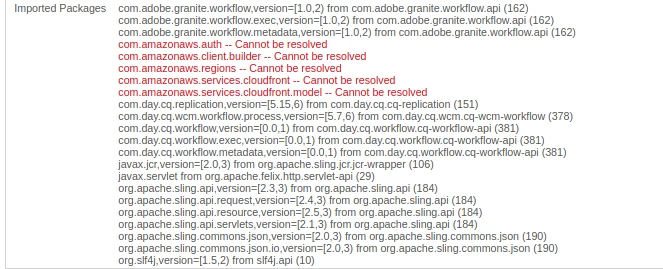
How can I fix this in my current project structure? I've read a few comments telling us to create some sort of eclipse bundle, but is there a more practical way to sort out this issue? We need this to be part of our continuous integration pipeline.

Many thanks in advance

This post is no longer active and is closed to new replies. Need help? Start a new post to ask your question.
Best answer by tonycarreira

Ok, I finally managed to get it to work! It was based on Macdonalds original advice.

For all reading this, ignore the <artifactId>aws-java-sdk-osgi</artifactId> bundle because it has a lot of dependency faults and version issues. You will end up driving yourself mad chasing dependencies. For anyone wanting to incorporate AWS related stuff DO NOT follow the AWS tutorial here Using the SDK with Apache Maven - AWS SDK for Java  it will tell you to either install the "bom" package or the one that pulls all the dependencies <groupId>software.amazon.awssdk</groupId>. I just used the bit that interested me which was cloudfront, so I used the following dependency:

            <dependency>

                <groupId>com.amazonaws</groupId>

                <artifactId>aws-java-sdk-cloudfront</artifactId>

                <version>1.11.534</version>

            </dependency>

Then using that dependency only, I created a bundle in eclipse following the link Macdonald provided me Adobe Experience Manager Help | Submitting Adobe Experience Manager form data to Java Sling Servlets

The jar you need to build the bundle can be found in your .m2 folder.

It is very important that you remove all manifest related information from the bundle otherwise you will run into version problems.

Then deploy it to OSGI using the update button.

It should look something like this:

Bundle-Name: AWS-Cloudfront-AEM-Centrica-OSGI

Bundle-SymbolicName: AWS-Cloudfront-AEM-Centrica-OSGI

Bundle-Version: 1.0.0

Bundle-Vendor: Centrica

Automatic-Module-Name: AWS-AEM-Centrica-OSGI

Bundle-RequiredExecutionEnvironment: JavaSE-1.8

Export-Package: com.amazonaws, etc... etc... etc...

If you get the "cannot be resolved"  issue regarding any of the things I mention in the printscreens above, DO NOT CHASE THEM you will end up going down a rabit hole.

Thanks to all that tried to help and especially, huge thanks Macdonald!!!

16 replies

Gaurav-Behl
Level 10
April 17, 2019

If a bundle is already available/active in OSGI say com.fasterxml.jackson.annotation then add its symbolic name to maven-bundle-plugin in your pom.xml and test it

<Require-Bundle>com.fasterxml.jackson.annotation</Require-Bundle>

Alternatively, you could also package the jar/bundle within your code-bundle so that it resolves using internally available classes as Scott mentioned -- use <Import-Package>.... </Import-Package> for same

Peter_Puzanovs
Community Advisor
Community Advisor
April 17, 2019

Hi Filip,

What's the problem with using [0], this one has been adapted for OSGi, so you don't have to mess with the dependencies yourself:

[0] Maven Repository: com.amazonaws » aws-java-sdk-osgi

Regards,

Peter

tonycarreira
Level 2
April 17, 2019

Thanks Peter!

That's the dependency I am using as well in the Core POM.

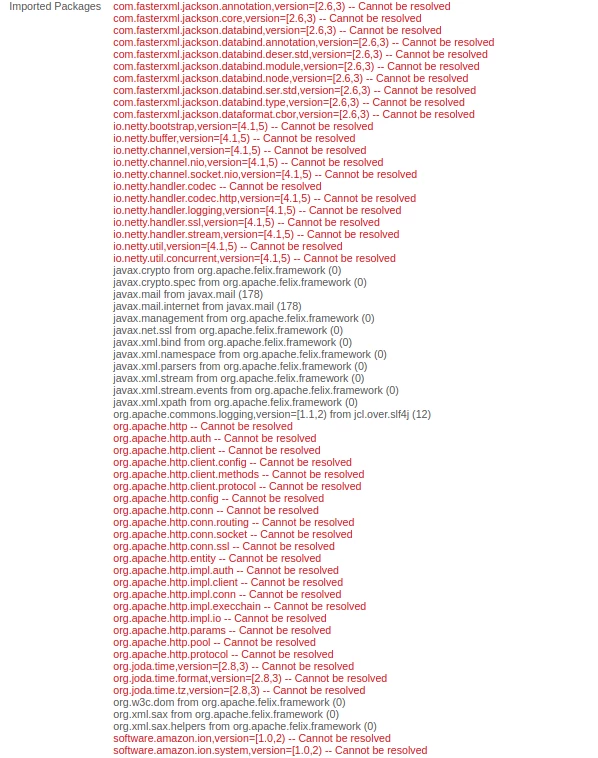
I tried it before but when I install that dependency on OSGI though I get these errors:

Peter_Puzanovs
Community Advisor
Community Advisor
April 17, 2019

Hi Filip,

For the dependencies that can't be resolved by your Apache Felix OSGi context, you would either set them as ignored in your OSGi context or help AWS bundle to resolve these by having them present in your OSGi system.

Regards,

Peter

tonycarreira
tonycarreiraAuthorAccepted solution
Level 2
April 18, 2019

Ok, I finally managed to get it to work! It was based on Macdonalds original advice.

For all reading this, ignore the <artifactId>aws-java-sdk-osgi</artifactId> bundle because it has a lot of dependency faults and version issues. You will end up driving yourself mad chasing dependencies. For anyone wanting to incorporate AWS related stuff DO NOT follow the AWS tutorial here Using the SDK with Apache Maven - AWS SDK for Java  it will tell you to either install the "bom" package or the one that pulls all the dependencies <groupId>software.amazon.awssdk</groupId>. I just used the bit that interested me which was cloudfront, so I used the following dependency:

            <dependency>

                <groupId>com.amazonaws</groupId>

                <artifactId>aws-java-sdk-cloudfront</artifactId>

                <version>1.11.534</version>

            </dependency>

Then using that dependency only, I created a bundle in eclipse following the link Macdonald provided me Adobe Experience Manager Help | Submitting Adobe Experience Manager form data to Java Sling Servlets

The jar you need to build the bundle can be found in your .m2 folder.

It is very important that you remove all manifest related information from the bundle otherwise you will run into version problems.

Then deploy it to OSGI using the update button.

It should look something like this:

Bundle-Name: AWS-Cloudfront-AEM-Centrica-OSGI

Bundle-SymbolicName: AWS-Cloudfront-AEM-Centrica-OSGI

Bundle-Version: 1.0.0

Bundle-Vendor: Centrica

Automatic-Module-Name: AWS-AEM-Centrica-OSGI

Bundle-RequiredExecutionEnvironment: JavaSE-1.8

Export-Package: com.amazonaws, etc... etc... etc...

If you get the "cannot be resolved"  issue regarding any of the things I mention in the printscreens above, DO NOT CHASE THEM you will end up going down a rabit hole.

Thanks to all that tried to help and especially, huge thanks Macdonald!!!

November 15, 2021

HI  tonycarreira ,

I am trying out same solution you got it. Can I get the proper link address whih you used  given by  Macdonald . Because the link provided  by you doesnot work anymore.

Can you please send me the proper link from Mt  Macdonald .

December 21, 2022

Hi @baysunny,


Could you please send me the proper link from Mt  Macdonald.

I am also facing the same issue.


Level 3
October 23, 2019

Funny how things work out. Now i am part of the AWS team after working on AEM for 7 years.

November 15, 2021

Hi Mr Scott,  I am  trying to download a file from AWS S3 bucket via AEM backend code in a seperate workflow process step.

I am unable to get the bundle resolved when I use various AWS API dependencies.


I tried using the dependency jar as below:


<dependency>
   <groupId>com.amazonaws</groupId>
   <artifactId>aws-java-sdk-osgi</artifactId>
   <scope>provided</scope>
</dependency>


Error we are getting in ISGI bundle here is :


Imported Packages

com.fasterxml.jackson.annotation,version=[2.12,3) -- Cannot be resolved
com.fasterxml.jackson.core,version=[2.12,3) -- Cannot be resolved
com.fasterxml.jackson.core.type,version=[2.12,3) -- Cannot be resolved
com.fasterxml.jackson.databind,version=[2.12,3) -- Cannot be resolved
com.fasterxml.jackson.databind.annotation,version=[2.12,3) -- Cannot be resolved
com.fasterxml.jackson.databind.deser.std,version=[2.12,3) -- Cannot be resolved
com.fasterxml.jackson.databind.module,version=[2.12,3) -- Cannot be resolved
com.fasterxml.jackson.databind.node,version=[2.12,3) -- Cannot be resolved
com.fasterxml.jackson.databind.ser.std,version=[2.12,3) -- Cannot be resolved
com.fasterxml.jackson.databind.type,version=[2.12,3) -- Cannot be resolved
com.fasterxml.jackson.dataformat.cbor,version=[2.12,3) -- Cannot be resolved
io.netty.bootstrap,version=[4.1,5) -- Cannot be resolved
io.netty.buffer,version=[4.1,5) -- Cannot be resolved
io.netty.channel,version=[4.1,5) -- Cannot be resolved
io.netty.channel.nio,version=[4.1,5) -- Cannot be resolved
io.netty.channel.socket.nio,version=[4.1,5) -- Cannot be resolved
io.netty.handler.codec -- Cannot be resolved
io.netty.handler.codec.http,version=[4.1,5) -- Cannot be resolved
io.netty.handler.logging,version=[4.1,5) -- Cannot be resolved
io.netty.handler.ssl,version=[4.1,5) -- Cannot be resolved
io.netty.handler.stream,version=[4.1,5) -- Cannot be resolved
io.netty.util,version=[4.1,5) -- Cannot be resolved
io.netty.util.concurrent,version=[4.1,5) -- Cannot be resolved


Can you please help to resolve it with proper AWS API dependecy to use and how to resolve the bundle in felix console by providing the corect link address.


Thanks