AVIF rendition using dynamic media | Community
Skip to main content
Level 2
December 5, 2024
Solved

AVIF rendition using dynamic media

  • December 5, 2024
  • 2 replies
  • 1052 views

Hi, for now I´m using Dynamic media deliver to make webp images. As you can see in the below screenshots:

 

the requested url is (for example for 1600w): /adobe/dynamicmedia/deliver/dm-aid--96257829-89c9-4fb4-8f29-ffda3ac363a6/tortuga-boba-jon.jpg?preferwebp=true&quality=85&width=1600


this is working fine and giving me a web image as I can see in network: 

 

My question is: there is a parameter that I can add to this path to get an avif image?


I have tried something like this:

/adobe/dynamicmedia/deliver/dm-aid--96257829-89c9-4fb4-8f29-ffda3ac363a6/tortuga-boba-jon.jpg?preferavif=true&quality=85&width=1600


/adobe/dynamicmedia/deliver/dm-aid--96257829-89c9-4fb4-8f29-ffda3ac363a6/tortuga-boba-jon.jpg?preferwebp=false&quality=85&width=1600&format=avif


/adobe/dynamicmedia/deliver/dm-aid--96257829-89c9-4fb4-8f29-ffda3ac363a6/tortuga-boba-jon.jpg?preferwebp=false&quality=85&width=1600&fmt=avif


but it is not working.


Has anyone faced something similar and can help me?


thank you all in advance 🙂
 

This post is no longer active and is closed to new replies. Need help? Start a new post to ask your question.
Best answer by EstebanBustamante

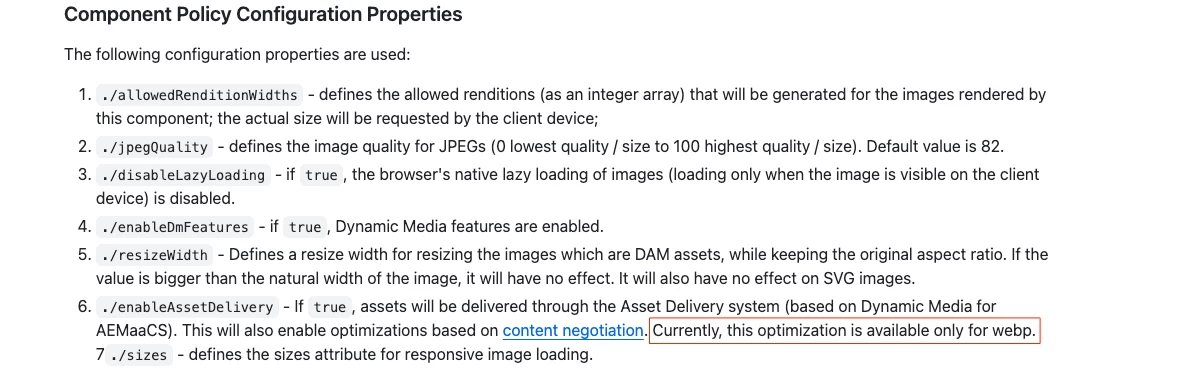
Hey, sorry I missed that you posted the URL of your asset, it looks like you’re not using Smart Imaging after all, because typically, you would have a dedicated domain[1] or one of the known domains at the start of the URL, but that doesn’t seem to be the case here. What you are using is the "Web Optimized" option from the image core component, you can read more about it here: https://experienceleague.adobe.com/en/docs/experience-manager-learn/cloud-service/developing/advanced/web-optimized-image-delivery-java-apis, unfortunately, this delivery method does not support AVIF format [2]


[1] https://experienceleague.adobe.com/en/docs/experience-manager-65/content/assets/dynamic/imaging-faq

[2] https://github.com/adobe/aem-core-wcm-components/tree/main/content/src/content/jcr_root/apps/core/wcm/components/image/v3/image 


Hope this helps

2 replies

EstebanBustamante
Community Advisor and Adobe Champion
December 5, 2024

Hi, 

Are you using DynamicMedia with Smart Imaging? If so, something like this should work: https://staging.scene7.com/is/image/SmartImaging/AdobeStock_115033825?wid=600&fmt=avif&qlt=50&bfc=off 


Hope this helps

Esteban Bustamante
Level 2
December 5, 2024

Thank you for your response @estebanbustamante ,

I don´t really know. how can I know if my proyect is able to use smart imaging? and how I know which is my cdn url to access smart imaging services? I´m looking into documentation but I can found nothing.


we are currently using the urls starting with "/adobe/dynamicmedia/deliver/*"

EstebanBustamante
Community Advisor and Adobe Champion
EstebanBustamanteCommunity Advisor and Adobe ChampionAccepted solution
Community Advisor and Adobe Champion
December 5, 2024

Hey, sorry I missed that you posted the URL of your asset, it looks like you’re not using Smart Imaging after all, because typically, you would have a dedicated domain[1] or one of the known domains at the start of the URL, but that doesn’t seem to be the case here. What you are using is the "Web Optimized" option from the image core component, you can read more about it here: https://experienceleague.adobe.com/en/docs/experience-manager-learn/cloud-service/developing/advanced/web-optimized-image-delivery-java-apis, unfortunately, this delivery method does not support AVIF format [2]


[1] https://experienceleague.adobe.com/en/docs/experience-manager-65/content/assets/dynamic/imaging-faq

[2] https://github.com/adobe/aem-core-wcm-components/tree/main/content/src/content/jcr_root/apps/core/wcm/components/image/v3/image 


Hope this helps

Esteban Bustamante
arunpatidar
Community Advisor
Community Advisor
December 5, 2024

