Authors input is saved but when going again to the component value are not present | Community
Skip to main content
rishabht4951433
October 18, 2019
Solved

Authors input is saved but when going again to the component value are not present

  • October 18, 2019
  • 4 replies
  • 1812 views

I have created a textarea field and used already created textField java code to take input from authors for placeholder & maxlength.

I have observe that authors input are stored in crx as "string[] = ,12,"(eg for maxlength).
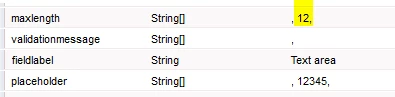
When I change the position to "string[] = 12,,"(eg for maxlength) it will work as expected.

I am new to aem it would be very helpful if the explanation is as per the beginner level  .

This post is no longer active and is closed to new replies. Need help? Start a new post to ask your question.
Best answer by Ankur_Khare

Values are getting saved properly -

i think you need to update your dialog as below-

<content

        jcr:primaryType="nt:unstructured"

        sling:resourceType="granite/ui/components/foundation/container">

        <layout

            jcr:primaryType="nt:unstructured"

            sling:resourceType="granite/ui/components/foundation/layouts/fixedcolumns"/>

        <items jcr:primaryType="nt:unstructured">

            <column

                jcr:primaryType="nt:unstructured"

                sling:resourceType="granite/ui/components/foundation/container">

                <items jcr:primaryType="nt:unstructured">      

          <placeholder

                    jcr:primaryType="nt:unstructured"

                    sling:resourceType="granite/ui/components/foundation/form/textfield"

                    fieldLabel="Placeholder"

                    name="./placeholder"/>

                            <maxlength

                                jcr:primaryType="nt:unstructured"

                                sling:resourceType="granite/ui/components/foundation/form/textfield"

                                fieldLabel="Maxlength"

                                name="./maxlength"/>

                     </items>

            </column>

        </items>

    </content>

4 replies

Ankur_Khare
Community Advisor
Community Advisor
October 18, 2019

Is maxlength a multifield?

Could you please be more clear like what you are trying to achieve here.

Also could you please upload cq dialog.xml.

rishabht4951433
October 18, 2019

The value that author enter should saved but when I again revisit the textarea setting(cq:dialog) the value is not saved it is blank.

Please refer the below for cq dialog.xml:

<textarea

                jcr:primaryType="nt:unstructured"

                jcr:title="Text"

                sling:resourceType="granite/ui/components/foundation/section"

                class="cq-dialog-coe-toggle-tab_target textarea">

                <layout

                    jcr:primaryType="nt:unstructured"

                    sling:resourceType="granite/ui/components/foundation/layouts/fixedcolumns"

                    margin="{Boolean}false"/>

                <items jcr:primaryType="nt:unstructured">

                    <column

                        jcr:primaryType="nt:unstructured"

                        sling:resourceType="granite/ui/components/foundation/container">

                        <items jcr:primaryType="nt:unstructured">

                            <placeholder

                                jcr:primaryType="nt:unstructured"

                                sling:resourceType="granite/ui/components/foundation/form/textfield"

                                fieldLabel="Placeholder"

                                name="./placeholder"/>

                            <maxlength

                                jcr:primaryType="nt:unstructured"

                                sling:resourceType="granite/ui/components/foundation/form/textfield"

                                fieldLabel="Maxlength"

                                name="./maxlength"/>

                            </items>

                    </column>

                </items>

            </textarea>

Ankur_Khare
Community Advisor
Ankur_KhareCommunity AdvisorAccepted solution
Community Advisor
October 18, 2019

Values are getting saved properly -

i think you need to update your dialog as below-

<content

        jcr:primaryType="nt:unstructured"

        sling:resourceType="granite/ui/components/foundation/container">

        <layout

            jcr:primaryType="nt:unstructured"

            sling:resourceType="granite/ui/components/foundation/layouts/fixedcolumns"/>

        <items jcr:primaryType="nt:unstructured">

            <column

                jcr:primaryType="nt:unstructured"

                sling:resourceType="granite/ui/components/foundation/container">

                <items jcr:primaryType="nt:unstructured">      

          <placeholder

                    jcr:primaryType="nt:unstructured"

                    sling:resourceType="granite/ui/components/foundation/form/textfield"

                    fieldLabel="Placeholder"

                    name="./placeholder"/>

                            <maxlength

                                jcr:primaryType="nt:unstructured"

                                sling:resourceType="granite/ui/components/foundation/form/textfield"

                                fieldLabel="Maxlength"

                                name="./maxlength"/>

                     </items>

            </column>

        </items>

    </content>

Ankur_Khare
Community Advisor
Community Advisor
October 23, 2019

is it resolved if yes pls mark it as correct so that it help others..