Asset search is not working in stage environment. | Community
Skip to main content
Adobe Employee
September 16, 2025
Question

Asset search is not working in stage environment.

  • September 16, 2025
  • 3 replies
  • 405 views

Hi,

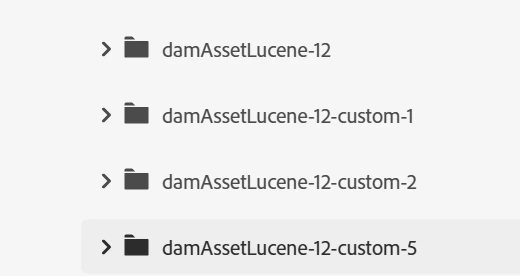
We recently completed the stage deployment with the updated index. However, asset search is not working for all assets. When I try searching for certain asset IDs in stage, it returns 0 results. I also verified using Query Builder, but the results are still missing. Interestingly, if I edit an asset’s properties (without making any changes) and simply save and close, that asset ID then appears in the query results.


updated index is damAssetLucene-12-custom-5.
previous index is damAssetLucene-12-custom-2.

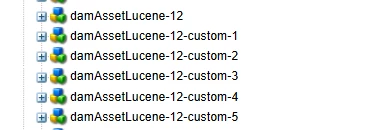
in dev created multiple indexes and it was working when changed to custom-5. In stage this could be happening bcz of transition form custom-2 to custom-5?

In stage :
 

In dev:

if that is the issue how to resolve it? since it is already updated.


Thanks.

3 replies

SantoshSai
Community Advisor
Community Advisor
September 16, 2025

Hi @keerthana_h_n,

Can you check which index being used with on of the below option?

1. Query Builder Debug (easiest)

  1. Open Query Builder Debug:
    https://<author-stage-host>/libs/cq/search/content/querydebug.html

  2. Enter your query params (e.g., path, type=dam:Asset, your property/values).

  3. Check Explain and click Execute.

  4. In the Plan / Explain output you should see something like:

lucene:damAssetLucene-12-custom-5(/oak:index/damAssetLucene-12-custom-5)

If it shows -custom-2, your search is still hitting the old index.

2. Query Builder JSON (straight URL)

You can hit the JSON servlet and ask for an explain:

https://<author-stage-host>/bin/querybuilder.json?
path=/content/dam
&type=dam:Asset
&property=jcr:content/metadata/dc:identifier
&property.value=<YOUR_ASSET_ID>
&p.limit=1
&explain=true

Look for "explain" in the JSON; it will include the chosen index name (expect damAssetLucene-12-custom-5).

3. SQL-2 “Explain” (alternative)

  1. Open Query Performance tool:
    https://<author-stage-host>/libs/granite/operations/content/diagnosistools/queryPerformance.html

  2. Choose SQL-2, paste an equivalent query, tick Explain.

  3. The plan line will name the index (again, expect damAssetLucene-12-custom-5).

Santosh Sai
Adobe Employee
September 16, 2025

Hi @santoshsai , query is using the latest index. But when I search asset name in asset search not returning results. And this is not for all assets. for some id's search is working and some id's it's not. And this was not a issue before.

aanchal-sikka
Community Advisor
Community Advisor
September 17, 2025

@keerthana_h_n 

Please verify async  and async-previous  index properties. Reference:  https://experienceleague.adobe.com/en/docs/experience-cloud-kcs/kbarticles/ka-25698 

Aanchal Sikka
Shashi_Mulugu
Community Advisor
Community Advisor
September 18, 2025

@keerthana_h_n as you say if you edit something you are getting results immediately means, index is working currently but reindex is not correctly done after rules updates.


have you done reindex on those updated indexes? It might take lot of time for first full reindex after changing index rules.


Just go to that index under /oak:index and make reindex: true


https://experienceleague.adobe.com/en/docs/experience-cloud-kcs/kbarticles/ka-16460