Asset replication to production from development in AEM as Cloud Service! | Community
Skip to main content
jezwn
Level 5
July 1, 2020
Solved

Asset replication to production from development in AEM as Cloud Service!

  • July 1, 2020
  • 2 replies
  • 3511 views

How to replicate assets to production environments from development environment in AEM as cloud service! Is it possible to add replication agents in dev or does it require to replicate package!!

This post is no longer active and is closed to new replies. Need help? Start a new post to ask your question.
Best answer by vanegi

In AEM Cloud Service, content is published using Sling Content Distribution to move the content to replicate to a pipeline service run on Adobe I/O that is outside of the AEM runtime.

 
The replication agents used in previous versions of AEM are no longer used or provided. You can check [0] for more details.


[0]: https://docs.adobe.com/content/help/en/experience-manager-cloud-service/operations/replication.html


Methods of Publishing Content

Quick Un/Publish - Planned Un/Publish
These standard AEM functionalities for the authors do not change with AEM Cloud Service.
Tree Activation
To perform a tree activation:
  1. From the AEM Start Menu navigate to Tools > Deployment > Distribution
  2. Select the card forwardPublisher
  3. Once in the forwardPublisher Web console UI, select Distribute
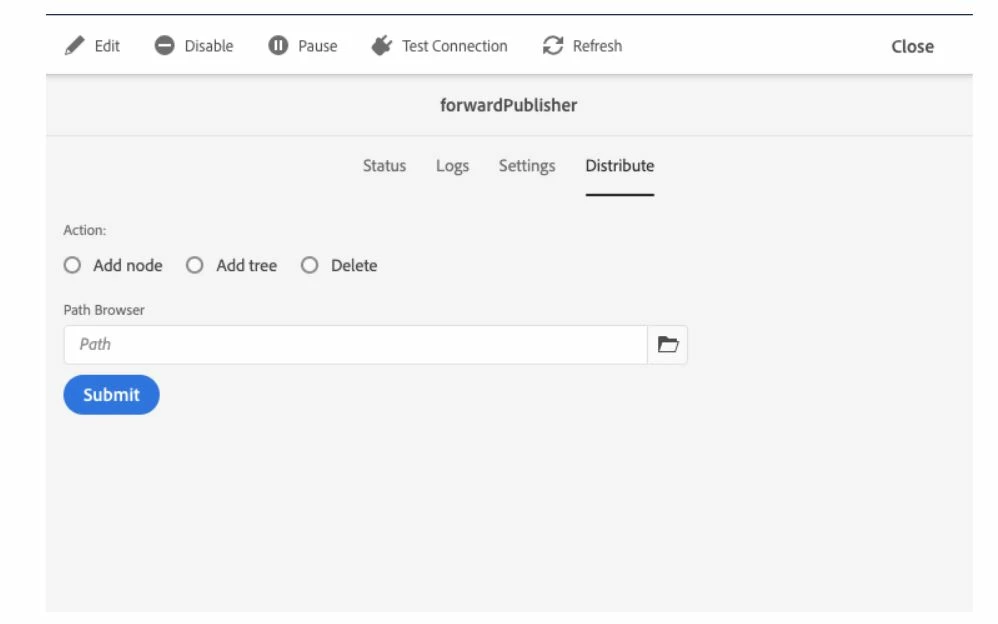


  4. Select the path in the path browser, choose to add a node, tree or delete as required and select Submit


2 replies

vanegi
Adobe Employee
vanegiAdobe EmployeeAccepted solution
Adobe Employee
July 1, 2020

In AEM Cloud Service, content is published using Sling Content Distribution to move the content to replicate to a pipeline service run on Adobe I/O that is outside of the AEM runtime.

 
The replication agents used in previous versions of AEM are no longer used or provided. You can check [0] for more details.


[0]: https://docs.adobe.com/content/help/en/experience-manager-cloud-service/operations/replication.html


Methods of Publishing Content

Quick Un/Publish - Planned Un/Publish
These standard AEM functionalities for the authors do not change with AEM Cloud Service.
Tree Activation
To perform a tree activation:
  1. From the AEM Start Menu navigate to Tools > Deployment > Distribution
  2. Select the card forwardPublisher
  3. Once in the forwardPublisher Web console UI, select Distribute


  4. Select the path in the path browser, choose to add a node, tree or delete as required and select Submit


jezwn
jezwnAuthor
Level 5
July 1, 2020

Hi, one question though. This method publishes to publish instances only right! What if I need to replicate assets to production from dev! I tried the tree activation for the asset folder, but aint getting deployed to prod.

Akash_Kapoor
Adobe Employee
Adobe Employee
July 1, 2020

Hi @jezwn As Vaishali mentioned, the replication part has changed from replication agents to SCD. Also, to move the content from dev to prod, you might be using packages only in past as well. So here you can create the package from DEV and deploy it to Prod via pipeline. For environments above DEV, every deployment shall go through the pipelines.


Let us know in case you have any confusion.

Akash_Kapoor
Adobe Employee
Adobe Employee
July 1, 2020
You can push the package to git provisioned under /apps/system/install, the structure would be somewhat <project>/ui.apps/src/main/content/jcr_root/apps/system/install