
Anyway to add dynamic value to the cq:htmlTag of a component ? | Community
Skip to main content
samsundar23
Level 4
September 22, 2022
Solved

Anyway to add dynamic value to the cq:htmlTag of a component ?

  • September 22, 2022
  • 1 reply
  • 1420 views

I'm using AEM 6.5.10.

I need to inject aria-label with a dynamic value along with class and role which has been rendered in the HTML structure.

    <div role="navigation" class="col-12 col-sm-6 col-lg-3" aria-label="headingvalue">

The 'headingvalue' is a dynamic value which should keep on changing based on the heading authored.


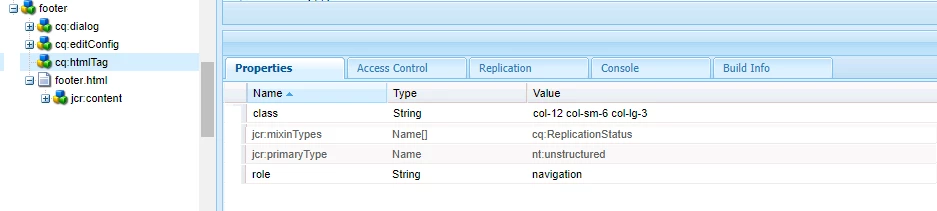
I'm using cq:htmlTag in my component as per below screenshot to add up the class and role to my <div>.
Now, I need to get the heading value from dialog field and update the aria-label value dynamically.

Is there anyway to achieve it.
Any thoughts and suggestion on the above query will be very much helpful.


Component structure and cq:htmlTag
HTML rendered in the page:


<div class="col-12 col-sm-6 col-lg-3" role="navigation"> <div aria-label="mylinks"> <h4>My links</h4> <ul> <li> <a href="/support" class="navlink" target="_self"> Complaints </a> </li> </ul> </div> </div>


Thank you

This post is no longer active and is closed to new replies. Need help? Start a new post to ask your question.
Best answer by Saravanan_Dharmaraj

Have you seen this document which explains the setting class name and other properties by variable in HTL?

Check this out : https://experienceleague.adobe.com/docs/experience-manager-65/developing/components/decoration-tag.html?lang=en 


Use Case 3: Custom Behavior

There can be any number of complex cases, which can be achieved easily by the possibility of HTL to provide explicitly:

  • decorationTagName='ELEMENT_NAME' To define the element name of the wrapper.
  • cssClassName='CLASS_NAME' To define the CSS class names to set on it.

one.html: <sly data-sly-resource="${'child' @ decorationTagName='aside', cssClassName='child'}"></sly>

two.html: Hello World!

Resulting output /content/test.html:

<aside class="child">Hello World!</aside>

1 reply

Saravanan_Dharmaraj
Community Advisor
Saravanan_DharmarajCommunity AdvisorAccepted solution
Community Advisor
September 22, 2022

Have you seen this document which explains the setting class name and other properties by variable in HTL?

Check this out : https://experienceleague.adobe.com/docs/experience-manager-65/developing/components/decoration-tag.html?lang=en 


Use Case 3: Custom Behavior

There can be any number of complex cases, which can be achieved easily by the possibility of HTL to provide explicitly:

  • decorationTagName='ELEMENT_NAME' To define the element name of the wrapper.
  • cssClassName='CLASS_NAME' To define the CSS class names to set on it.

one.html: <sly data-sly-resource="${'child' @ decorationTagName='aside', cssClassName='child'}"></sly>

two.html: Hello World!

Resulting output /content/test.html:

<aside class="child">Hello World!</aside>