Any suitable IntelliJ Idea Plugin for AEM to push and pull from JCR | Community
Skip to main content
Level 2
May 16, 2021
Solved

Any suitable IntelliJ Idea Plugin for AEM to push and pull from JCR

  • May 16, 2021
  • 4 replies
  • 7430 views

Hi Everyone, 

Hope you all are doing good and safe.

I want to push and pull from IntelliJ idea to JCR and vice versa.

I am using below configuration, IntelliJ Idea community edition 2021.1, JDK 11.0.9, Maven 3.6.3, Windows 10. I have gone through Repo tool  and  IntelliVault documents but no luck.

In 1st Repo tool URL, Configuration for Windows is not so elaborative. Do I need to downgrade the configuration mentioned ? As IntelliVault is deprecated in current mentioned IntelliJ version. Can you please provide solution. Do let me know if you need more details regarding this.

Thanks in advance. 

Regards,

Pavan 
This post is no longer active and is closed to new replies. Need help? Start a new post to ask your question.
Best answer by Asutosh_Jena_

Hi @p1hampi 


This does not work with IntelliJ 2021 version. You need to downgrade to 2019.2 version and it will work.


Download the vault-cli jar from here: https://repo1.maven.org/maven2/org/apache/jackrabbit/vault/vault-cli/

Preferably https://repo1.maven.org/maven2/org/apache/jackrabbit/vault/vault-cli/3.2.8/vault-cli-3.2.8-bin.zip 

Extract it and keep it somewhere in the file system based on OS (Windows you can keep it in C drive, for Mac you can keep it under /User/username/Applications


Now download the intellivault plugin from https://plugins.jetbrains.com/plugin/download?rel=true&updateId=44439 and install it manually in intellij 2019.2 version.

Navigate to IntellijIdea -> Plugins -> Settings -> Install Plugin from disk

Restart the Application.


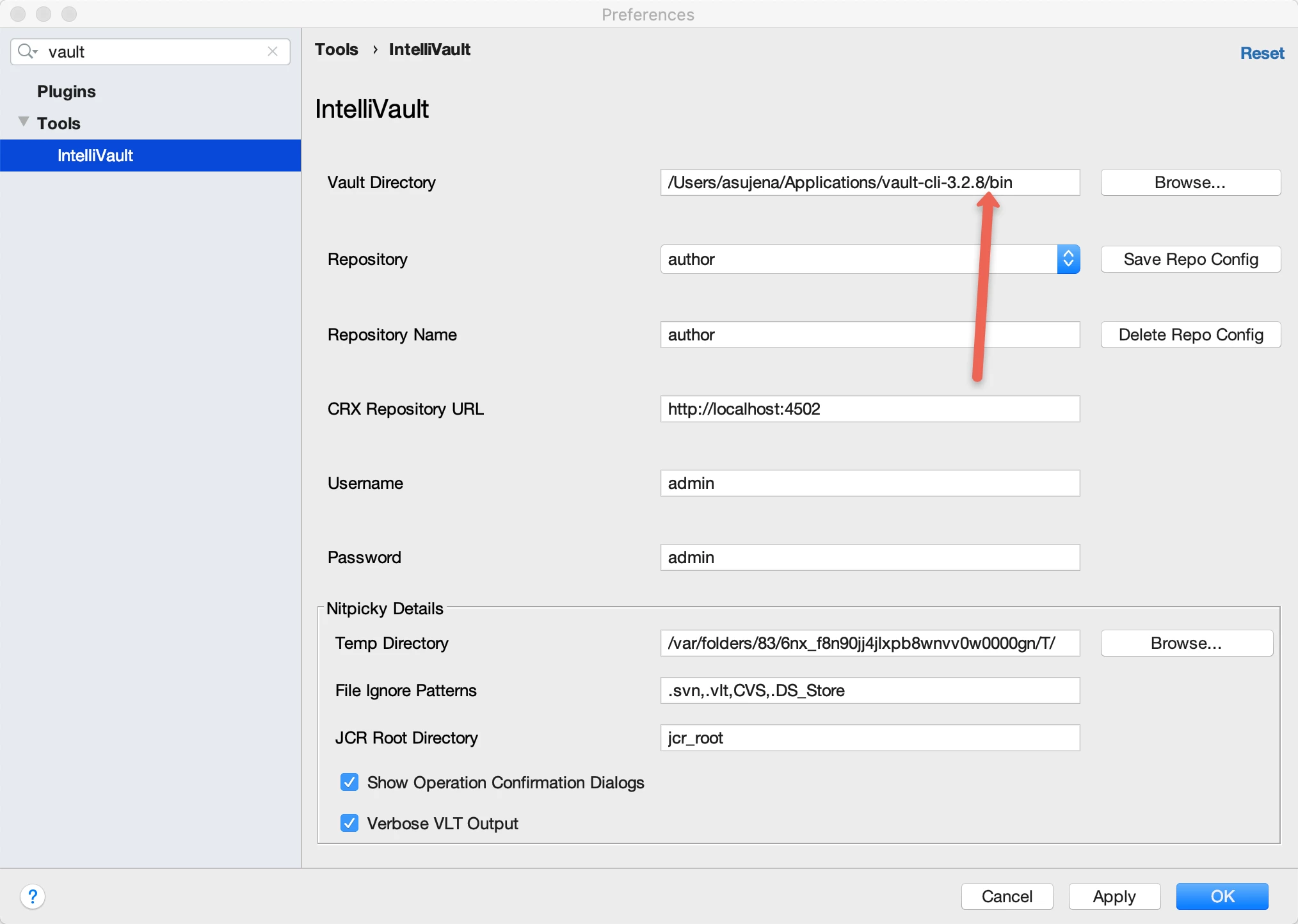
Now Navigate to intellivault settings in Intellij Application and configure the Vault directory:

The path will be absolute path to your bin folder where you kept the extracted vault application.

This should enable the pull/push from CRX using Intellij Idea.


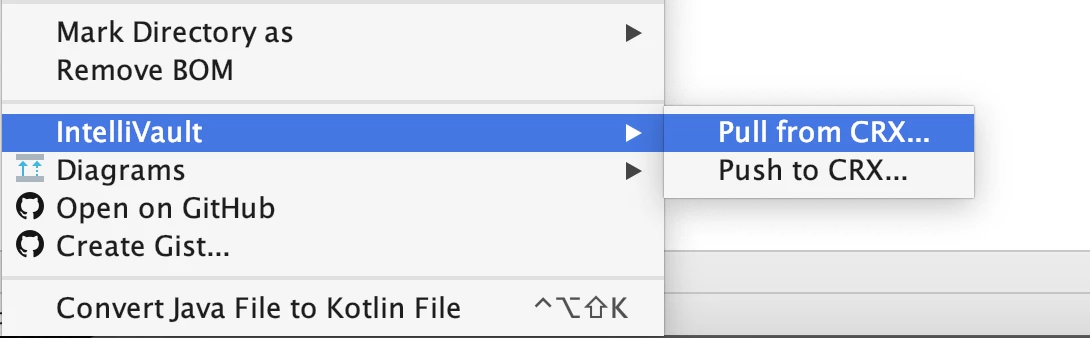
Right click on the folder which you want to pull/push in code base and you will be able to see the below options.


https://plugins.jetbrains.com/plugin/7328-intellivault

https://github.com/shsteimer/IntelliVault


Steps to setup:

https://medium.com/@darakhshansheikh/integrate-aem-crx-repository-with-intellij-using-intellivault-plugin-2a4287fc3eba


Thanks!


4 replies

Asutosh_Jena_
Community Advisor
Asutosh_Jena_Community AdvisorAccepted solution
Community Advisor
May 16, 2021

Hi @p1hampi 


This does not work with IntelliJ 2021 version. You need to downgrade to 2019.2 version and it will work.


Download the vault-cli jar from here: https://repo1.maven.org/maven2/org/apache/jackrabbit/vault/vault-cli/

Preferably https://repo1.maven.org/maven2/org/apache/jackrabbit/vault/vault-cli/3.2.8/vault-cli-3.2.8-bin.zip 

Extract it and keep it somewhere in the file system based on OS (Windows you can keep it in C drive, for Mac you can keep it under /User/username/Applications


Now download the intellivault plugin from https://plugins.jetbrains.com/plugin/download?rel=true&updateId=44439 and install it manually in intellij 2019.2 version.

Navigate to IntellijIdea -> Plugins -> Settings -> Install Plugin from disk

Restart the Application.


Now Navigate to intellivault settings in Intellij Application and configure the Vault directory:

The path will be absolute path to your bin folder where you kept the extracted vault application.

This should enable the pull/push from CRX using Intellij Idea.


Right click on the folder which you want to pull/push in code base and you will be able to see the below options.


https://plugins.jetbrains.com/plugin/7328-intellivault

https://github.com/shsteimer/IntelliVault


Steps to setup:

https://medium.com/@darakhshansheikh/integrate-aem-crx-repository-with-intellij-using-intellivault-plugin-2a4287fc3eba


Thanks!


Asutosh_Jena_
Community Advisor
Community Advisor
May 17, 2021

@p1hampi Let me know if the above steps did not work for you.

Level 2
May 17, 2021

it won't work in IntelliJ 2021, you have to downgrade. you can use IntelliJ vault and one more suggestion while pulling from the vault, before pushing code to git you will see lots of unnecessary property like

jcr:created by, jcr:lastmodified  to clean that you can use crx cleaner plugin it will remove this node from dialog.xml. 

June 2, 2023

You can use e AEM Repo Tool and configure external commands using this guide.


NOTE: If you are using windows, remember to set "$UnixSeparators($FilePath$)$" in repo command in order to make it work.


If you are aiming for a paid good solution you can use AEM IDE.

pabpalac
June 2, 2023

You can use e AEM Repo Tool and configure external commands using this guide.


NOTE: If you are using windows, remember to set "$UnixSeparators($FilePath$)$" in repo command in order to make it work.


If you are aiming for a paid good solution you can use AEM IDE.