[Angular] Text and Image Components are not visible in authoring mode when trying with AEM SPA Editor | Community
Skip to main content
May 19, 2020
Solved

[Angular] Text and Image Components are not visible in authoring mode when trying with AEM SPA Editor

  • May 19, 2020
  • 2 replies
  • 3692 views

Local Environment
Before filing an issue verify that the prerequisite tools/software are installed:

  • AEM 6.4 + SP2
  • Java 1.8
  • Apache Maven 3.3.9 
  • Node.js v10.16.1
  • npm 6.9.0

The issue
Text and Image Components are not visible in authoring mode. And I am not able to see the components in the side panel as well. The interesting thing is that there are no errors in Chrome's dev tools while loading the URL http://localhost:4502/editor.html/content/wknd-events/angular/home.html

Where in the tutorial are you experiencing an issue?

In Chapter 3 while reviewing the Text and Image components in AEM

This post is no longer active and is closed to new replies. Need help? Start a new post to ask your question.
Best answer by Nikhil-Kumar

@tinoymthms 

As Editable templates were not supported in AEM 6.4.2 (But now supported with AEM 6.5.5).
So the issue might be your component wont be the part of the Policies. 
So to access policies you need to access it from Editable templates but as that option is not available in AEM 6.4.2 with SPA. 
In this case you need to navigate under /conf folder to the node where policies are stored and you need to add as part of policies manually.

NOTE: In AEM 6.5.5 Onwards this issue can be handled straight forward.

Thanks,
Nikhil

2 replies

ArpitVarshney
Community Advisor
Community Advisor
May 20, 2020

Hi @tinoymthms 


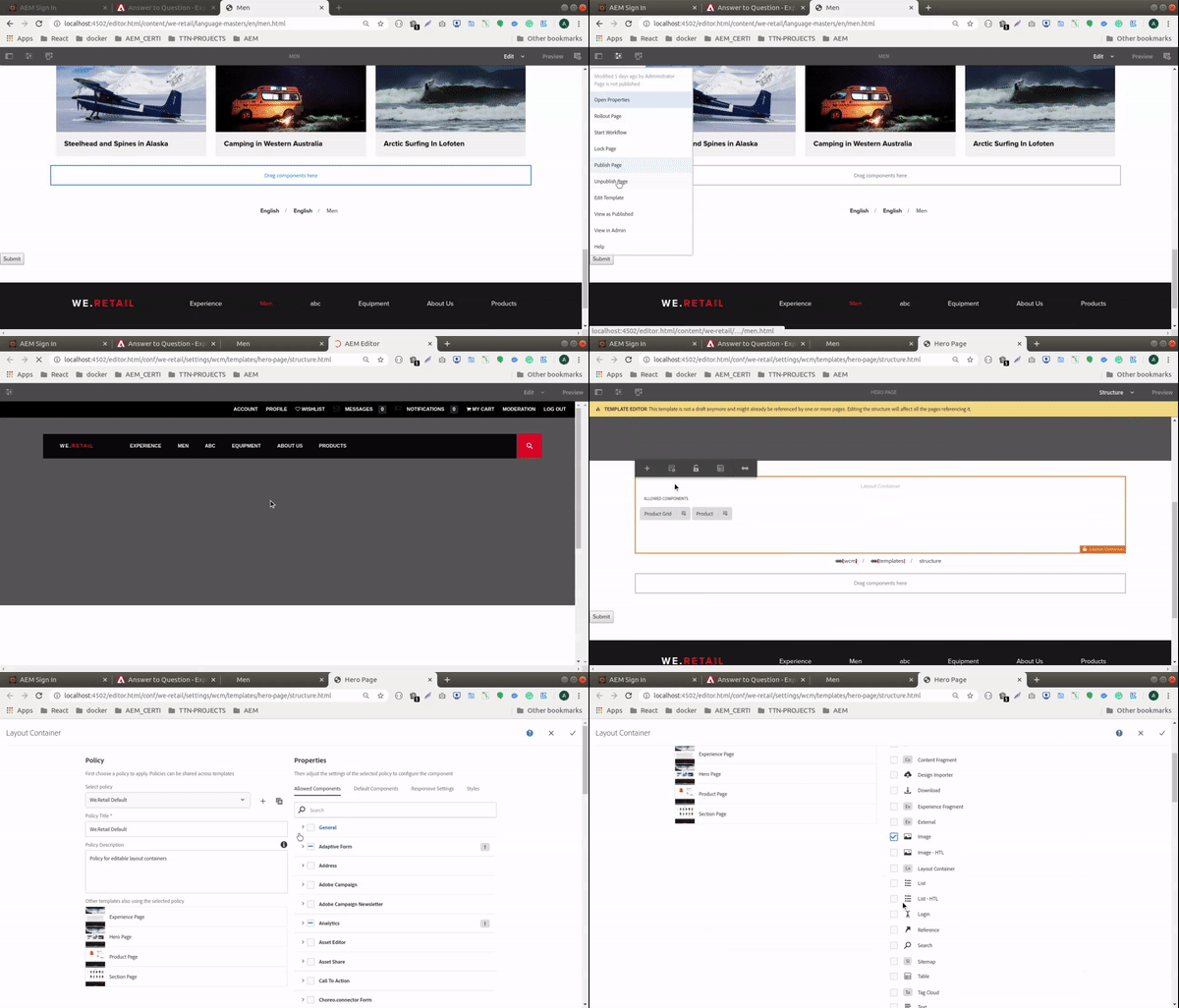
Could you please check your template on whether those components have been allowed in the layout container or not?

If not, please add them so that it will start appearing on the pages using that template for that layout container.

To add General Image and text component, Follow the below steps in GIF:


Regards,

Arpit

May 20, 2020

Hi @arpitvarshney ,

I have tried what you have suggested, but my template is empty when I try to edit it. And I can see some errors in the console of the template page.

1. Uncaught TypeError: Handlebars.compile is not a function

2.  Error: Uncaught (in promise): Error: Cannot match any routes. URL Segment: 'conf/wknd-events/settings/wcm/templates/wknd-events-page-template/structure.html'

3. Uncaught TypeError: Cannot read property 'lastModified' of undefined

Nikhil-Kumar
Community Advisor
Nikhil-KumarCommunity AdvisorAccepted solution
Community Advisor
August 24, 2020

@tinoymthms 

As Editable templates were not supported in AEM 6.4.2 (But now supported with AEM 6.5.5).
So the issue might be your component wont be the part of the Policies. 
So to access policies you need to access it from Editable templates but as that option is not available in AEM 6.4.2 with SPA. 
In this case you need to navigate under /conf folder to the node where policies are stored and you need to add as part of policies manually.

NOTE: In AEM 6.5.5 Onwards this issue can be handled straight forward.

Thanks,
Nikhil