Alt text issue in links in RTE when alt text has a special character | Community
Skip to main content
Level 2
May 16, 2018
Solved

Alt text issue in links in RTE when alt text has a special character

  • May 16, 2018
  • 5 replies
  • 2897 views

Hi All,

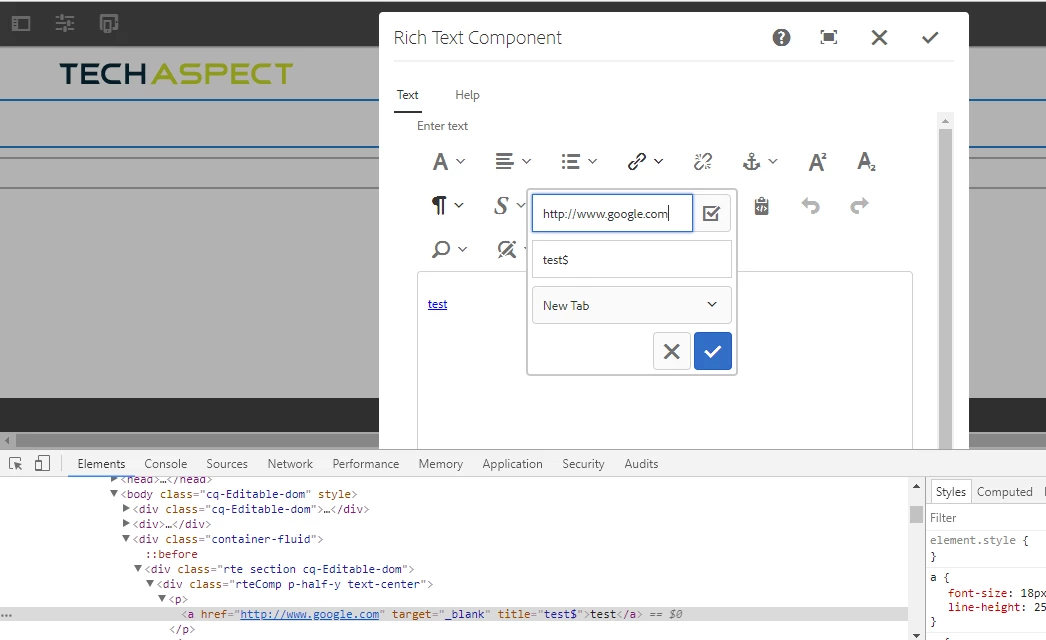
In AEM 6.3 when i am trying to add special character in alt text field for a link in RTE, the hover functionality stops working and I don't see any alt text.When I have inspected <a> tag, I found that the title attribute from <a> tag is completely removed due to special character.Is there any way I can add special characters like '?',copyright in alt text.To render the RTE content to page I am using context as 'html' .

Thanks in advance.

This post is no longer active and is closed to new replies. Need help? Start a new post to ask your question.
Best answer by Techaspect_Solu

Hi,

Instead of using @ context = 'unsafe', it's good to use AntiSamy configuration file in CRXDE light to handle your use-case.

We've tested your use-case and it got resolved after following the below steps:

1) Copy /libs/cq/xssprotection/config.xml to /apps/cq/xssprotection/config.xml.

2) Open /apps/cq/xssprotection/config.xml.

3) In the config.xml file, search for common-attributes and add the following target attribute declaration.

<attribute name="title">

     <regexp-list>

           <regexp value="[a-zA-Z0-9-_\$]+" />

      </regexp-list>

</attbribute>

4) Search for the term <tag name="a" in the config.xml file.

5) Add the line below in the list of attributes:

<attribute name="title" />

6) Save the file. Now, test your use-case and the issue should be resolved.

Sample output:

You can also find above steps in adobe helpx docs:

XSS Filter issue with the target attribute of the a tag

Hope this helps!

Regards,

TechAspect Solutions

5 replies

smacdonald2008
Level 10
May 16, 2018

I do not think Special chars are supported in this use case.

Level 2
May 17, 2018

Is there any other way we can use special characters in alt text without using context as unsafe.

smacdonald2008
Level 10
May 17, 2018

NOt that I am aware of. I avoid using special chars as much as possible,

Techaspect_Solu
Techaspect_SoluAccepted solution
Level 7
May 17, 2018

Hi,

Instead of using @ context = 'unsafe', it's good to use AntiSamy configuration file in CRXDE light to handle your use-case.

We've tested your use-case and it got resolved after following the below steps:

1) Copy /libs/cq/xssprotection/config.xml to /apps/cq/xssprotection/config.xml.

2) Open /apps/cq/xssprotection/config.xml.

3) In the config.xml file, search for common-attributes and add the following target attribute declaration.

<attribute name="title">

     <regexp-list>

           <regexp value="[a-zA-Z0-9-_\$]+" />

      </regexp-list>

</attbribute>

4) Search for the term <tag name="a" in the config.xml file.

5) Add the line below in the list of attributes:

<attribute name="title" />

6) Save the file. Now, test your use-case and the issue should be resolved.

Sample output:

You can also find above steps in adobe helpx docs:

XSS Filter issue with the target attribute of the a tag

Hope this helps!

Regards,

TechAspect Solutions

smacdonald2008
Level 10
May 17, 2018

Techaspect Solutions​ -- great answer!