After migration into CoralUI Query is not generating | Community
Skip to main content
Level 2
July 13, 2021
Solved

After migration into CoralUI Query is not generating

  • July 13, 2021
  • 3 replies
  • 1163 views

Hi Team,
After migration into CoralUI Query is not generating, while it was working before migration.
Please find below XML file and help me out:-


<generateQuery
jcr:primaryType="nt:unstructured"
sling:resourceType="granite/ui/components/coral/foundation/button"
icon="icon-info-sign"
name="./generateQuery"
granite:rel="tagFilterQuery"
text="Generate Query"/>
<queryField
jcr:primaryType="nt:unstructured"
sling:resourceType="granite/ui/components/coral/foundation/form/textarea"
granite:class="queryTextArea"
disabled="{Boolean}true"
fieldLabel="Generated Query"
name="./queryField"
rows="3"/>
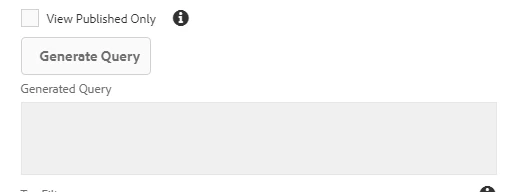
Please help me out !! Thanks in advance

This post is no longer active and is closed to new replies. Need help? Start a new post to ask your question.
Best answer by Vijayalakshmi_S

Hi @rajnishkr93

Compare the logic/markup of Resource (sling:resourceType of dialog fields) used for source element Button (Generate Query) and the target element (textarea) prior to and after Migration. 

On a very high level, it could be the identifiers (class/id or HTML tag name) or if you are relying on custom properties on a dialog field node. 

Share the complete dialog resources used and custom JS for debugging further. 

3 replies

Dipti_Chauhan
Community Advisor
Community Advisor
July 13, 2021

Hi @rajnishkr93 

 GenerateQuery is not a OOTB function or component. In your case this is just a button. Please share Java script function which is getting called on click of it. There must be some error in that JS .


Thanks

Dipti

arunpatidar
Community Advisor
Community Advisor
July 13, 2021

Hi, can you try to move rows="3" in granite:data node?

Arun Patidar
Level 2
July 13, 2021
Hi Arun, that approach dint work....it seems js is breaking somewhere
Vijayalakshmi_S
Vijayalakshmi_SAccepted solution
Level 10
July 16, 2021

Hi @rajnishkr93

Compare the logic/markup of Resource (sling:resourceType of dialog fields) used for source element Button (Generate Query) and the target element (textarea) prior to and after Migration. 

On a very high level, it could be the identifiers (class/id or HTML tag name) or if you are relying on custom properties on a dialog field node. 

Share the complete dialog resources used and custom JS for debugging further.