After migrating From AEM 6.2 to AEM 6.4 Clientlib is not working in Publish | Community
Skip to main content
Level 4
December 5, 2018
Solved

After migrating From AEM 6.2 to AEM 6.4 Clientlib is not working in Publish

  • December 5, 2018
  • 10 replies
  • 3674 views

Dear All,

I have migrated my AEM application from AEM 6.2 AEM 6.4.

In AEM 6.2 , my clientlibs was under the path /etc/designs , as shown below.
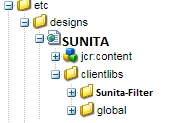
After migrating to AEM 6.4 , I have moved to the clientlibs under the apps/Sunita , as shown below.
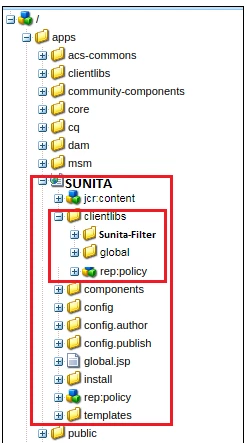
After doing the necessary changes , my home page images are coming fine in AEM-6.4 author instance.

But it is not coming fine in AEM-6.4 publish instance. It is still calling etc.clientlibs , as shown below.
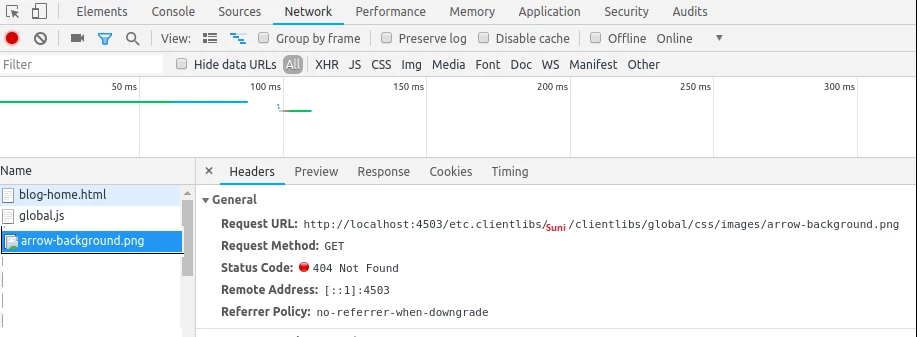
I am feeling I have missed something. But I am not able to figure out .

It will be really appreciated if Anybody can help me on this.

This post is no longer active and is closed to new replies. Need help? Start a new post to ask your question.
Best answer by arunpatidar

Yes, you need to change references in CSS as well

e.g.

You can reference the image in CSS via /etc.clientlibs/myprojects/clientlibs/foo/resources/icon.png

.insight-splash-v2 .arr-right {

    background-image: url("/etc.clientlibs/SUNITA/clientlibs/global/resources/images/arrow-background.png");

    display: block;

    height: 30px;

    width: 30px;

    color: #fff;

}

10 replies

smacdonald2008
Level 10
December 5, 2018

Looks like a cache issue

Ravi_Pampana
Community Advisor
Community Advisor
December 6, 2018

Hi,

Try this, it worked for me. Images under /apps are worked only when there are under resources folder

Ex:

Image/Fonts: /apps/site/clientlibs/resources

CSS: /apps/site/clientlibs/css

vipins5188
Level 3
December 6, 2018

What category you are adding for clientlibs ?? How you are including your clientlibs ???

Please post more details

arunpatidar
Community Advisor
Community Advisor
December 6, 2018

In order for the client libraries under /apps to be accessible, a proxy servelt is used. The ACLs are still enforced on the client library folder, but the servlet allows for the content to be read via /etc.clientlibs/ if the allowProxy property is set to true.

A static resource can only be accessed via the proxy, if it resides below a resource below the client library folder.

As an example:

  • You have a clientlib in /apps/myproject/clientlibs/foo
  • You have a static image in /apps/myprojects/clientlibs/foo/resources/icon.png

Then you set the allowProxy property on foo to true.

  • You can then request /etc.clientlibs/myprojects/clientlibs/foo.js
  • You can then reference the image via /etc.clientlibs/myprojects/clientlibs/foo/resources/icon.png
Arun Patidar
Level 4
December 6, 2018

Dear All,

Thanks a lot for your response. I have put the images in resources and still it is not coming fine.

and in my clientlibs /apps/SUNITA/clientlibs/global , I have created the below categories.

In my head.jsp , I have included below categories

<cq:includeClientLib categories="etc.sunita.global"/>

But still it is not calling to the images to the path SUNITA/clientlibs/global/css/images/arrow-background.png

arunpatidar
Community Advisor
Community Advisor
December 6, 2018

Hi,

Your image should be inside resources folder

SUNITA/clientlibs/global/resources/images/arrow-background.png

Arun Patidar
Level 4
December 6, 2018

So I have one doubt here. After putting the images under resources , do I need to change anything in my css file "or" there is no need to change anywhere ?

I have added below one in my css file.

.insight-splash-v2 .arr-right {

    background-image: url("images/arrow-background.png");

    display: block;

    height: 30px;

    width: 30px;

    color: #fff;

}

I believe to call the  resources/images/arrow-background.png is the later part but all the [pages still calling to the path  http://localhost:4503/etc.clientlibs/SUNITA/clientlibs/global/css/images/arrow-background.png

vipins5188
Level 3
December 6, 2018

Sunita,

As arun mentioned your images should be in resources folder.

Please try using ui include instead of cq. Ex:

<ui:includeClientLib categories="etc.sunita.global"/>

arunpatidar
Community Advisor
arunpatidarCommunity AdvisorAccepted solution
Community Advisor
December 6, 2018

Yes, you need to change references in CSS as well

e.g.

You can reference the image in CSS via /etc.clientlibs/myprojects/clientlibs/foo/resources/icon.png

.insight-splash-v2 .arr-right {

    background-image: url("/etc.clientlibs/SUNITA/clientlibs/global/resources/images/arrow-background.png");

    display: block;

    height: 30px;

    width: 30px;

    color: #fff;

}

Arun Patidar
Level 4
December 6, 2018

Thanks Arun ,

Now it is working fine after , I changes all my images/ path to the below path.

background-image: url("/etc.clientlibs/SUNITA/clientlibs/global/resources/images/arrow-background.png");