AEMaaCS - How to create OAK index for all nodes under a path by node name | Community
Skip to main content
Level 2
June 16, 2025
Solved

AEMaaCS - How to create OAK index for all nodes under a path by node name

  • June 16, 2025
  • 1 reply
  • 496 views

Hi,

I have some product nodes under this jcr path - /etc/products/mycompany/media. 

The structure is as below -
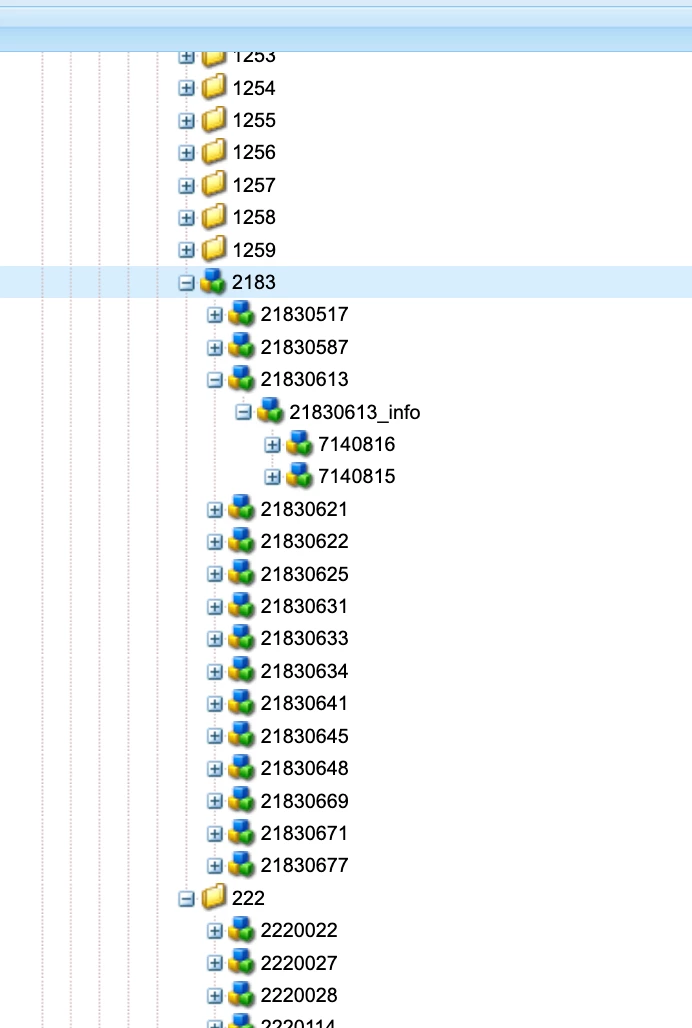
 

I ran a query to find all leaf nodes under a specific path like /etc/products/mycompany/media/2183. My query is this which returns all nodes correctly. But due to large number of nodes I'm getting Traversal query warning. So I wanted to create oak index to optimize this query. However, query doesn't contain any property to specify in the index. So can anyone suggest index definition for this query? 

select * from [nt:unstructured] as a where isdescendantnode(a, "/etc/products/mycompany/media/2183") 

Please note that I'm using AEM cloud service.


Thanks

Best answer by SantoshSai

Hi @prithwi,

Create a Custom Oak Index for Path Restriction

Since your query is only using isdescendantnode, you can create a path-restricted index that indexes nt:unstructured nodes under /etc/products/mycompany/media.

Here’s how you can define this index via a custom OAK index definition under /apps.

Create Index Definition: Example Structure

Place this under:

/apps/mycompany/oak-index/mediaDescendantsIndex/.content.xml

mediaDescendantsIndex - Index Definition

<?xml version="1.0" encoding="UTF-8"?> <jcr:root xmlns:sling="http://sling.apache.org/jcr/sling/1.0" xmlns:jcr="http://www.jcp.org/jcr/1.0" xmlns:oak="http://jackrabbit.apache.org/oak/ns/1.0" jcr:primaryType="oak:QueryIndexDefinition" jcr:title="Index for media descendant nodes" type="lucene" async="async" evaluatePathRestrictions="{Boolean}true" compatVersion="{Long}2" includedPaths="[/etc/products/mycompany/media]" indexRules="[nt:unstructured]" reindex="{Boolean}true"> </jcr:root>

Note: You can also add costPerEntry and costPerExecution if needed, but they’re optional unless you want to fine-tune indexing behavior.

Deployment Steps (AEM Cloud Service)
  1. Place this XML under your project path:
    ui.apps/src/main/content/jcr_root/apps/mycompany/oak-index/mediaDescendantsIndex/.content.xml

  2. Deploy the code to Cloud Manager pipeline.

  3. Once deployed, verify indexing is complete using:

This will help you to know:
  • Indexes all nt:unstructured nodes under /etc/products/mycompany/media

  • Enables efficient execution of isdescendantnode(...) queries

  • Avoids traversal warnings

1 reply

SantoshSai
Community Advisor
SantoshSaiCommunity AdvisorAccepted solution
Community Advisor
June 16, 2025

Hi @prithwi,

Create a Custom Oak Index for Path Restriction

Since your query is only using isdescendantnode, you can create a path-restricted index that indexes nt:unstructured nodes under /etc/products/mycompany/media.

Here’s how you can define this index via a custom OAK index definition under /apps.

Create Index Definition: Example Structure

Place this under:

/apps/mycompany/oak-index/mediaDescendantsIndex/.content.xml

mediaDescendantsIndex - Index Definition

<?xml version="1.0" encoding="UTF-8"?> <jcr:root xmlns:sling="http://sling.apache.org/jcr/sling/1.0" xmlns:jcr="http://www.jcp.org/jcr/1.0" xmlns:oak="http://jackrabbit.apache.org/oak/ns/1.0" jcr:primaryType="oak:QueryIndexDefinition" jcr:title="Index for media descendant nodes" type="lucene" async="async" evaluatePathRestrictions="{Boolean}true" compatVersion="{Long}2" includedPaths="[/etc/products/mycompany/media]" indexRules="[nt:unstructured]" reindex="{Boolean}true"> </jcr:root>

Note: You can also add costPerEntry and costPerExecution if needed, but they’re optional unless you want to fine-tune indexing behavior.

Deployment Steps (AEM Cloud Service)
  1. Place this XML under your project path:
    ui.apps/src/main/content/jcr_root/apps/mycompany/oak-index/mediaDescendantsIndex/.content.xml

  2. Deploy the code to Cloud Manager pipeline.

  3. Once deployed, verify indexing is complete using:

This will help you to know:
  • Indexes all nt:unstructured nodes under /etc/products/mycompany/media

  • Enables efficient execution of isdescendantnode(...) queries

  • Avoids traversal warnings

Santosh Sai
prithwiAuthor
Level 2
June 17, 2025

Thanks Santosh for your detail solution. It worked for me.

The magic resides in these two properties that I was missing before. 🙂

evaluatePathRestrictions="{Boolean}true" includedPaths="[/etc/products/mycompany/media]" indexRules="[nt:unstructured]"

Thank you