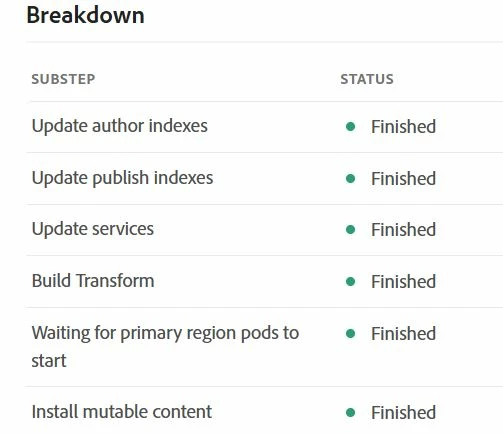
AEMaaCS DEV deployment failing in "Build transform" step | Community
Skip to main content
jayv25585659
Level 8
July 29, 2024
Solved

AEMaaCS DEV deployment failing in "Build transform" step

  • July 29, 2024
  • 3 replies
  • 1621 views

The only changes I made include:

  • adding ACS commons into my maven project
  • some component changes

all/pom.xml


<embedded> <artifactId>acs-aem-commons-all</artifactId> <target>/apps/myhost-vendor-packages/container/install</target> <filter>true</filter> <isAllVersionsFilter>true</isAllVersionsFilter> </embedded> ... ... <dependency> <groupId>com.adobe.acs</groupId> <artifactId>acs-aem-commons-all</artifactId> <classifier>cloud</classifier> <version>6.6.2</version> <type>zip</type> </dependency>


core/pom.xml


<dependency> <groupId>com.adobe.acs</groupId> <artifactId>acs-aem-commons-bundle</artifactId> <version>6.6.2</version> <scope>provided</scope> </dependency>


all/vault/filter.xml


<filter root="/apps/myhost-vendor-packages"/> </workspaceFilter>


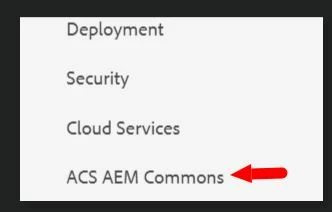
I built/installed the project locally first, I can see ACS commons option in Tools.
 

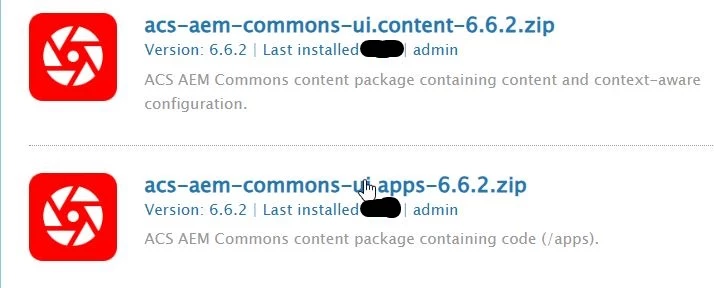
I can also see these 2 packages has been installed
 

I downloaded and viewed the log BUT nothing jumps out to me that should cause the error. Here's a link to the logs => https://pastebin.com/A4h2rrzr


Any ideas what could be wrong and how to fix? Thanks


UPDATE: I reverted my changes (removed adding ACS commons to my maven project) and the DEV deployment pipeline has successfully completed.
This post is no longer active and is closed to new replies. Need help? Start a new post to ask your question.
Best answer by AMANATH_ULLAH

@jayv25585659 

Please follow below steps to install ACS commons in AEMaaCS

  1. Add the below dependency to your all project's pom.xml
    <dependency>
        <groupId>com.adobe.acs</groupId>
        <artifactId>acs-aem-commons-ui.content</artifactId>
        <version>6.6.2</version>
        <type>zip</type>
        <classifier>min</classifier>
    </dependency>
    
    <dependency>
        <groupId>com.adobe.acs</groupId>
        <artifactId>acs-aem-commons-ui.apps</artifactId>
        <version>6.6.2</version>
        <type>zip</type>
        <classifier>min</classifier> 
    </dependency>
  2. Add the below embed properties in your all project's pom.xml.
    <embedded>
                        <groupId>com.adobe.acs</groupId>
                        <artifactId>acs-aem-commons-ui.apps</artifactId>
                        <type>zip</type>
                        <target>/apps/myhost-packages/application/install</target>
                    </embedded>
                    <embedded>
                        <groupId>com.adobe.acs</groupId>
                        <artifactId>acs-aem-commons-ui.content</artifactId>
                        <type>zip</type>
                        <target>/apps/myhost-packages/content/install</target>
                    </embedded>
  3. Add the below dependency to your core project's pom.xml
    <dependency>
        <groupId>com.adobe.acs</groupId>
        <artifactId>acs-aem-commons-bundle</artifactId>
        <version>6.6.2</version>
        <scope>provided</scope>
    </dependency>

3 replies

AMANATH_ULLAH
Community Advisor
AMANATH_ULLAHCommunity AdvisorAccepted solution
Community Advisor
July 29, 2024

@jayv25585659 

Please follow below steps to install ACS commons in AEMaaCS

  1. Add the below dependency to your all project's pom.xml
    <dependency>
        <groupId>com.adobe.acs</groupId>
        <artifactId>acs-aem-commons-ui.content</artifactId>
        <version>6.6.2</version>
        <type>zip</type>
        <classifier>min</classifier>
    </dependency>
    
    <dependency>
        <groupId>com.adobe.acs</groupId>
        <artifactId>acs-aem-commons-ui.apps</artifactId>
        <version>6.6.2</version>
        <type>zip</type>
        <classifier>min</classifier> 
    </dependency>
  2. Add the below embed properties in your all project's pom.xml.
    <embedded>
                        <groupId>com.adobe.acs</groupId>
                        <artifactId>acs-aem-commons-ui.apps</artifactId>
                        <type>zip</type>
                        <target>/apps/myhost-packages/application/install</target>
                    </embedded>
                    <embedded>
                        <groupId>com.adobe.acs</groupId>
                        <artifactId>acs-aem-commons-ui.content</artifactId>
                        <type>zip</type>
                        <target>/apps/myhost-packages/content/install</target>
                    </embedded>
  3. Add the below dependency to your core project's pom.xml
    <dependency>
        <groupId>com.adobe.acs</groupId>
        <artifactId>acs-aem-commons-bundle</artifactId>
        <version>6.6.2</version>
        <scope>provided</scope>
    </dependency>
Amanath Ullah
jayv25585659
Level 8
July 29, 2024

according to this site (click here for link), "In ACS AEM Commons 6.0.0, the main dependency artifact ID was renamed from acs-aem-commons-content to acs-aem-commons-all."


but I'll test your suggestion. Thanks

(all I'm saying is that your suggestion goes against the suggestion in the ACS documentation)


arunpatidar
Community Advisor
Community Advisor
July 29, 2024
kautuk_sahni
Community Manager
Community Manager
August 1, 2024

@jayv25585659 Did you find the suggestions from users helpful? Please let us know if you require more information. Otherwise, please mark the answer as correct for posterity. If you've discovered a solution yourself, we would appreciate it if you could share it with the community. Thank you!

Kautuk Sahni