
[AEM6.5] Limit Multifield in AEM6.5 and throw pop-up once reached Limit. | Community
Skip to main content
tushaar_srivastava
Level 6
May 7, 2024
Solved

[AEM6.5] Limit Multifield in AEM6.5 and throw pop-up once reached Limit.

  • May 7, 2024
  • 3 replies
  • 700 views

Hi Team,


I need one guidance here where I have to limit the multifield, upto certain value and once that value is reached then the [ADD] button will get disable and throw pop-up that "limit exceed"

Currently I am using JS where I am just restricting not to save the dialog, instead I have to show pop-us and disable the Add button if reached limit.


(function ($, $document) { "use strict"; $.validator.register("foundation.validation.validator", { selector: "coral-multifield", validate: function(el) { var totalPanels = el["0"].items.getAll().length; var min; var max; if ($(el).data("min-item")){ min = $(el).data("min-item"); if(totalPanels < min) { return "Minimum numbers of items required are: " + min; } } if ($(el).data("max-item")){ max = $(el).data("max-item"); if(totalPanels > max) { return "Maximum numbers of items allowed are: " + max; } } }}); })($, $(document));

 in Addition to this :
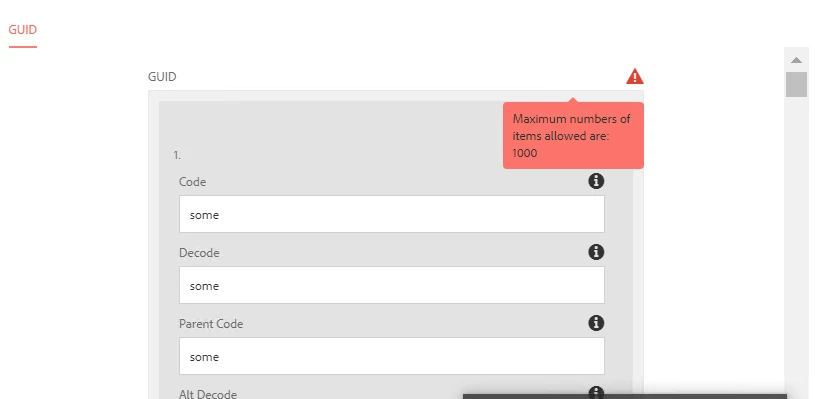
We need to disable the add button and pop-up the limit reached message.


I tried, but it seems not working maybe because of Granite issue.

Any suggestion..


Thanks


@kautuk_sahni  @lukasz-m  

This post is no longer active and is closed to new replies. Need help? Start a new post to ask your question.
Best answer by EstebanBustamante

Hi, 

For the button, you just need to identify a unique selector for this and then add the disabled property. Something like this:

$("button[coral-multifield-add]").prop("disabled", true);

For the popup, you could try something like this:

//Create the dialog var dialog = new Coral.Dialog().set({ id: 'myDialog', header: { innerHTML: 'This Dialog is Awesome' }, content: { innerHTML: '<coral-checkbox id="agree">I Agree</coral-checkbox>' }, footer: { innerHTML: '<button is="coral-button" variant="primary" coral-close>Ok</button>' } }); document.body.appendChild(dialog); //Show the dialog dialog.show()

Here you have all the documentation about how to create a dialog: https://developer.adobe.com/experience-manager/reference-materials/6-5/coral-ui/coralui3/Coral.Dialog.html 


Hope this helps

3 replies

EstebanBustamante
Community Advisor and Adobe Champion
EstebanBustamanteCommunity Advisor and Adobe ChampionAccepted solution
Community Advisor and Adobe Champion
May 7, 2024

Hi, 

For the button, you just need to identify a unique selector for this and then add the disabled property. Something like this:

$("button[coral-multifield-add]").prop("disabled", true);

For the popup, you could try something like this:

//Create the dialog var dialog = new Coral.Dialog().set({ id: 'myDialog', header: { innerHTML: 'This Dialog is Awesome' }, content: { innerHTML: '<coral-checkbox id="agree">I Agree</coral-checkbox>' }, footer: { innerHTML: '<button is="coral-button" variant="primary" coral-close>Ok</button>' } }); document.body.appendChild(dialog); //Show the dialog dialog.show()

Here you have all the documentation about how to create a dialog: https://developer.adobe.com/experience-manager/reference-materials/6-5/coral-ui/coralui3/Coral.Dialog.html 


Hope this helps

Esteban Bustamante
kautuk_sahni
Community Manager
Community Manager
May 16, 2024

@tushaar_srivastava Did you find the suggestions from users helpful? Please let us know if more information is required. Otherwise, please mark the answer as correct for posterity. If you have found out solution yourself, please share it with the community.

Kautuk Sahni