AEM6.3 Autocomplete with smart search for touch ui | Community
Skip to main content
srinivas_chann1
Level 7
August 13, 2019
Solved

AEM6.3 Autocomplete with smart search for touch ui

  • August 13, 2019
  • 19 replies
  • 7435 views

Hi,

I have the below autocomplete tag getting populated in the touch ui ,but it is not of smart search and have to type in full tag path.Similar to that is mentioned in AEM6.3 Touch ui autocomplete not working for tags for namespaces

When i type in any particular tag it does not show any reference at all. Even though the tag is present. So it the full tag name that appears is Content tag: checking / abc.  I need to type in the full tag Content tag: checking / abc  only then it filters .I need some thing like if i type in abc it must show up the tag

Things i tried:-

I tried with adding mode="contains" but does not effect the search. Please let me know  if i could customize any files that will solve this problem.

<tag

         jcr:primaryType="nt:unstructured"

         sling:resourceType="granite/ui/components/coral/foundation/form/autocomplete"

         fieldLabel=" Asset Tags"

          multiple="{Boolean}true"

         name="./assetTags"

         mode="contains">

          <datasource

           jcr:primaryType="nt:unstructured"

           sling:resourceType="cq/gui/components/common/datasources/tags"/>

          <options

           jcr:primaryType="nt:unstructured"

           sling:resourceType="granite/ui/components/coral/foundation/form/autocomplete/list"/>

          <values

           jcr:primaryType="nt:unstructured"

           sling:resourceType="granite/ui/components/coral/foundation/form/autocomplete/tags"/>

                                    </tag>

Thanks
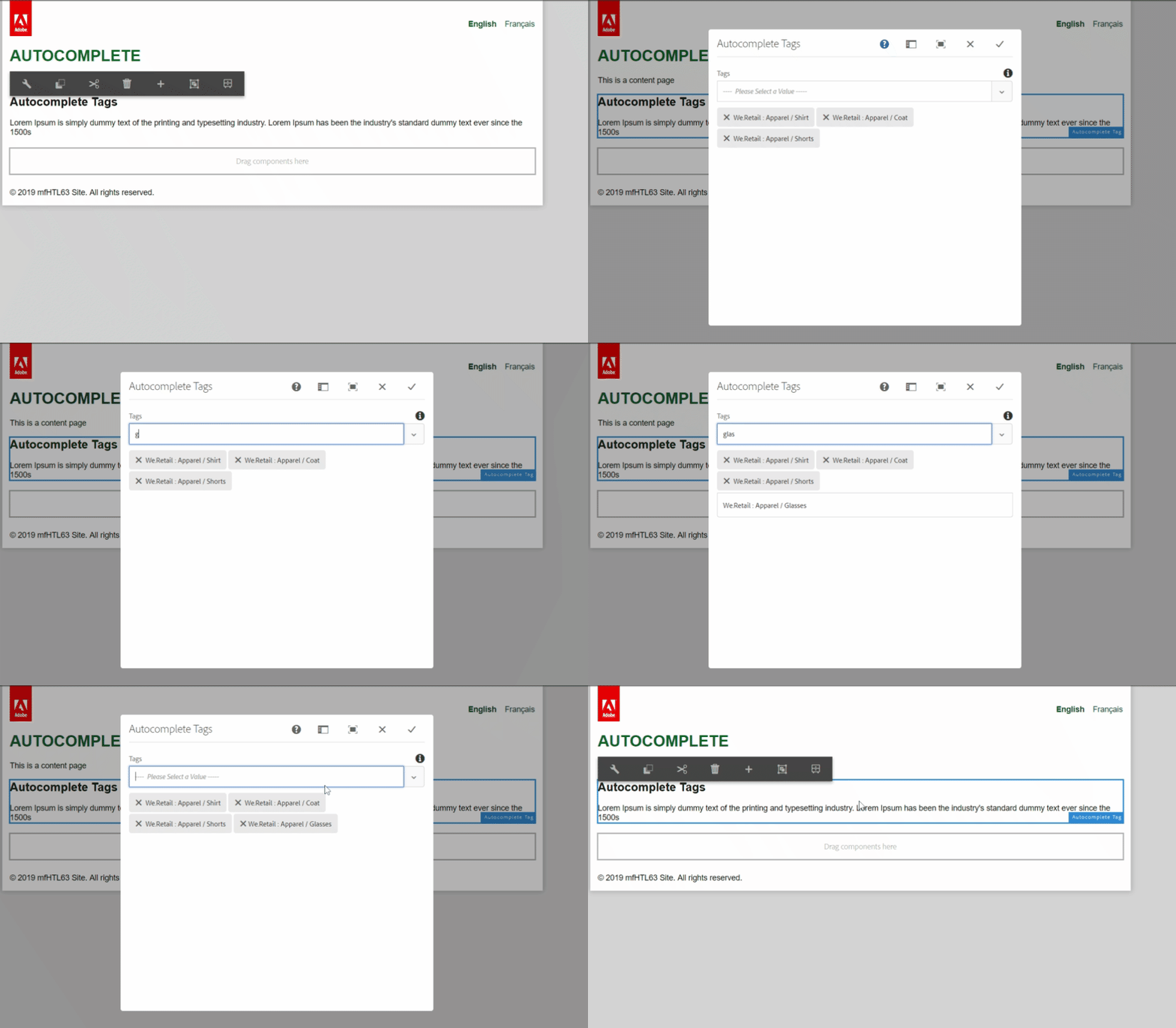
This post is no longer active and is closed to new replies. Need help? Start a new post to ask your question.
Best answer by arunpatidar

Hi,

I am not sure what is the issue at your end but it works fine for me

Code :

(function($, $document) {

    "use strict";

    $document.on("dialog-ready", function() {

        $(document).on("keyup", "#productTagListTagcomp div>input.js-coral-Autocomplete-textfield", function() {

            applyFilter($(this).val().toLowerCase(), $("ul.js-coral-Autocomplete-selectList.coral-SelectList li"));

        });

         $(document).on("click", "#productTagListTagcomp ul.js-coral-Autocomplete-selectList.coral-SelectList li.is-highlighted", function() {

            $(this).closest('ul').removeClass("is-visible").removeClass("is-below");

        });

    });

    function applyFilter(txtVal, filterList) {

            filterList.each(function() {

                if ($(this).text().toLowerCase().indexOf(txtVal) > 0) {

                    setTimeout(() => {

                            $(this).removeClass("is-hidden", false)

                            $(this).closest('ul').addClass("is-visible").addClass("is-below");

                        },

                        100);

                }

            });

        }

})($, $(document));

19 replies

arunpatidar
Community Advisor
arunpatidarCommunity AdvisorAccepted solution
Community Advisor
August 19, 2019

Hi,

I am not sure what is the issue at your end but it works fine for me

Code :

(function($, $document) {

    "use strict";

    $document.on("dialog-ready", function() {

        $(document).on("keyup", "#productTagListTagcomp div>input.js-coral-Autocomplete-textfield", function() {

            applyFilter($(this).val().toLowerCase(), $("ul.js-coral-Autocomplete-selectList.coral-SelectList li"));

        });

         $(document).on("click", "#productTagListTagcomp ul.js-coral-Autocomplete-selectList.coral-SelectList li.is-highlighted", function() {

            $(this).closest('ul').removeClass("is-visible").removeClass("is-below");

        });

    });

    function applyFilter(txtVal, filterList) {

            filterList.each(function() {

                if ($(this).text().toLowerCase().indexOf(txtVal) > 0) {

                    setTimeout(() => {

                            $(this).removeClass("is-hidden", false)

                            $(this).closest('ul').addClass("is-visible").addClass("is-below");

                        },

                        100);

                }

            });

        }

})($, $(document));

Arun Patidar
srinivas_chann1
Level 7
August 19, 2019

Hi,

Thanks for your inputs again as you have now shared even a video .That really helps.

I noticed that setTimeout(() =>  this line was causing the issue for the dialog not to close .

So i changed it to

function applyFilter(txtVal, filterList) {

            filterList.each(function() {

               var $this=$(this);

                if ($(this).text().toLowerCase().indexOf(txtVal) > 0) {

                    setTimeout(function() {

                            $this.removeClass("is-hidden", false)

                            $this.closest('ul').addClass("is-visible").addClass("is-below");

                        },

                        100);

                }

            });

        }


The above worked for me. Do you have any more inputs on $this if i could write it in a better that could be used in setTimeout of this should be fine??

Thanks

arunpatidar
Community Advisor
Community Advisor
August 19, 2019

Hi Srinivas,

I did not get your question? could you please let us know, what issue are you facing now?

Arun Patidar
srinivas_chann1
Level 7
August 20, 2019

Hi,

1>

setTimeout(() =>  This line was causing an issue in my code due to which I changed it below and it worked .The syntax may not be supported in the AEM i am using, due to internal query packages.

setTimeout(function() {

                            /////

                        },

                        100);

2>I have added var $this=$(this);  and using it in setTimeout is it fine this way or any other  better code we could change to  was my question under setTimeout

filterList.each(function() {

               var $this=$(this);

                if ($(this).text().toLowerCase().indexOf(txtVal) > 0) {

                    setTimeout(function() {

                            $this.removeClass("is-hidden", false)

                            $this.closest('ul').addClass("is-visible").addClass("is-below");

                        },

                        100);

                }

            });

Thanks

arunpatidar
Community Advisor
Community Advisor
August 20, 2019

var $this=$(this); line has no issues. It just a variable name and $ represent object type.

Arun Patidar
srinivas_chann1
Level 7
September 27, 2019

Hi ,

I have 2 autocomplete then how could i modify the above code.

One with granite:id productTagListTagcomp and other with granite:id regionTagListTagcomp

Your inputs will be very helpful.

Please let me know in-case i need to create a new discussion for this.

Thanks

arunpatidar
Community Advisor
Community Advisor
September 27, 2019

you can use multiple selectors to register event for onlick

Example

$(document).on("click", "#productTagListTagcomp ul.js-coral-Autocomplete-selectList.coral-SelectList li.is-highlighted, #regionTagListTagcomp ul.js-coral-Autocomplete-selectList.coral-SelectList li.is-highlighted", function() {})

Arun Patidar
srinivas_chann1
Level 7
September 28, 2019

Hi,

Thanks for the inputs

I have written the below code .Could you please suggest if you see any changes  on this

1> when i type in any character in one of the auto complete input field it shows both selection  results of both  tags id with 2 pop up,  so i am trying hide one of selection which is not typed. I Have replaced tag id names with TagA1 and TagB2 .

2>How to remove the scroll bar that is coming up when i type in any character in auto complete input field .When we have 2 autocomplete one below another.

(function($, $document) {

    "use strict";

    // when dialog gets injected

    $(document).on("dialog-ready", function(e) {

         $(document).on("keyup", "#TagA1 div>input.js-coral-Autocomplete-textfield", function() {

            applyFilter($(this).val().toLowerCase(), $("ul.js-coral-Autocomplete-selectList.coral-SelectList li"),

$('#TagB2  ul.js-coral-Autocomplete-selectList'));

        });

$(document).on("keyup", "#TagB2 div>input.js-coral-Autocomplete-textfield", function() {

            applyFilter($(this).val().toLowerCase(), $("ul.js-coral-Autocomplete-selectList.coral-SelectList li"),

$('#TagA1 ul.js-coral-Autocomplete-selectList'));

        });

         $(document).on("click", "#TagA1 ul.js-coral-Autocomplete-selectList.coral-SelectList li.is-highlighted", function() {

            $(this).closest('ul').removeClass("is-visible").removeClass("is-below");

        });

$(document).on("click", "#TagB2 ul.js-coral-Autocomplete-selectList.coral-SelectList li.is-highlighted", function() {

            $(this).closest('ul').removeClass("is-visible").removeClass("is-below");

        });

    });

    function applyFilter(txtVal, filterList ,hide ) {

        filterList.each(function() {

               hide.closest('ul').removeClass("is-visible",true).removeClass("is-below",true);

               var $this = $(this);//for timeout function

if ($(this).text().toLowerCase().indexOf(txtVal) > 0) {

                setTimeout(function(){

                         $this.removeClass("is-hidden", false);

                        $this.closest('ul').addClass("is-visible").addClass("is-below");

                         hide.closest('ul').removeClass("is-visible",true).removeClass("is-below",true);

                    },

                    200);

            }

        });

    }

})($, $(document));

2>How to remove the scroll bar that is coming up when i type in any character in auto complete.When we have 2 autocomplete one below another.

konstantyn_diachenko
Community Advisor
Community Advisor
November 25, 2024

Hi @srinivas_chann1 and @arunpatidar ,

Recently I tried to solve the same problem with autocomplete dialog component. I was looking for "contains" mode for an autocomplete suggestions search. After some investigation I found that we can provide mode property via granite:data attributes and it will be read by CUI.Autocomplete implementation (/libs/clientlibs/granite/coralui3), because it reads data attributes and maps them to options.

I tested this solution on tags from this thread and can confirm that it works as well.

<tag jcr:primaryType="nt:unstructured" sling:resourceType="granite/ui/components/coral/foundation/form/autocomplete" fieldLabel="Asset Tags" multiple="{Boolean}true" name="./assetTags"> <granite:data jcr:primaryType="nt:unstructured" mode="contains"/> <datasource jcr:primaryType="nt:unstructured" sling:resourceType="cq/gui/components/common/datasources/tags"/> <options jcr:primaryType="nt:unstructured" sling:resourceType="granite/ui/components/coral/foundation/form/autocomplete/list"/> <values jcr:primaryType="nt:unstructured" sling:resourceType="granite/ui/components/coral/foundation/form/autocomplete/tags"/> </tag>


I want to share this info for community if someone else is looking for this solution.


Best regards,

Kostiantyn Diachenko.

Kostiantyn Diachenko, Community Advisor, Certified Senior AEM Developer, creator of free AEM VLT Tool, maintainer of AEM Tools plugin.