AEM Web Console Pattern Detector - non.backwards.compatible.content | Community
Skip to main content
April 1, 2020
Question

AEM Web Console Pattern Detector - non.backwards.compatible.content

  • April 1, 2020
  • 2 replies
  • 1630 views

I'm new to AEM and I'm working in an 6.3 to 6.5 in-place upgrade activity. As part of this, while I'm fixing the issues raised by pattern detector I found the below issue and I'm unable to fix this. Can anyone help me to fix this? 
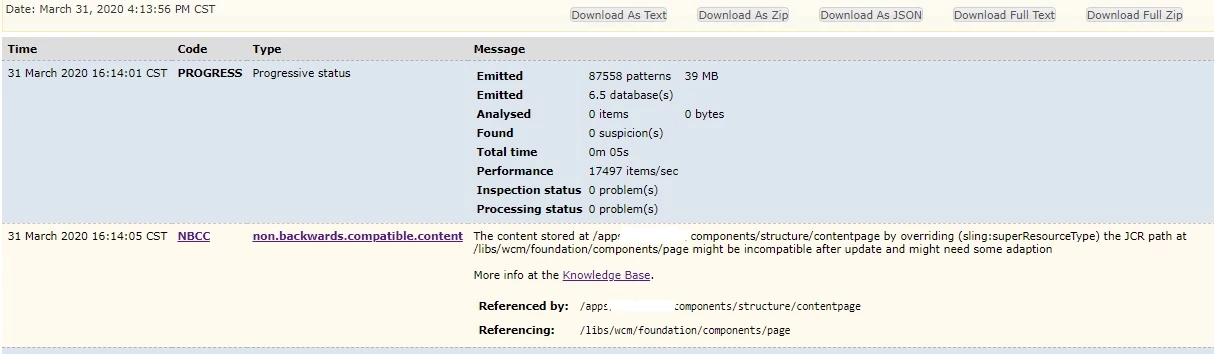
 

This is the possible solution but I don't really know how to do this:

Overlay or reference only Sling components that are backwards compatible

Consider resources needed for adapting changes coming from /libs or bundles after AEM upgrades

This post is no longer active and is closed to new replies. Need help? Start a new post to ask your question.

2 replies

jonjonxd1Author
April 1, 2020
Thank you!! I already solved the problem. This page helps me http://www.sgaemsolutions.com/2019/02/how-to-make-page-component-and-template.html . The value of Super Type used to change as per the AEM Version. In AEM 6.3, we use “/apps/core/wcm/components/page/v1/page” for Super Type. In AEM 6.2, we use “/libs/wcm/foundation/components/page” for Super Type.
Theo_Pendle
April 2, 2020

Hi Jon, 


What this message means is that somewhere in you are referencing a component which works in 6.3 but may no longer work in 6.5.


In this specific instance, it looks like your contentpage component overrides wcm/foundation/components/page, which is deprecated in 6.5. The new component to override is wcm/foundation/components/basicpage/v1/basicpage.


I am actually also doing a 6.3 -> 6.5 migration at the moment and I highly recommend you migrate towards AEM Core Components which implements many common components (including a Page component) using the latest best practices and a number of great features! Much easier than re-inventing the wheel, and it's backed by Adobe so you don't have to worry about compatibility issues or support 👍