AEM servlet throwing HTTP Error 404.0 - Not found on Dispatcher IIS 10 | Community
Skip to main content
Level 3
March 12, 2025

AEM servlet throwing HTTP Error 404.0 - Not found on Dispatcher IIS 10

  • March 12, 2025
  • 5 replies
  • 2075 views

Hi Community,


I am seeing an issue where AEM custom sling servlet is not accessible on one of the Dispatcher servers (IIS 10).


On trying to access the servlet, I get this error:
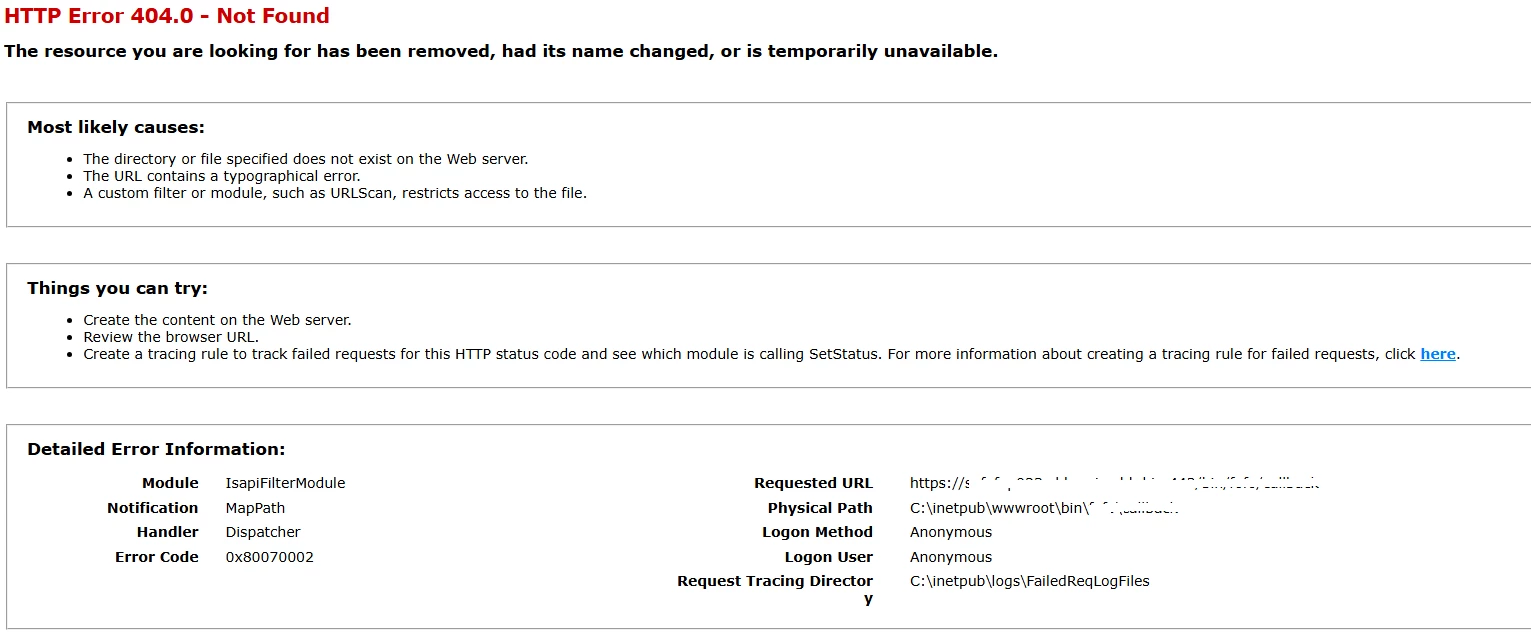


I have added filter to allow the servlet path in dispatcher.any file.

/0116 { /type "allow" /method "GET" /url "/bin/nameofthepath*" }


The pages are loading fine, just the servlets are not working. Kindly let me know if I am missing out anything. Appreciate your support.


Please note: The custom sling servlet is working fine on publish instance.


5 replies

SmrithiG1Author
Level 3
March 12, 2025

I have also provided all permissions for DefaultAppPool 


Adobe Employee
March 12, 2025

@smrithig1 Have you checked dispatcher log?  Is your servlet path resolving to required farm file which contains the /allow filter you mentioned above?

SmrithiG1Author
Level 3
March 12, 2025

Hi @pavangaddam ,


Yes I checked the dispatcher.log and the servlet path not shown in the logs at all.


I can see logs like request declined on trying to access the servlet.


But on the working Dispatcher server (another instance), I can see the request and the servlet path is resolving to required farm file.


Ritesh_Mittal
Community Advisor and Adobe Champion
March 12, 2025

Hi @smrithig1 ,


It looks like the issue may be related to the Dispatcher configuration. Here’s an additional step to check:

  1. Ensure there are no conflicting rewrite rules in the dispatcher files that might be preventing access to the /bin/ URL path.
  2. Review the Dispatcher logs for any errors or clues as to why the servlet request might be getting blocked or not routed properly.

Also, could you confirm if other path based servlets are working fine on the same Dispatcher server? Just to make sure its not related to some typo in configuration.


Let me know if this helps!


Thanks

Ritesh Mittal

SmrithiG1Author
Level 3
March 12, 2025

Hi @ritesh_mittal 


1. I have cross checked the filter rules in dispatcher.any file. I have added 5 filter rules for five different custom servlet, all registered under /bin path. The difficulty that I am finding is that, the same dispatcher.any file is used on all other envs and multiple servers and they all seem to work fine.

2. I can see only debug and trace logs and there is no error log recorded.

3. All the other custom sling servlets are also not accessible and is throwing the same error.


Do you think this can be the issue with IIS installation on this server.

Can I try a reinstallation of IIS.


Ritesh_Mittal
Community Advisor and Adobe Champion
March 12, 2025

Try below-

  1. Check if the Dispatcher module is properly installed on IIS.
  2. Look for any issues with request forwarding or access to /bin/ paths in the IIS logs.
  3. Try restarting IIS and clearing the dispatcher cache.
  4. Reinstall IIS : Only consider if the above steps don’t resolve the issue.
DPrakashRaj
Community Advisor
Community Advisor
March 12, 2025

If other requests are going through the dispatcher then I think your iis configuration are correct. Try changing the dispatcher log level to trace and check what’s happening on the particular servlet request. Trace log level will trace everything for that request and will also logs what causing this request call to be blocked/denied 

Hope this helps

SmrithiG1Author
Level 3
March 13, 2025

I tried my updating the log level to trace.

I believe the request is blocked, as I dont see any log info related to the servlet request.


All other pages are loading fine on dispatcher and URL rewrite rules are working too on the pages.

Just the sling servlets are not working.


Tried restarting IIS and cleared dispatcher cache too.


DPrakashRaj
Community Advisor
Community Advisor
March 13, 2025

With the log level as trace on dispatcher you can still see the entry for your request if it’s coming to dispatcher even if dispatcher filter rules block it. This lead me to conclude that you need to debug on IIS server. I believe somehow this server is blocking the request. Do you se the option to change the log level to trace or debug for your IIS server?

MukeshYadav_
Community Advisor
Community Advisor
March 14, 2025

Hi @smrithig1 ,

You may check https://forums.ivanti.com/s/article/Issue-IIS-blocks-access-to-bin-folders-and-specific-extension-types?language=en_US

Or

Can you rewrite the path to /api/pathname instead of /bin just for testing purpose by allowing in Apache Sling Servlet/Script Resolver and Error Handler

https://experienceleaguecommunities.adobe.com/t5/adobe-experience-manager/why-do-sling-servlets-only-work-with-with-a-path-of-bin-demo-xxx/m-p/402781

Thanks

SmrithiG1Author
Level 3
March 17, 2025

HI @mukeshyadav_ , I did try the first option that you provided.


Its the same error still.


The second one I didnt try, as I already have another servlet which is not using /bin and it is also not working.

kautuk_sahni
Community Manager
Community Manager
June 23, 2025

@smrithig1 Did you find the suggestions helpful? If you need more information, please let us know. If a response resolved your issue, kindly mark it as correct to help others in the future. Alternatively, if you discovered a solution on your own, we'd appreciate it if you could share it with the community. Thank you.

Kautuk Sahni
SmrithiG1Author
Level 3
June 24, 2025

HI @kautuk_sahni , The issue is still there and I couldnt proceed to investigate on that further. As the issue is happening just on one of the server, I believe the issue is specific to that server or IIS installation on that server. I will update the post with the answer once I figure it out. Thanks again for the support.