Hi Kunal,
The jcr:data structure, I meant if you are directly adding this file in CRXDE temporarily for testing. But in order to add this file into code base, you can create it as a "regular" file.
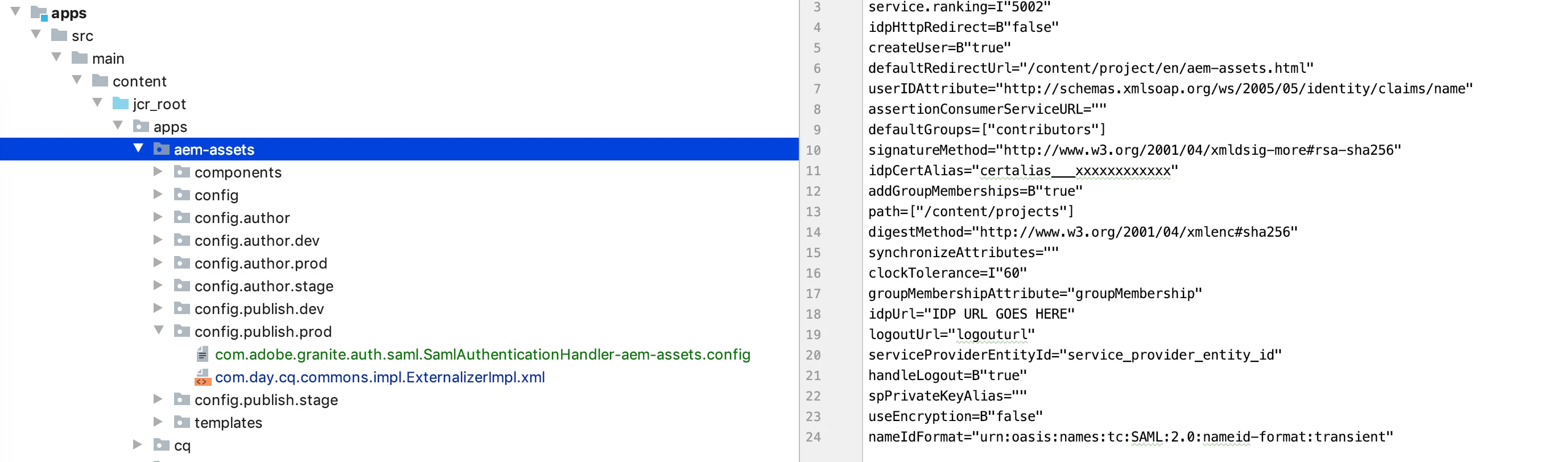
1. Name the file as: "com.adobe.granite.auth.saml.SamlAuthenticationHandler-<Project_Identifier>.config" (Make sure it is a regular file in Eclipse or IntelliJ); no need to add extension ".xml" at the end.
2. Inside this file, just add the configuration like a regular text. Please see below:
# Configuration created by Apache Sling JCR Installer
keyStorePassword="keystorepass"
service.ranking=I"5002"
idpHttpRedirect=B"false"
createUser=B"true"
defaultRedirectUrl="/content/project/en/aem-assets.html"
userIDAttribute="http://schemas.xmlsoap.org/ws/2005/05/identity/claims/name"
assertionConsumerServiceURL=""
defaultGroups=["contributors"]
signatureMethod="http://www.w3.org/2001/04/xmldsig-more#rsa-sha256"
idpCertAlias="certalias___xxxxxxxxxxxx"
addGroupMemberships=B"true"
path=["/content/projects"]
digestMethod="http://www.w3.org/2001/04/xmlenc#sha256"
synchronizeAttributes=""
clockTolerance=I"60"
groupMembershipAttribute="groupMembership"
idpUrl="IDP URL GOES HERE"
logoutUrl="logouturl"
serviceProviderEntityId="service_provider_entity_id"
handleLogout=B"true"
spPrivateKeyAlias=""
useEncryption=B"false"
nameIdFormat="urn:oasis:names:tc:SAML:2.0:nameid-format:transient"
You can also copy the content of the file from CRXDE, after you manually save the OSGi config thru /system/console/configMgr.
Please see the attached screen-shot. You can clearly see the difference between a regular file and a sling:osgiConfig file (com.day.cq.commons.impl.ExternalizerImpl.xml).
Thanks.