Solved
AEM Responsive Grid with 0px height when no components are included
My problem is, my component has the responsive grid. Initially when adding the component, the responsive grid has no height. If I added the parsys is draggable and has height.
I followed the tips provided here
And added the JSP to the headlib
https://dev.to/bearcherian/aem-responsive-grid-with-0px-height-1il3
My component has a multi-field where we can create a child node under the component's node. The first node is named tab-par-1
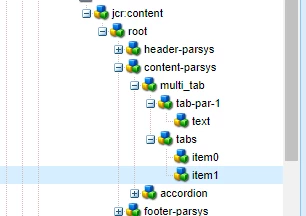
There is no tab-par-2 yet
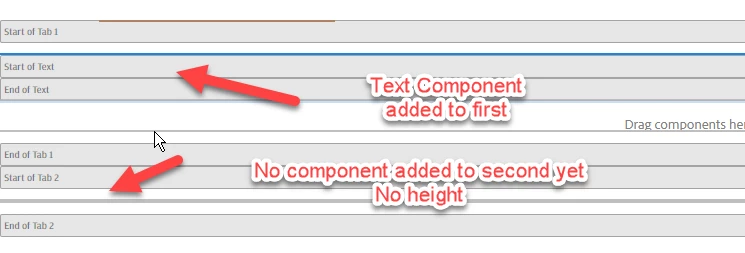
The model is returning a list using tab property.
Here is a part of the code showing the data-sly-list for the responsivegrids
<div class="mt-tabs-container">
  <div class="mt-left-column" data-sly-test="${(properties.title || properties.description || properties.ctaText)}">
    <div class="mt-column-top"></div>
  </div>
  <div class="tabs ${model.columnOrientation}">
    <sly data-sly-test.id="${model.uniqueID}" data-sly-unwrap>
      <div role="tablist" aria-label="Tab List">
        <sly data-sly-list.tab="${model.tabs}" data-sly-unwrap>
          <button
              class="${tabList.count == 1 ? 'active' : ''}"
              role="tab"
              aria-label="${tab.adaText}"
              aria-selected="${tabList.count == 1 ? 'true' : ''}"
              aria-controls="panel-${id}-${tabList.count}"
              id="tab-${id}-${tabList.count}"
              tabindex="${tabList.count == 1 ? '0' : '-1'}">
            ${tab.heading @ context='html'}
          </button>
        </sly>
      </div>
      <div class="multi-tab-filler-border-container">
        <div class="multi-tab-filler-border"></div>
      </div>
      <div class="mt-tablet-dropdown-container">
        <div class="atomic-dropdown"></div>
        <div class="mt-tablet-dropdown-border"></div>
        <div class="mt-tablet-dropdown-filler"></div>
      </div>
      <div class="multi-tab-container">
        <sly data-sly-list.tab="${model.tabs}" data-sly-unwrap>
          <div class="info-block" data-sly-test="${wcmmode.edit}">
            <p>Start of Tab ${tabList.count}</p>
          </div>
          <div id="panel-${id}-${tabList.count}" role="tabpanel"
              aria-labelledby="tab-${id}-${tabList.count}"
              hidden="${wcmmode.edit || (!wcmmode.edit && tabList.count == 1) ? 'false' : 'true'}">
            <div data-sly-resource="${tabParsysName @ resourceType='wcm/foundation/components/responsivegrid'}"
                data-sly-set.tabParsysName="tab-par-${tabList.count}"></div>
          </div>
          <div class="info-block" data-sly-test="${wcmmode.edit}">
            <p>End of Tab ${tabList.count}</p>
          </div>
        </sly>
      </div>
    </sly>
  </div>
  <div class="mt-right-column" data-sly-test="${(properties.title || properties.description || properties.ctaText)}">
    <div class="mt-column-top"></div>
  </div>
</div>