AEM Project - Double Code Base in the same AEM overwrite bundles | Community
Skip to main content
Adobe Employee
May 13, 2020
Solved

AEM Project - Double Code Base in the same AEM overwrite bundles

  • May 13, 2020
  • 2 replies
  • 6795 views

Hi at all, how is the best practices?

Use Case:

- 2 project in AEM, every project have his own code base (basically equal)

- On deploy each code base on AEM will overwrite the bundle of the other project


How is possible to deploy or merge the two code base for not overwrite the each other project bundle?


Thanks


This post is no longer active and is closed to new replies. Need help? Start a new post to ask your question.
Best answer by Theo_Pendle

Hi @tommy9,

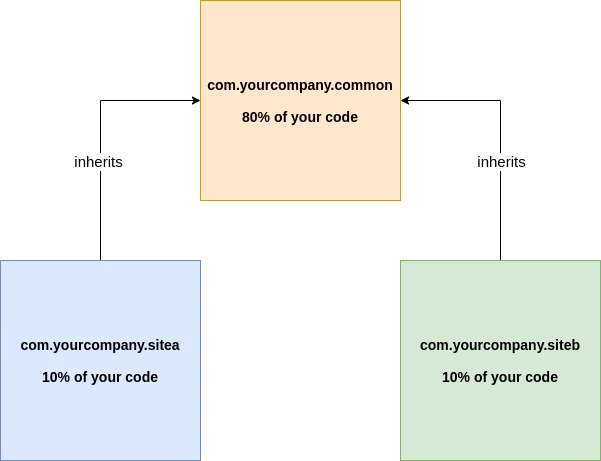
If your 2 sites are very similar, then you may need something like this:

Just like you would do in any project, you should identify the shared code and extract it to a dependency that both your projects share. This way:

  1. No risk of conflict between bundles
  2. In the future if you need to change your code, you can likely do it once as opposed to doing it in sitea and siteb
  3. Less code deployed overall = less complexity

If you're not sure how to do this, please see the WKND Tutorial which will teach you how to use AEM Core Components as a dependency, then do the same in your projects 🙂

2 replies

Ankur_Khare
Community Advisor
Community Advisor
May 13, 2020

First of all this is not the best practice to have such kind of code base.

Still you need to have such kind of stuff-

then you need to change package in one of the bundle so that both the bundles not interfere with other.


And you need to update corresponding references in html codes as well.


Note: This is not recommended.

tommy9Adobe EmployeeAuthor
Adobe Employee
May 22, 2020
Hi @ankur_khare I know this is not the best practice, I'm try to convince one customer partner in redesign the entire codebase, but probably they works out of our Best Practice
Theo_Pendle
Theo_PendleAccepted solution
Level 8
May 14, 2020

Hi @tommy9,

If your 2 sites are very similar, then you may need something like this:

Just like you would do in any project, you should identify the shared code and extract it to a dependency that both your projects share. This way:

  1. No risk of conflict between bundles
  2. In the future if you need to change your code, you can likely do it once as opposed to doing it in sitea and siteb
  3. Less code deployed overall = less complexity

If you're not sure how to do this, please see the WKND Tutorial which will teach you how to use AEM Core Components as a dependency, then do the same in your projects 🙂

tommy9Adobe EmployeeAuthor
Adobe Employee
May 22, 2020
Hi @theo_pendle thanks for the diagram. I advice on this practice the customers partner for redesign the codebase in they way you describe.