AEM Page Export, not working for non-admin users | Community
Skip to main content
dileepak3436603
July 19, 2018
Solved

AEM Page Export, not working for non-admin users

  • July 19, 2018
  • 7 replies
  • 2835 views

Using references from The Page Exporter and Mobile with Content Sync , I have implemented page exporter configuration.

With this, in admin login, http://localhost:4502/content/something.export.zip works fine. This downloads a ZIP file with all HTML, images, CSS and JS.

But with any other login, even though the user is of administrator group will only download empty zip file.

Please help resolve this.
This post is no longer active and is closed to new replies. Need help? Start a new post to ask your question.
Best answer by arunpatidar

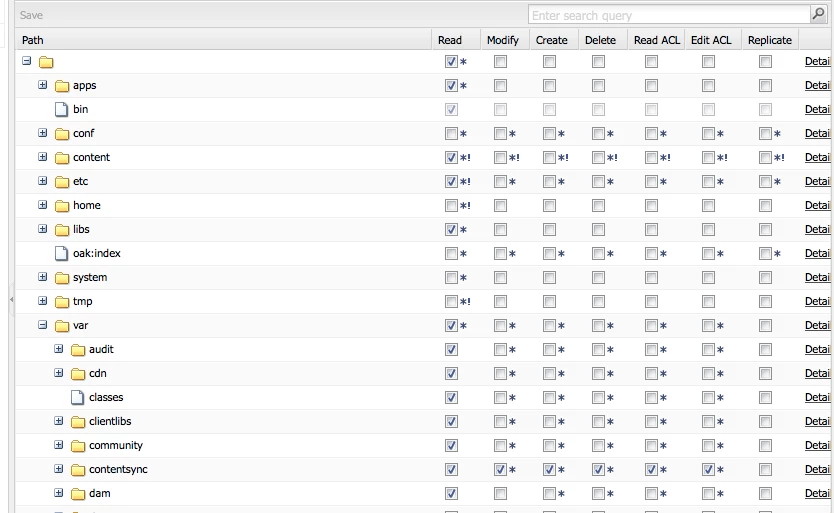
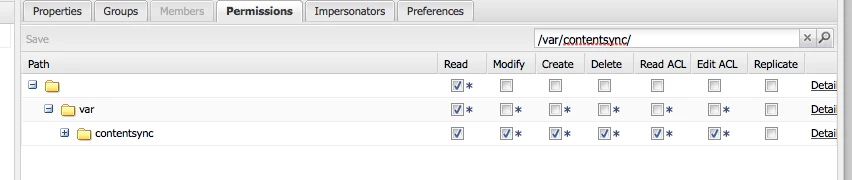
For export action, apart from read permissions of content below permission is required at /var/contentsync.

for my test user to perform export, minimum permission is

Thanks

Arun

7 replies

smacdonald2008
Level 10
July 19, 2018

Have you tried giving permissions to the other users to access the content you are trying to export?

smacdonald2008
Level 10
July 19, 2018

I was able to successfully export a page using a non-admin user:

dileepak3436603
July 20, 2018

Hi Scott MacDonald,

Thanks for response, I did the following after watching the video, but with fail.

1) I created a fresh instance of AEM-6.2.

2) Logged in to available user: author/author, which had permission to the content required. (Screenshot 1)

3) Opened the page, which opened without any problem. (Screenshot 2)

4) Modified extension as "export.zip". Which gave an error (Screenshot 3)

5) So loaded URL without "editor.html", which also gave an error (http://localhost:4502/content/geometrixx-outdoors/en/company/our-story.export.zip ) (Screenshot 4)

6) Configured export path to be default OOTB one. (Screenshot 5)

7) Same error on page. (Screenshot 6)

Screenshot 1:

Screenshot 2:

Screenshot 3:

Screenshot 4:

Screenshot 5:

Screenshot 6:

Regards,

Dileepa

arunpatidar
Community Advisor
Community Advisor
July 20, 2018

Hi,

the issue is with the permission.

you can replicate by just adding user in admin group, it will work.

for testing you can create demo group with all the permission and add user, it will work then.

If you need I can extract exact permission.

Arun Patidar
smacdonald2008
Level 10
July 20, 2018

YOu did not add the correct permissions as Arun stated. I added most permissions to user Dan i used in video. For testing purposes, click all permissons in top row and try again.

arunpatidar
Community Advisor
arunpatidarCommunity AdvisorAccepted solution
Community Advisor
July 21, 2018

For export action, apart from read permissions of content below permission is required at /var/contentsync.

for my test user to perform export, minimum permission is

Thanks

Arun

Arun Patidar
dileepak3436603
July 24, 2018

Thanks it worked in localhost with permission to /var/contentsync.

But still server downloads 1B sized corrupted ZIP file at our server, with full permissions to every directory possible of CRX.