AEM Page Authentication property does not enforce SAML Authentication after every restart | Community
Skip to main content
Level 2
July 18, 2022
Question

AEM Page Authentication property does not enforce SAML Authentication after every restart

  • July 18, 2022
  • 3 replies
  • 4143 views

Hi There,

I'm experiencing an issue in AEM with the SAML Aunthentication. It goes like this: We have a login page, Enable check under "Authentication Requirement" is enabled. We do have SAML configuration setup with the IDP. After the code is deployed, when we click on the Login button (pointing to /content/myProject/us/en/login.html), the expected IDP SSO login page shows up as per the SAML configuration, everything works as expected.


But when we bounce the publisher server, after the server restarts and when we access the application home page and click on login button. The expected IDP SSO login page doesn't show up as per the SAML config.  In our QA, UAT environments, whenever the code is deployed, Ops team restarts the publisher servers and that's how this issue came into light. 

As a workaround, we have told the team to open the login page properties, disable the authentication checkbox, save the change. Open the login page again, Enable the authentication checkbox, save change. If we do this, then the login button works and shows the IDP login page.


Can someone let me know why the authentication property is not being considered by AEM after restart, why we are being forced to set this property manually after every restart. Please let me know if we are missing anything here.

Anybody can throw some light here, will be greatly appreciated.

This post is no longer active and is closed to new replies. Need help? Start a new post to ask your question.

3 replies

Jagadeesh_Prakash
Community Advisor
Community Advisor
July 19, 2022

@sk09 do you see any error in the logs. Can you share it

sk09Author
Level 2
July 19, 2022

Hi,

There was no error seen in the logs, unless some specific debug logs enabled on some out-of-the-box apis, we don't see any error.

arunpatidar
Community Advisor
Community Advisor
July 19, 2022

Hi,

Is your login page is accessible by anonymous user? If not then login page won't show.

 open the login page properties, disable the authentication checkbox, save the change.
Arun Patidar
sk09Author
Level 2
July 19, 2022

Hi,

We have a home page that is accessible to everyone, it has the link to Login. When the user clicks on login, IDP login page as per the saml configuration would be displayed. Once the user is successfully authenticated through IDP, the user will be navigated to the dashboard page.


Nikhil_Verma
Level 4
July 20, 2022

That's a weird one.

When authentication checkbox is enabled, a property for granite:AuthenticationRequired is set on that page node:


Do you see this property on the page after restart?

sk09Author
Level 2
July 20, 2022

Hi,

Thanks for your response.

After the restart, I opened the page in the browser and verified the page properties in the Advanced tab and could see that the Authentication Requirement checkbox is  still Enabled. But somehow when I click on login, SAML authentication IDP login page does not display, that's weird.
When I manually disable the checkbox, save and enable the checkbox and save, then it works as expected.
Not sure what am I missing here, I would assume we don't have to do anything with respect to the server startup script in terms of sling authentication.

Nikhil_Verma
Level 4
July 21, 2022

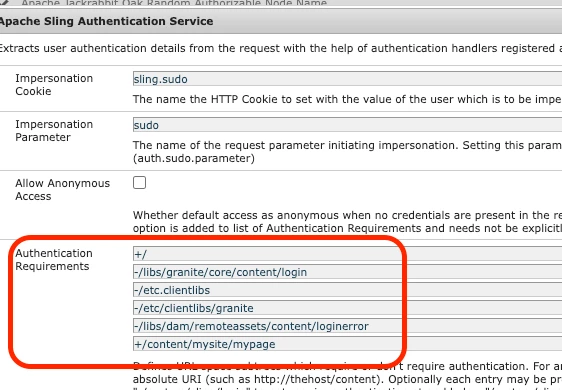
Typically when I need to protect pages and mandate authentication, I use the Apache Sling Authenticatiopn Service OSGi config:


In the 'Authentication Requirements' property, I add the paths that I want or don't want to protect. For example in the above screenshot: /content/mysite/mypage is protected and will require authentication to access it.

Whereas, /libs/granite/core/content/login is open to public, which is the login page.


OSGi configs can be persisted in code base and I'd say more reliable. I'd suggest to give this a try, I never faced such as issue with this approach.