
AEM on AWS - Not accessible on public IP:4502 even after adding 4502 on security group | Community
Skip to main content
gauravtyagi
Level 2
May 13, 2021

AEM on AWS - Not accessible on public IP:4502 even after adding 4502 on security group

  • May 13, 2021
  • 3 replies
  • 1864 views

Hi,


I am trying to run my AEM on AWS EC2 instance. I have installed and started the AEM on port 4502, std out logs says that it is running.

RAWProcessor succesfully installed
Attempting to load ESAPI.properties via file I/O.
Attempting to load ESAPI.properties as resource file via file I/O.
Not found in 'org.owasp.esapi.resources' directory or file not readable: /aem/author/ESAPI.properties
Not found in SystemResource Directory/resourceDirectory: .esapi/ESAPI.properties
Not found in 'user.home' (/root) directory: /root/esapi/ESAPI.properties
Loading ESAPI.properties via file I/O failed. Exception was: java.io.FileNotFoundException
Attempting to load ESAPI.properties via the classpath.
SUCCESSFULLY LOADED ESAPI.properties via the CLASSPATH from '/ (root)' using class loader for DefaultSecurityConfiguration class!
Attempting to load validation.properties via file I/O.
Attempting to load validation.properties as resource file via file I/O.
Not found in 'org.owasp.esapi.resources' directory or file not readable: /aem/author/validation.properties
Not found in SystemResource Directory/resourceDirectory: .esapi/validation.properties
Not found in 'user.home' (/root) directory: /root/esapi/validation.properties
Loading validation.properties via file I/O failed.
Attempting to load validation.properties via the classpath.
SUCCESSFULLY LOADED validation.properties via the CLASSPATH from '/ (root)' using class loader for DefaultSecurityConfiguration class!
13.05.2021 02:13:32.943 *INFO * [main] Startup completed


I had started the AEM from sudo user as there was some permission issue with the ec2-user (due to file permissions),hope that is not an issue as with sudo user ,it is starting ?


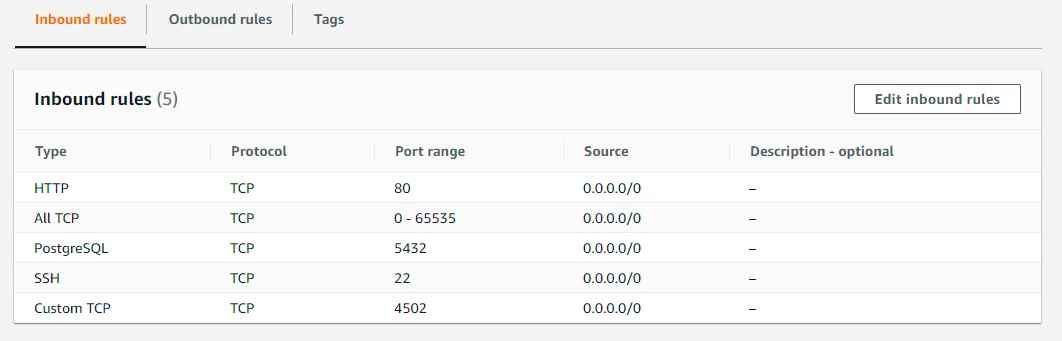
I have added the 4502 port on HTTP - even all traffic ,but AEM portal does not show up and I keep getting 

This site can’t be reached

The connection was reset.


Please help me out to solve this issue, Thanks for your help as always.


This post is no longer active and is closed to new replies. Need help? Start a new post to ask your question.

3 replies

Ritesh_Mittal
Community Advisor and Adobe Champion
May 13, 2021

 Hi @gauravtyagi ,


If your application is not accessible (time out), then it's mostly a security group issue. Just check if you have attached any SG with your EC2 instance that blocks the inbound/outbound traffic. The default SG has all inbound traffic blocked and all outbound traffic is allowed.


Also the Public IPV4 address changes after every restart of EC2 so just check you are using the right public IP while accessing the server. 


Also, just to check which AMI you have used to launch EC2?


Asutosh_Jena_
Community Advisor
Community Advisor
May 13, 2021

Hi @gauravtyagi 


Please create an user called "aem" and provide the complete folder permission where the AEM application is running and start the service using the "aem" user.

Do not run the application using root user.


Also try to attach an elastic IP from the pool to the EC2 instance and use it as a public IP with 4502 port. Try to see if you are able to access the application in the same instance using localhost:4502 which will ensure the application is running absolutely fine and it;s a permission issue with SG.


Thanks!

gauravtyagi
Level 2
May 13, 2021
Thanks @asutosh_jena_, my ec2 instance is a linux ec2 instance, should i try to access application in the same instance using localhost:4502 ,through RDP, you mean ?
gauravtyagi
Level 2
May 13, 2021

Hi Guys, Thanks for your great help.


This issue is now sorted, there was a firewall issue and once that is opened,the application has started loaded on public IP address,


Thanks for your kind help @asutosh_jena_, @ritesh_mittal have a great day ahead.