@socialtaylor There are few minor adjustments you have to do to your logic to get this work . Find below the sample model I did to just implement the very basic of your logic
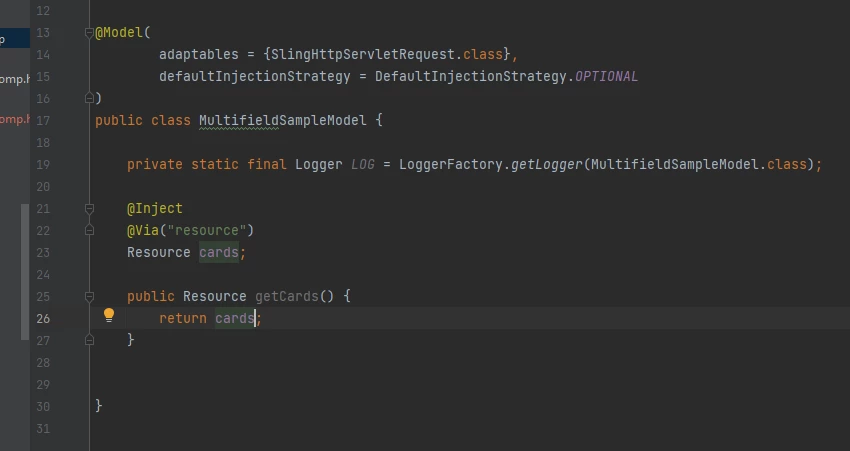
1. First point you have to understand is the naming conventions. Since your component's multifield has name cards , as you can see in your node structure , each items starting from item0 , item1,.... will get added to a node/ resource by name "cards" . So basically you have to inject the resource which has the name as "cards" .
Below image explains the nodes as per my component structure
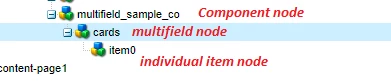
In your code, at line 27, you are trying to inject a resource componentResource . I am not sure from where you are referring that name. If we have to go by the names you have given and the nodes which are created , you should have been injecting the Resource as "cards"
2. Now as have I explained in another forum post https://experienceleaguecommunities.adobe.com/t5/adobe-experience-manager/usage-of-via-in-sling-models/td-p/283719 you have to use @Via("resource") to get any Resources in your model if you are adapting your model using SlingHttpServletRequest.class .
But I think , since you don't need any request object in your model , you can better avoid using SlingHttpServletRequest.class and use only Resource.class ( Request is reccomended only when you need to use any object which Resource cannot provide) So may be you can rewrite your adaptable as something like below
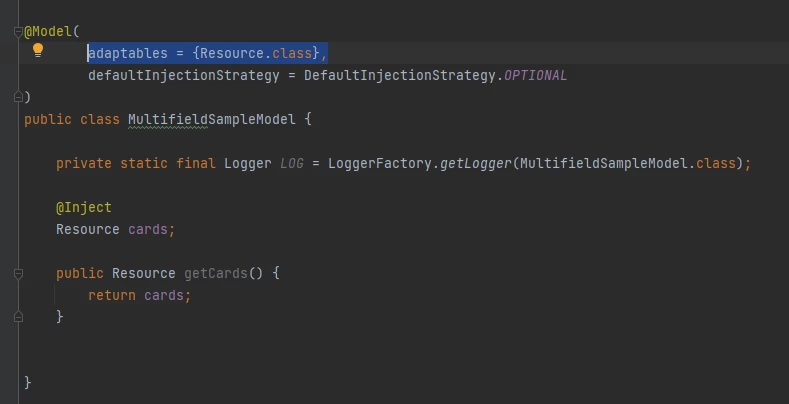
If you notice , in this case , you don't have to Inject it via resource , because your model is adapted via Resource.
Also , I think the logic you have written in the post construct is not needed. It can be simplified and done directly in the HTL as below
@Inject
@Via("resource")
Resource cards;

public Resource getCards() {
    return cards;
}
Return your cards resource via a getCards() method in the Model and do the below in the HTL
<div
     data-sly-use.model="com.learn.practice.aem.core.models.MultifieldSampleModel">
    <div data-sly-list.children="${model.cards.listChildren}">
        ${children.headerText}
        ${children.headerImage}
        ${children.content}
    </div>
</div>
Depending on your requirement and FE rendering play around with this values in the HTL.
Hope this helps. I tried to explain it the best I could, but still if you have any questions please let me know. Hope you get it resolved asap. Next time don't wait for a week , but an extra eye might help to catch the issues 🙂 Always feel free to come back to forum if you face any issues 🤗
Veena ✌