AEM Feed Importer for latest AEM Versions? | Community
Skip to main content
Adobe Champion
September 23, 2021
Solved

AEM Feed Importer for latest AEM Versions?

  • September 23, 2021
  • 1 reply
  • 1197 views

Dear Community,


Is the Feed importer feature available still on AEM? I tried using the classic UI but even that (at least using purely UI) does not seem to work. My questions here are:

  1. Is there a workaround for this, to make the feed importer work?
  2. If not, what is the best way to create a custom e.g. RSS feed importer (although it would sound like re-inventing the wheel, considering the feature used to be there)?

I am looking into AEM 6.5+ or AEM as a Cloud Service offerings.


Thank you in advance.

This post is no longer active and is closed to new replies. Need help? Start a new post to ask your question.
Best answer by Vijayalakshmi_S

Hi @user55521,

You can create custom implementation for Importer. Please find below for the details.


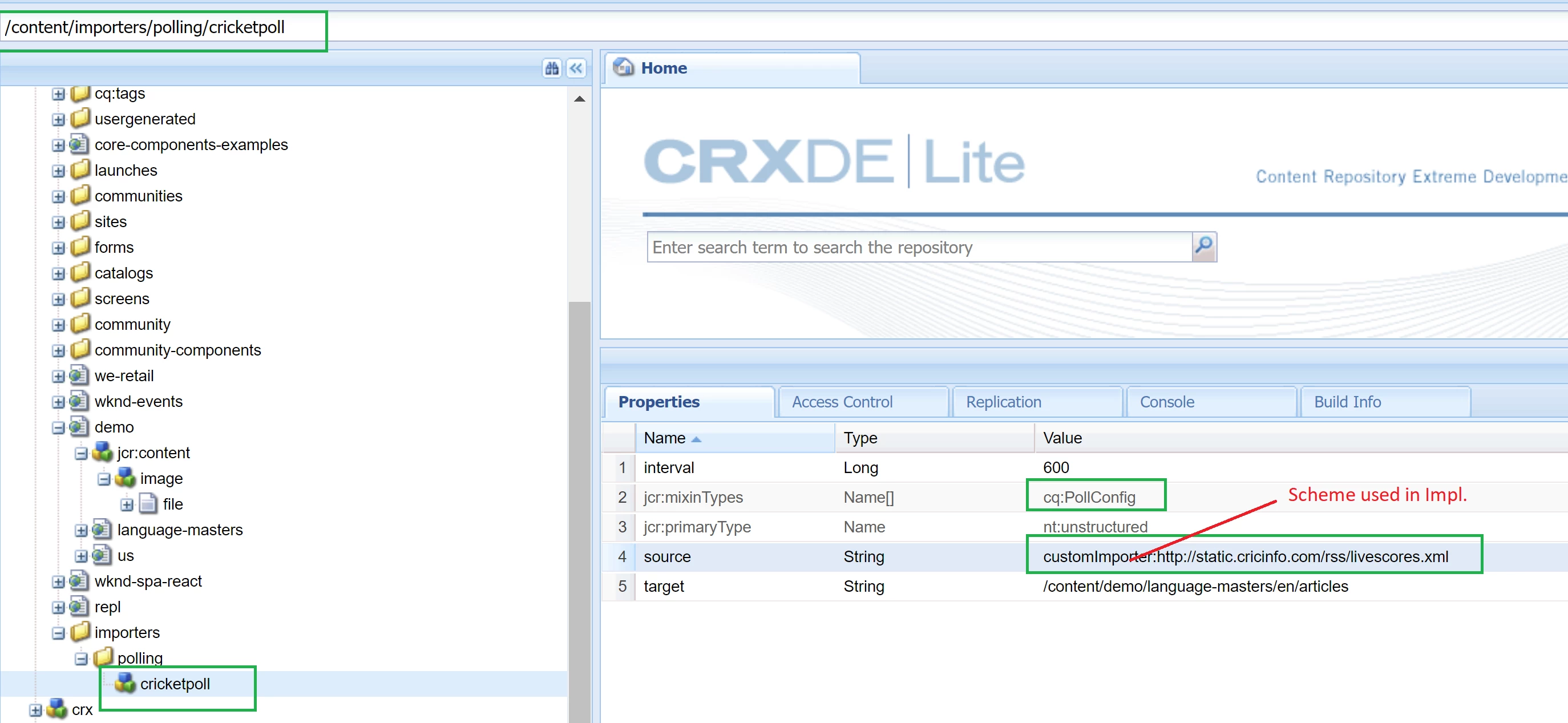
We should create a config (nt:unstructured node with mixin - cq:PollConfig) with properties as source, target and interval in either /etc or /content. Sample screenshot attached. 


format for property, source : scheme:datasource where

  • scheme mentioned here in config should match the custom implementation property - Importer.SCHEME_PROPERTY.
  • datasource : Desired rss feed. Example : I have considered cricket info. 

In the implementation class, importData method has all the details as part of the poll config(have attached log screenshot) using which we can frame the desired logic. 
 

package com.aem.demoproject.core.services.impl;

import com.day.cq.polling.importer.ImportException;
import com.day.cq.polling.importer.Importer;
import org.apache.sling.api.resource.Resource;
import org.osgi.service.component.annotations.Component;
import org.slf4j.Logger;
import org.slf4j.LoggerFactory;

@Component(service = Importer.class, property = {Importer.SCHEME_PROPERTY + "=customImporter"})
public class CustomPollingImporter implements Importer {

    private static final Logger LOG = LoggerFactory.getLogger(CustomPollingImporter.class);

    @Override
    public void importData(String scheme, String datasource, Resource resource) throws ImportException {
        LOG.info("Scheme={},  data source={} and target repo path={} ", scheme, datasource, resource.getPath());
        /* Logic to Parse the data source XML and write to target repo path */
    }

    @Override
    public void importData(String s, String s1, Resource resource, String s2, String s3) throws ImportException {

    }
}

 

1 reply

Vijayalakshmi_S
Vijayalakshmi_SAccepted solution
Level 10
September 23, 2021

Hi @user55521,

You can create custom implementation for Importer. Please find below for the details.


We should create a config (nt:unstructured node with mixin - cq:PollConfig) with properties as source, target and interval in either /etc or /content. Sample screenshot attached. 


format for property, source : scheme:datasource where

  • scheme mentioned here in config should match the custom implementation property - Importer.SCHEME_PROPERTY.
  • datasource : Desired rss feed. Example : I have considered cricket info. 

In the implementation class, importData method has all the details as part of the poll config(have attached log screenshot) using which we can frame the desired logic. 


package com.aem.demoproject.core.services.impl;

import com.day.cq.polling.importer.ImportException;
import com.day.cq.polling.importer.Importer;
import org.apache.sling.api.resource.Resource;
import org.osgi.service.component.annotations.Component;
import org.slf4j.Logger;
import org.slf4j.LoggerFactory;

@Component(service = Importer.class, property = {Importer.SCHEME_PROPERTY + "=customImporter"})
public class CustomPollingImporter implements Importer {

    private static final Logger LOG = LoggerFactory.getLogger(CustomPollingImporter.class);

    @Override
    public void importData(String scheme, String datasource, Resource resource) throws ImportException {
        LOG.info("Scheme={},  data source={} and target repo path={} ", scheme, datasource, resource.getPath());
        /* Logic to Parse the data source XML and write to target repo path */
    }

    @Override
    public void importData(String s, String s1, Resource resource, String s2, String s3) throws ImportException {

    }
}