AEM/CQ - javax.xml.namespace can't resolve OSGI dependency | Community
Skip to main content
jineetv21622325
Level 2
June 5, 2017
Solved

AEM/CQ - javax.xml.namespace can't resolve OSGI dependency

  • June 5, 2017
  • 17 replies
  • 6385 views

'm using AEM 6.2 and I'm currently implementing WebService. I included all dependency jars in OSGI bundle which I created externally and all dependency issue got resolved except one:

javax.xml.namespace,version=[1.0,2) -- Cannot be resolved

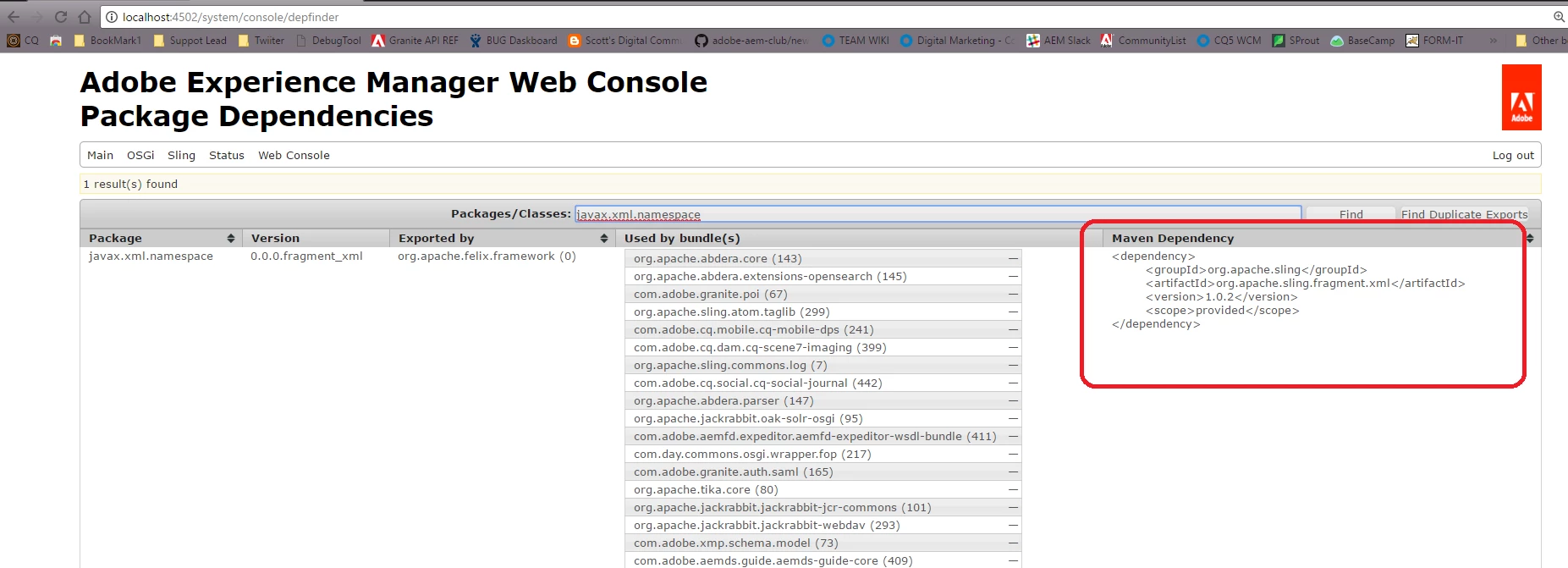
When I checked in the maven using depfinder tool, it showed me as below:

<dependency> <groupId>org.apache.sling</groupId> <artifactId>org.apache.sling.fragment.ws</artifactId> <version>1.0.2</version> <scope>provided</scope> </dependency>

However, in my other custom project, the javax.xml.namespace is showing resolved state.

I'm stuck in this situation and any pointers will be really appreciated.

Thanks, Jineet
This post is no longer active and is closed to new replies. Need help? Start a new post to ask your question.
Best answer by smacdonald2008

You should be using the Dependency finder that i referenced in this thread and then get that into you Dependencies section of your POM. For AEM 6.2 - see this:

17 replies

joerghoh
Adobe Employee
Adobe Employee
June 5, 2017

Can you please post relevant import statements of the bundle, which does not resolve? Can you also check your error.log file if there is a statement about this sling fragment?

kind regards,
Jörg

smacdonald2008
Level 10
June 5, 2017

In your bundle that does resolve - are you referencing same version. Looks like a version conflict.

smacdonald2008
Level 10
June 5, 2017

Also use the Dependency Finder in AEM to see what version AEM has installed. For information about the Dep Finder - see The Real CQ: CQ5/AEM How do I find out exactly which maven dependency I need?

jineetv21622325
Level 2
June 5, 2017

Error log:
5.06.2017 23:11:22.800 *ERROR* [qtp110252325-58675] org.apache.felix.http.jetty %bundles.pluginTitle: Cannot start (org.osgi.framework.BundleException: Unable to resolve com.xyz.cq.support.core [515](R 515.2): missing requirement [com.xyz.cq.support.core [515](R 515.2)] osgi.wiring.package; (&(osgi.wiring.package=javax.xml.namespace)(version>=1.0.0)(!(version>=2.0.0))) Unresolved requirements: [[com.xyz.cq.support.core [515](R 515.2)] osgi.wiring.package; (&(osgi.wiring.package=javax.xml.namespace)(version>=1.0.0)(!(version>=2.0.0)))])

org.osgi.framework.BundleException: Unable to resolve com.xyz.cq.support.core [515](R 515.2): missing requirement [com.xyz.cq.support.core [515](R 515.2)] osgi.wiring.package; (&(osgi.wiring.package=javax.xml.namespace)(version>=1.0.0)(!(version>=2.0.0))) Unresolved requirements: [[com.xyz.cq.support.core [515](R 515.2)] osgi.wiring.package; (&(osgi.wiring.package=javax.xml.namespace)(version>=1.0.0)(!(version>=2.0.0)))]

jineetv21622325
Level 2
June 5, 2017

The bundle which resolves:
javax.xml.namespace,version=0.0.0.fragment_xml from org.apache.felix.framework (0)
The bundle which doesn't resolve:
javax.xml.namespace,version=[1.0,2) -- Cannot be resolved

smacdonald2008
Level 10
June 5, 2017

What AEM version are you using?

If you are using AEM 6.2 - you should be using Maven Archetype 10 and AEM uber 6.2 JAR to resolve the dependencies. See this article --

Scott's Digital Community: Creating your first AEM 6.2 Project using Adobe Maven Archetype 10

jineetv21622325
Level 2
June 5, 2017

Thanks smacdonald2008​, I did find the dependency by entering javax.xml.namespace and below is the result returned:

Package: javax.xml.namespace

Version: 0.0.0.fragment_xml

Exported by: org.apache.felix.framework (0)

Maven dependency:

<dependency>

     <groupId>org.apache.sling</groupId>

     <artifactId>org.apache.sling.fragment.ws</artifactId>

     <version>1.0.2</version>

     <scope>provided</scope>

</dependency>

And in my bundle: it is showing me this - javax.xml.namespace,version=[1.0,2) -- Cannot be resolved

If this is an version issue, can you please tell me what I should I do to make this package resolved?

Many thanks,Jineet

jineetv21622325
Level 2
June 5, 2017

Using AEM 6.2, archetype 10 and using Uber Jar as well.

joerghoh
Adobe Employee
Adobe Employee
June 5, 2017

Hi,

There's a version mismatch, so it looks like you compile against a wrong version of the AEM uber jar. What version of the uber.jar are you using and what version of AEM are you targetting? Or: what version of the AEM archetype are you using?

regards,

Jörg

smacdonald2008
Level 10
June 5, 2017

Here is a tip (but you would need to do it each time you build the bundle) - open the bundle in ZIP tool. Open the  Manifest file.

Remove the version information beside the package - then it will pick up the available version in AEM.