AEM Component Toolbar Icons Missing | Community
Skip to main content
February 21, 2024
Question

AEM Component Toolbar Icons Missing
  • February 21, 2024
  • 1 reply
  • 1257 views

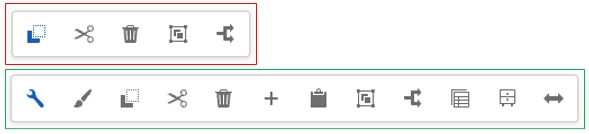
While editing a page (under language masters), sometimes the toolbar for a component won't show all of the icons/options (red box). It seems to happen randomly for various components. I also notice it happens if I start browsing in a different tab/window and then come back to the edit screen.


A quick refresh of the page will fix it, but why is it happening and can it be prevented?

This post is no longer active and is closed to new replies. Need help? Start a new post to ask your question.

1 reply

Imran__Khan
Community Advisor
Community Advisor
February 22, 2024

@jacobso1 Please specify the AEM version you are using. Also, can you once try and check behavior in vanilla instance. It may be an issue with particular service pack.

JacobSo1Author
February 29, 2024

AEM Cloud. I found that its in the Adobe backlog of bugs. I'll just hope it gets fixed soon.