AEM communities blog featuat re | Community
Skip to main content
gargsahil099
Level 3
January 22, 2018
Solved

AEM communities blog featuat re

  • January 22, 2018
  • 3 replies
  • 1757 views

Hi all,

I am following the below article to create the blog feature in AEM

Blog Feature

Able to see that the moderation thing is not working at all in blog feature in user moderation tab of blog dialog i have checked the Moderated field in dialog

still if anyone is posting the article they are able to do it successfully it is not going for approval at all same i happening with comments as well.
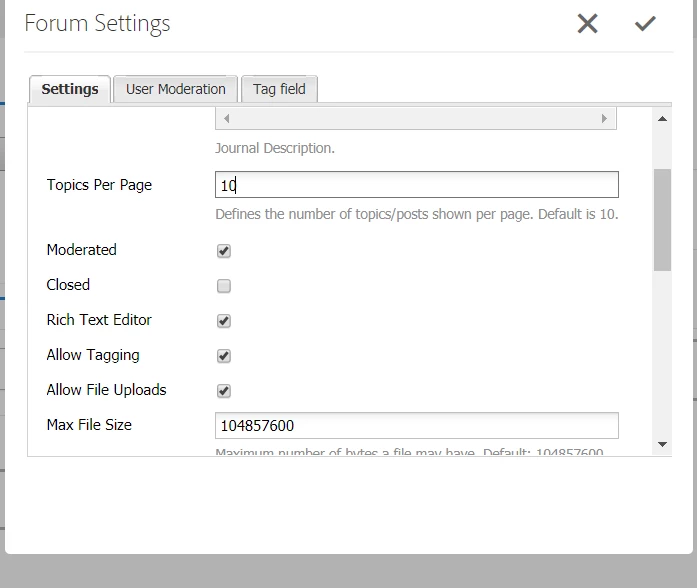
Any help will be very appreciated.

Thank you very much in advance.

This post is no longer active and is closed to new replies. Need help? Start a new post to ask your question.
Best answer by Rahul_Bhardwaj

Hi Sahil,

Along with checking moderated in blog configuration(please note, you can also do it at site level), you will also have to configure your moderation configuration to included necessary process to run spam test on your ugc.

In /system/console/configMgr, go to "AEM Communities Auto Moderation". By default, only "Sentiment Process" is added. For 6.3 FP1, you can add "Profanity Filter" to it, to use OOTB Spam detector which is in beta stage. A more matured option by the name "Spam Process" will be available from next release.

At the same time, you can also implement "com.adobe.cq.social.ugcbase.moderation.AutoModerationProcess" to create your own spam process and adding it to "AEM Communities Auto Moderation" for immediate action.

Hope, that answers your question.

-Rahul

3 replies

kautuk_sahni
Community Manager
Community Manager
February 1, 2018

Checking internally!!

Kautuk Sahni
Rahul_Bhardwaj
Adobe Employee
Rahul_BhardwajAdobe EmployeeAccepted solution
Adobe Employee
February 1, 2018

Hi Sahil,

Along with checking moderated in blog configuration(please note, you can also do it at site level), you will also have to configure your moderation configuration to included necessary process to run spam test on your ugc.

In /system/console/configMgr, go to "AEM Communities Auto Moderation". By default, only "Sentiment Process" is added. For 6.3 FP1, you can add "Profanity Filter" to it, to use OOTB Spam detector which is in beta stage. A more matured option by the name "Spam Process" will be available from next release.

At the same time, you can also implement "com.adobe.cq.social.ugcbase.moderation.AutoModerationProcess" to create your own spam process and adding it to "AEM Communities Auto Moderation" for immediate action.

Hope, that answers your question.

-Rahul

February 10, 2023

I have requirement need create a customized bog in my recommended folder? Is it possible, if yes how?