AEM cloud - target _blank & _self issue | Community
Skip to main content
April 10, 2023
Solved

AEM cloud - target _blank & _self issue

  • April 10, 2023
  • 3 replies
  • 4607 views

Hi Team,

Did anyone face the below issue. If yes please help me to provide your suggestions to resolve it.

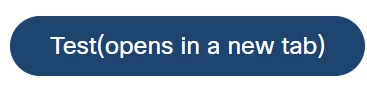
"Opens in a new tab" is getting added when I check the checkbox & it's not adding when the checkbox is unchecked.

AEM version: 2023.1.10912.20230130T173736Z-220900


Thanks!

 

This post is no longer active and is closed to new replies. Need help? Start a new post to ask your question.
Best answer by ramya726

Seems this is added to address accessibility, Please refer the link. Adding the snippet here for easy reference,

Not hiding the accessibility text was actually intended. On a project level, there are (at least) two options:

3 replies

Nandheswara
April 10, 2023

Hi Lakshmi,

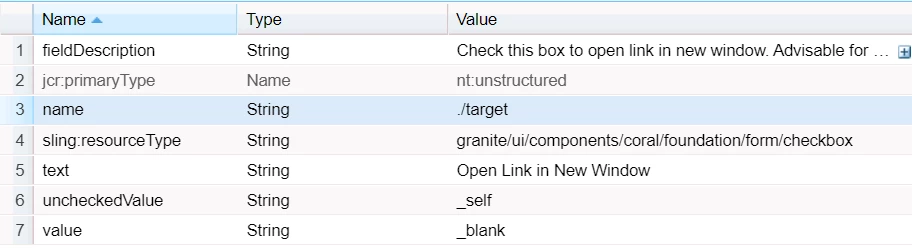
The properties which you are given in the Screenshot is correct, Might be issue in your HTL code you can check it.

Try with target="${properties.target}"

Thanks

Nandheswara

Lakshmi9Author
April 10, 2023

it wont work

Nandheswara
April 10, 2023

can you provide your dialog xml and htl code then i can check the issue.

VeenaVikraman
Community Advisor
Community Advisor
April 10, 2023

Hi @lakshmi9 


   I tried this in a vanilla instance and I am not able to replicate this issue. Are you sure this is not hardcoded in your code. Could you recheck ? Else can you share the steps to replicate this issue ? Because I can see you have given only the checkbox field dialog properties , and even after doing the same with my components , I couldn't replicate this issue.


Thanks

Veena ✌

Lakshmi9Author
April 10, 2023

Hi @veenavikraman 

no extra code has been added for this except dialog n html. But observed in the elements below tag is getting added in inside a tag.


<span class="cmp-link__screen-reader-only">(opens in a new tab)</span>


Same observed for OOTB components which is having the same functionality.


Thank you!

VeenaVikraman
Community Advisor
Community Advisor
April 10, 2023

Please correct me if I am wrong ,


So you created a new component and added the checkbox . Created a HTL file added the code to render the same ? 

ramya726Accepted solution
December 28, 2023

Seems this is added to address accessibility, Please refer the link. Adding the snippet here for easy reference,

Not hiding the accessibility text was actually intended. On a project level, there are (at least) two options: