AEM Cloud: Create only shows "CSV Report" for all new users, even with admin permission. Page etc. Missing from Create menu. | Community
Skip to main content
Level 8
July 7, 2021

AEM Cloud: Create only shows "CSV Report" for all new users, even with admin permission. Page etc. Missing from Create menu.

  • July 7, 2021
  • 2 replies
  • 1585 views

Some time back, we had 2 users.  Now we have many.  None of the new users can create anything, despite having all possible permissions.


In the admin control panel, we assigned all possible permissions for each env to each user, i.e.

publish-users

author-users

author-administrators

When the two old users open our sites in author, and hit create, the 2 original 
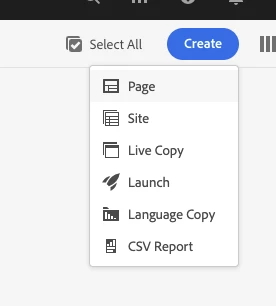
 

But all our newer users, with exactly the same permissions only see this:
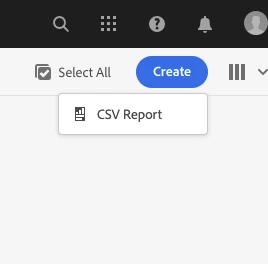
 

We have tried deleting the users, re-adding them, trying to login on a different machine and browser, nothing works.

We have raised a ticket with Adobe, but no response (since a week).

This is stopping us go live.  Any one has any ideas?


To recap:

1) our original 2 users can create pages

2) new users cant create pages.

3) all users have identical permissions in admin console, and users were all added in the same way

4) we use the adobe built in user authentication (not AD).


We just spent 1 hour going through this with a Adobe support person, and he did not know why random permissions were failing, and said what we have done is correct and should work.   He suspects there are issues with IMS syncing with AEM instances, but there is no work around or solution.

This post is no longer active and is closed to new replies. Need help? Start a new post to ask your question.

2 replies

Kiran_Vedantam
Community Advisor
Community Advisor
July 7, 2021

Hi @tb3dock,


  • Is this happening at every path where you are trying to create a page or only at a specific path?
  • If only at a specific path, can you give write permissions to the user individually at that path and check?
  • Try checking the permissions for the user by going to the http://localhost:4502/useradmin

Thanks,

Kiran Vedantam.

TB3dockAuthor
Level 8
July 7, 2021
Its every path 😞
Vijayalakshmi_S
Level 10
July 8, 2021

Hi @tb3dock,

Cause of this should be the same as explained in another thread - https://experienceleaguecommunities.adobe.com/t5/adobe-experience-manager/admin-console-only-has-two-permissions-author-user-and-author/qaq-p/415249

Admin console IMS groups are not necessarily specific permissions on AEM. Cross check in AEM instance for these synced IMS groups and what they are part of. (Tools -> Security -> Users / Groups)

TB3dockAuthor
Level 8
July 12, 2021
We spent 1 hour going through this with a Adobe support person, and he did not know why random permssions were failing. He suspects there are issues with IMS syncing with AEM instances, but there is no work around yet.