AEM caching and load balancing | Community
Skip to main content
This post is no longer active and is closed to new replies. Need help? Start a new post to ask your question.
Best answer by EstebanBustamante

Hi,

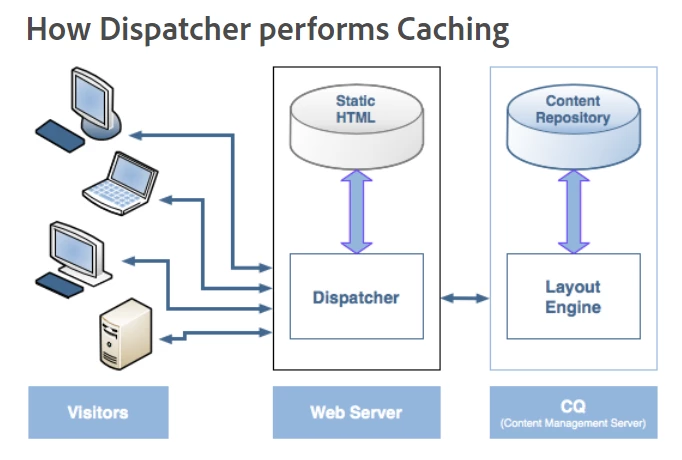
In the diagram, the term "Layout Engine" refers to the system or software responsible for rendering the page, i.e., web content. Therefore, in the context of your diagram, you should understand that the "Layout Engine" points to AEM as a whole. This encompasses publish instance(s) connected to author instance(s), and these instances possess all the elements described by @imran__khan. However, the diagram simplifies the entire setup with that term.


Hope that helps!

3 replies

Imran Khan
Community Advisor
Community Advisor
March 1, 2024

@jakecham In Adobe Experience Manager (AEM), the layout engine in the content repository refers to the mechanism by which content is organized, structured, and presented within the AEM platform. AEM is a comprehensive content management solution that includes features for managing digital assets, web content, and digital experiences.

The layout engine in AEM is primarily powered by its underlying repository, Apache Jackrabbit Oak. Apache Jackrabbit Oak is a scalable, high-performance content repository built on top of the Java Content Repository (JCR) standard. It provides a flexible and extensible architecture for storing and retrieving structured content.

Within the AEM context, the layout engine encompasses several key components and functionalities:

  1. Content Structure: AEM allows content authors to organize content into a hierarchical structure using folders, pages, and components. The layout engine ensures that this structure is maintained and enables navigation between different content items.

  2. Templates and Components: AEM provides a templating system that allows developers to create reusable templates and components for defining the layout and presentation of web pages. The layout engine renders these templates and components to generate the final HTML output for web pages.

  3. Responsive Design: AEM supports responsive design principles, allowing content authors to create layouts that adapt to different screen sizes and devices. The layout engine facilitates the implementation of responsive design by dynamically adjusting the layout and content presentation based on the device viewport.

  4. Personalization: AEM includes features for content personalization, enabling marketers to deliver targeted content experiences to different audience segments. The layout engine plays a role in rendering personalized content based on user profiles, behaviors, or other targeting criteria.

  5. Integration with Adobe Experience Cloud: AEM integrates with other components of the Adobe Experience Cloud, such as Adobe Analytics and Adobe Target, to provide comprehensive digital experience management capabilities. The layout engine facilitates the integration of these services to deliver personalized and optimized content experiences.

Overall, the layout engine in AEM is a central component that governs how content is structured, assembled, and presented within the platform, enabling organizations to create engaging and immersive digital experiences for their audiences.

EstebanBustamante
Community Advisor and Adobe Champion
EstebanBustamanteCommunity Advisor and Adobe ChampionAccepted solution
Community Advisor and Adobe Champion
March 1, 2024

Hi,

In the diagram, the term "Layout Engine" refers to the system or software responsible for rendering the page, i.e., web content. Therefore, in the context of your diagram, you should understand that the "Layout Engine" points to AEM as a whole. This encompasses publish instance(s) connected to author instance(s), and these instances possess all the elements described by @imran__khan. However, the diagram simplifies the entire setup with that term.


Hope that helps!

Esteban Bustamante
joerghoh
Adobe Employee
Adobe Employee
March 10, 2024

side note ... isn't this diagram 12+ years old? 🙂