


AEM 6550 - Touch UI Rich Text Editor, configure emptyText | AEM Community Blog Seeding
AEM 6550 - Touch UI Rich Text Editor, configure emptyText by Sreekanth Choudry Nalabotu
Abstract
Goal
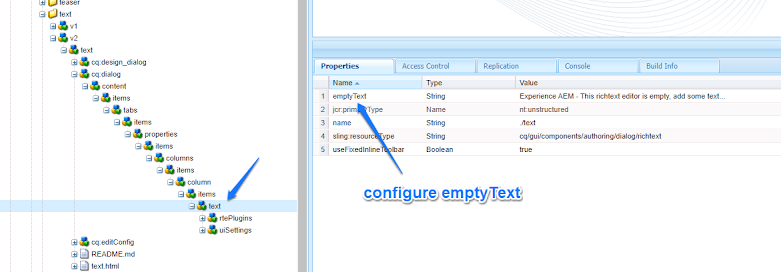
Configure emptyText property in Rich Text Editor (RTE) configuration to show placeholder text before entering content...

Another way is probably using CSS hack like below and setting data-eaem-placeholder attribute on the RTE div (however, it does not show the placeholder when there are empty tags in RTE, with no text content)...

[data-cq-richtext-editable="true"]:empty:before {
content:attr(data-eaem-placeholder);
color:gray
}

Solution
1) Login to CRXDE Lite (http://localhost:4502/crx/de), create folder /apps/eaem-rte-empty-text

2) Create node /apps/eaem-rte-empty-text/clientlib of type cq:ClientLibraryFolder, add String[] property categories with value [cq.authoring.dialog.all], String[] property dependencies with value lodash.


3) Create file (nt:file) /apps/eaem-rte-empty-text/clientlib/css.txt, add


rte-empty-text.css

4) Create file (nt:file) /apps/eaem-rte-empty-text/clientlib/rte-empty-text.css, add the following code

.eaem-rte-placeholder{
color: gray;
display: block;
}


5) Create file (nt:file) /apps/eaem-rte-empty-text/clientlib/js.txt, add

rte-empty-text.js
Read Full Blog
AEM 6550 - Touch UI Rich Text Editor, configure emptyText
Q&A
Please use this thread to ask the related questions.