AEM 6.5 Query Builder or CRX Query Tool not returning results for local environments | Community
Skip to main content
May 6, 2021
Solved

AEM 6.5 Query Builder or CRX Query Tool not returning results for local environments

  • May 6, 2021
  • 3 replies
  • 4197 views

I am experiencing a weird issue, for some pieces of the content in some of our author local development environments we are getting no results for the queries.

Exactly the same queries are returning valid results in other local development environments and in DEV and STAGE ones as well.

My first guess is that it could a permissions issue, but locally we are using the admin user which should have full permissions over all the nodes.

The following is part of the query in XPATH version, it is not a complex query:


/jcr:root/[content_path]/jcr:content//*[(@sling:resourceType = '[component_resource_type]')]


I even tried creating content packages from the environments where it is working fine and installing in my local environment without luck.

I would focus on debugging the code further(despite I already did without luck) but the fact that it does not return any result in the CRX query tool neither, indicates me the problem should not be in the code.

Also I already reviewd the query plans and there is not difference between it in a working environment and my local environment.

Also I tried an offline reindex with the oak tool and nothing changed.

Has anyone experienced something like that?

This post is no longer active and is closed to new replies. Need help? Start a new post to ask your question.
Best answer by Vijayalakshmi_S

Hi @jovidiaz,

As you are completely sure that it is not permission issue, I suggest to give a try on the below. 


Create a logger entry for the following in debug level in http://localhost:4502/system/console/slinglog

org.apache.jackrabbit.oak.query.QueryEngineImpl
org.apache.jackrabbit.oak.query.SQL2Parser
org.apache.jackrabbit.oak.query.QueryImpl
com.day.cq.search
org.apache.jackrabbit.oak.query

Also, Execute your query in Query Performance tool(http://localhost:4502/libs/granite/operations/content/diagnosistools/queryPerformance.html) and arrive at Index used. Try to reindex only that specific index by updating the property "reindex" to true and wait for some time to see the property updated to false and reindexCount update to next incremented value upon successful reindexing. (Refresh the index node after some time to see the property values updated automatically upon successful reindex)


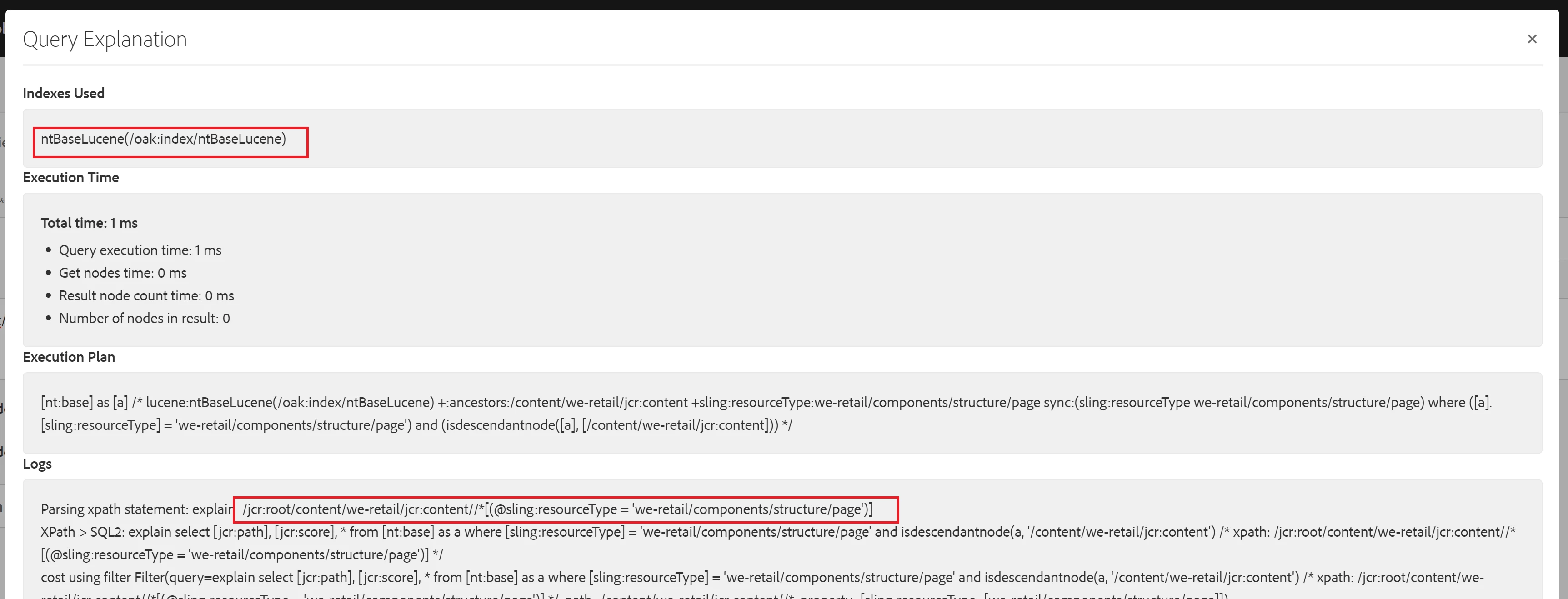
Example: For the sample query you posted, ntBaseLucene is the index used. You can reindex only that particular index - /oak:index/ntBaseLucene

Note : Given that it is your local environment, you can reindex directly like this. 


Logs statements are displayed here and you can also check detailed trace from Sling Log as mentioned above. 

3 replies

Asutosh_Jena_
Community Advisor
Community Advisor
May 6, 2021

Hi @jovidiaz 


Have you tried to reindex using the oak tool using the steps mentioned here:

https://experienceleague.adobe.com/docs/experience-manager-learn/foundation/administration/use-oak-run-jar-to-manage-indexes.html?lang=en#oak-run.jar-index-command-basics


If still this did not resolve the issue, try to copy the index from the working instance and put it on your instance and retry.


Thanks!

jovidiazAuthor
May 7, 2021
Hello @asutosh_jena_, For some reason create a package for that path always generated an empty package for me. Thanks anyways
Vijayalakshmi_S
Vijayalakshmi_SAccepted solution
Level 10
May 7, 2021

Hi @jovidiaz,

As you are completely sure that it is not permission issue, I suggest to give a try on the below. 


Create a logger entry for the following in debug level in http://localhost:4502/system/console/slinglog

org.apache.jackrabbit.oak.query.QueryEngineImpl
org.apache.jackrabbit.oak.query.SQL2Parser
org.apache.jackrabbit.oak.query.QueryImpl
com.day.cq.search
org.apache.jackrabbit.oak.query

Also, Execute your query in Query Performance tool(http://localhost:4502/libs/granite/operations/content/diagnosistools/queryPerformance.html) and arrive at Index used. Try to reindex only that specific index by updating the property "reindex" to true and wait for some time to see the property updated to false and reindexCount update to next incremented value upon successful reindexing. (Refresh the index node after some time to see the property values updated automatically upon successful reindex)


Example: For the sample query you posted, ntBaseLucene is the index used. You can reindex only that particular index - /oak:index/ntBaseLucene

Note : Given that it is your local environment, you can reindex directly like this. 


Logs statements are displayed here and you can also check detailed trace from Sling Log as mentioned above. 

Vijayalakshmi_S
Level 10
May 7, 2021
Hi,
Vijayalakshmi_S
Level 10
May 7, 2021

Hi @jovidiaz,

Just realized from my screenshot in previous answer that the result count is 0. (After posting the answer :()

Ignore my previous answer with respect to Query Performance. (You can consider Logger entry)

Issue is with the query. path shouldn't be with jcr:content in this case because there won't be any further nodes (under jcr:content) which has the sling:resourceType to be the one(weretail/components/structure/page) that we are looking for.

Here is the correct query with screenshot