
[AEM 6.5]Issue with Show Hide selection Path Browser under Multifield
Hi Team,
There is a issue I am facing with the pathbroswer in Multifield, and it is based on Show Hide of dropdown,
There is a requirement here is like.
Need to create a Multifield having 4 maximum limit, and each field should contain
- Title
- Description
- Media Type:
- Options:
- Image
- Video
- Options:
- Note: Based on Media Type selection can show either Image or Video fields.
- Image:
- Video:
- Alt-Text
The Dialog I created
<?xml version="1.0" encoding="UTF-8"?>
<jcr:root xmlns:sling="http://sling.apache.org/jcr/sling/1.0" xmlns:granite="http://www.adobe.com/jcr/granite/1.0" xmlns:cq="http://www.day.com/jcr/cq/1.0" xmlns:jcr="http://www.jcp.org/jcr/1.0" xmlns:nt="http://www.jcp.org/jcr/nt/1.0"
jcr:primaryType="nt:unstructured"
jcr:title="Feature"
sling:resourceType="cq/gui/components/authoring/dialog">
<content
jcr:primaryType="nt:unstructured"
sling:resourceType="granite/ui/components/foundation/container">
<layout
jcr:primaryType="nt:unstructured"
sling:resourceType="granite/ui/components/foundation/layouts/tabs"
type="nav"/>
<items jcr:primaryType="nt:unstructured">
<tab1
jcr:primaryType="nt:unstructured"
jcr:title="Content"
sling:resourceType="granite/ui/components/foundation/section">
<layout
jcr:primaryType="nt:unstructured"
sling:resourceType="granite/ui/components/foundation/layouts/fixedcolumns"/>
<items jcr:primaryType="nt:unstructured">
<column
jcr:primaryType="nt:unstructured"
sling:resourceType="granite/ui/components/foundation/container">
<items jcr:primaryType="nt:unstructured">
<fieldset
jcr:primaryType="nt:unstructured"
jcr:title=""
sling:resourceType="granite/ui/components/foundation/form/fieldset">
<layout
jcr:primaryType="nt:unstructured"
sling:resourceType="granite/ui/components/foundation/layouts/fixedcolumns"/>
<items jcr:primaryType="nt:unstructured">
<formFields
jcr:primaryType="nt:unstructured"
sling:resourceType="granite/ui/components/coral/foundation/form/multifield"
composite="{Boolean}true"
eaem-multi-nested=""
fieldLabel="Content"
maxLimit="4">
<field
jcr:primaryType="nt:unstructured"
sling:resourceType="granite/ui/components/foundation/form/fieldset"
name="./formFields">
<layout
jcr:primaryType="nt:unstructured"
sling:resourceType="granite/ui/components/foundation/layouts/fixedcolumns"
method="absolute"/>
<items jcr:primaryType="nt:unstructured">
<column
jcr:primaryType="nt:unstructured"
sling:resourceType="granite/ui/components/foundation/container"
fieldLabel="Items">
<items jcr:primaryType="nt:unstructured">
<title
jcr:primaryType="nt:unstructured"
sling:resourceType="granite/ui/components/coral/foundation/form/textfield"
fieldDescription="Under 45 characters recommended."
fieldLabel="Title"
name="./title"
required="{Boolean}true"/>
<description
jcr:primaryType="nt:unstructured"
sling:resourceType="granite/ui/components/coral/foundation/form/textarea"
fieldDescription="Under 140 characters recommended."
fieldLabel="Description"
name="./description"/>
<mediaType
granite:class="cq-dialog-dropdown-showhide"
jcr:primaryType="nt:unstructured"
sling:resourceType="granite/ui/components/coral/foundation/form/select"
fieldLabel="Media Type"
name="./mediaType">
<granite:data
jcr:primaryType="nt:unstructured"
cq-dialog-dropdown-showhide-target=".image-video-mediatype-showhide-target"/>
<items jcr:primaryType="nt:unstructured">
<image
jcr:primaryType="nt:unstructured"
text="Image"
value="image"/>
<video
jcr:primaryType="nt:unstructured"
text="Video"
value="video"/>
</items>
</mediaType>
<image
granite:class="hide image-video-mediatype-showhide-target"
jcr:primaryType="nt:unstructured"
sling:resourceType="granite/ui/components/coral/foundation/container">
<granite:data
jcr:primaryType="nt:unstructured"
showhidetargetvalue="image"/>
<items jcr:primaryType="nt:unstructured">
<image
jcr:primaryType="nt:unstructured"
sling:resourceType="granite/ui/components/foundation/form/pathbrowser"
emptyText="Drag-and-drop or select an asset into the input field"
fieldLabel="Image"
mimetype="image"
name="./image"
rootPath="/content/dam"/>
<alttextimage
jcr:primaryType="nt:unstructured"
sling:resourceType="granite/ui/components/coral/foundation/form/textfield"
fieldLabel="Alt-Text"
name="./alttextimage"/>
</items>
</image>
<video
granite:class="hide image-video-mediatype-showhide-target"
jcr:primaryType="nt:unstructured"
sling:resourceType="granite/ui/components/coral/foundation/container">
<granite:data
jcr:primaryType="nt:unstructured"
showhidetargetvalue="video"/>
<items jcr:primaryType="nt:unstructured">
<video
jcr:primaryType="nt:unstructured"
sling:resourceType="granite/ui/components/coral/foundation/form/pathbrowser"
emptyText="Drag-and-drop or select an asset into the input field"
fieldLabel="Video"
name="./video"
rootPath="/content/dam"/>
<alttextvideo
jcr:primaryType="nt:unstructured"
sling:resourceType="granite/ui/components/coral/foundation/form/textfield"
fieldLabel="Alt-Text"
name="./alttextvideo"/>
</items>
</video>
</items>
</column>
</items>
</field>
</formFields>
</items>
</fieldset>
</items>
</column>
</items>
</tab1>
</items>
</content>
</jcr:root>
Now >>
Step 1: Select Image form Dropdown and give some value in pathBrowser. (*Video dialog will hide)
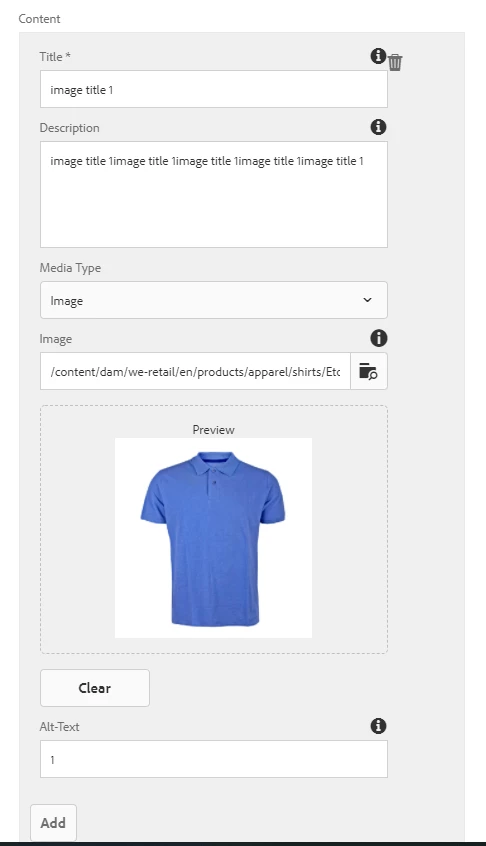
Step 2: Click on Add to Add new field, and select Video from Dropdown, and select some path for videos
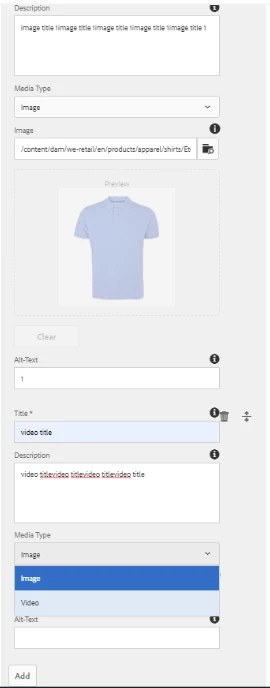
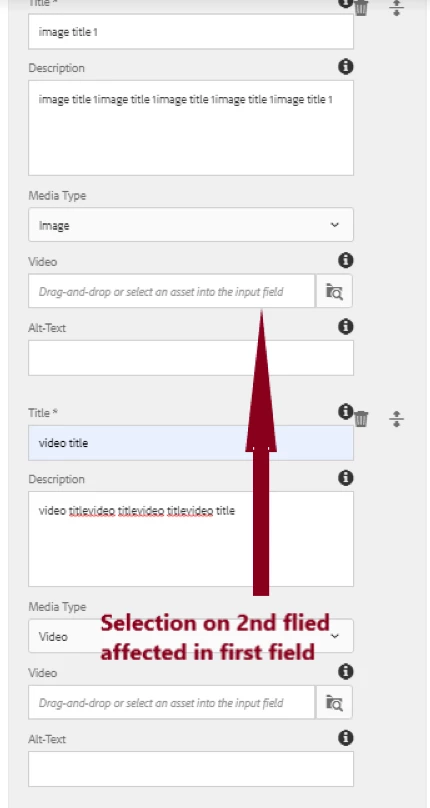
Step 3: After Selection of Video in Second field (step2), we can see the image pathbrowser changes to video on first fields (step1)
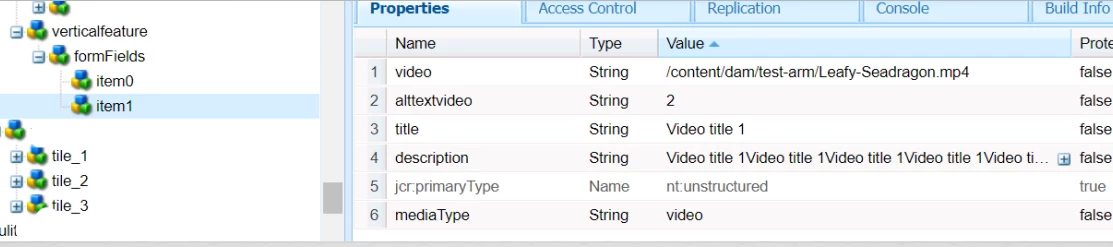
And in CRX, we can see the values are storing as expected, but the selection of just next field impacted the showing of first field
value for field 1:
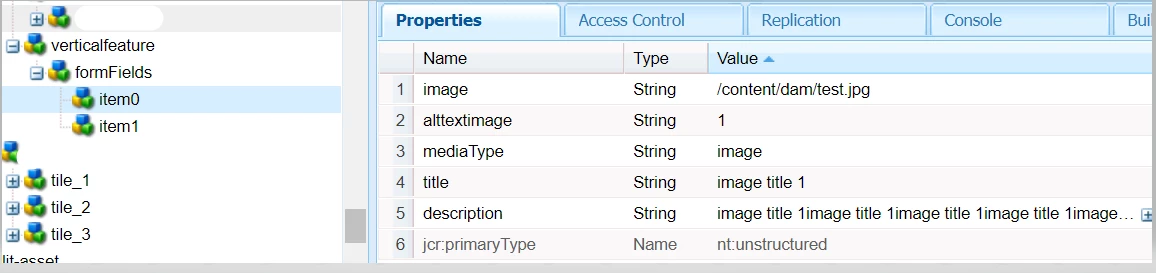
value for field 2:
Continuation of : https://experienceleaguecommunities.adobe.com/t5/adobe-experience-manager/pathfield-inside-multifield-aem-6-5-touch-ui-dialog/qaq-p/389987#M83361
Thanks you
@manjunath_k @kautuk_sahni @arunpatidar @briankasingli @santhosh_kumark @vanegi @vijayalakshmi_s



