
AEM 6.5 Image component put extra character | Community
Skip to main content
rabiul_alam
Level 2
March 29, 2023

AEM 6.5 Image component put extra character

  • March 29, 2023
  • 2 replies
  • 1286 views

When I add Image component, the component itself put an extra character below the image icon. And remains when I go for preview mode. I have added the snapshot below.
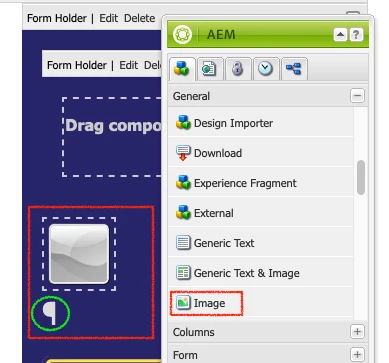
 

In preview mode the code appear for this section is also given below

<small><div><span class="cq-text-placeholder-ipe">¶</span></div></small>

Why does 'Image' component causing the problem?

This post is no longer active and is closed to new replies. Need help? Start a new post to ask your question.

2 replies

Level 4
March 29, 2023

Could you please share AEM version ? Any specific reason to use classic UI instead of touch UI ?

rabiul_alam
Level 2
March 29, 2023

 Adobe Experience Manager (6.5.12.0)
No special reason. Just using it.

arunpatidar
Community Advisor
Community Advisor
March 29, 2023

Can you please check the HTL / JSP code of image component? what do you see there?

Arun Patidar
rabiul_alam
Level 2
March 29, 2023

Hey, I remove the below line form JSP code

<cq:text property="jcr:description" placeholder="" tagName="small" escapeXml="true"/>


the unexpected character has gone. 

arunpatidar
Community Advisor
Community Advisor
March 29, 2023

Then it could be a product bug.

Could you please raise this with Adobe?

Arun Patidar