
AEM 6.5 – Extending Asset Timeline in assetdetails.html to Display Additional Custom Fields (User, Comments, Workflow Actions, etc.)
Hi Team,
I’m currently working on an implementation to enhance the Asset Timeline displayed in AEM’s assetdetails.html view.
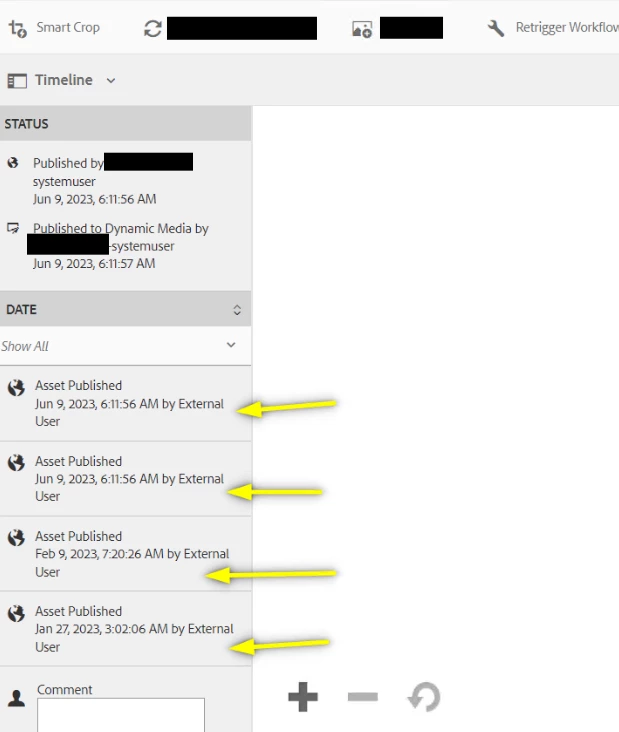
The goal is to make the Timeline more informative, To extend the AEM Asset Timeline so that for each key asset action, it displays:
1. User ID – who performed the action
2. Timestamp – when the action occurred
3. Comment/Remarks – associated workflow or operation comment
4. Action Type – e.g. Submitted, Published, Approved, Archived, Workflow Retriggered
Example expected behavior:
- Action Fields to Display in Timeline
- Asset Submitted User ID, Date, Comment
- Asset Published User ID, Date, Comment
- Edit Approved User ID, Date, Comment
- Dynamic Media Custom Workflow Retriggered User ID, Date, Comment
- Archived User ID, Date, Comment
If anyone had worked in enhancing the timeline need your guidance on :
1. What’s the recommended or best-practice approach to extend or customize the Asset Timeline in AEM 6.5? • For example, should it be customized via the AssetTimelineProvider, ActivityStreamService, or a custom Event Listener?
2. How can we inject custom metadata (e.g., user ID, workflow comments) into Timeline entries
3. Any official Adobe references or community articles covering Timeline customization or augmentation?
AEM Version: 6.5.21
Thanks