AEM 6.5.10 project build is successful, however project-bundle is in installed state. | Community
Skip to main content
Lavanya_Pejjayi
Adobe Employee
Adobe Employee
November 8, 2021
Solved

AEM 6.5.10 project build is successful, however project-bundle is in installed state.

  • November 8, 2021
  • 4 replies
  • 1385 views

Hello All,


I am experiencing a strange issue in my local setup.


1. I have cloned the working directory from the bitbucket and then executed the maven build commands. 

mvn clean install -PautoInstallPackage 

 this is executed successfully. However the project-bundle was on "installed" state I could see some errors. 

I have checked the parentPOM.xml and corePOM.xml and all other POM.XML's too.   I could not  find the jsoup version0.0.0.  

The dependencies are specified as follows.  
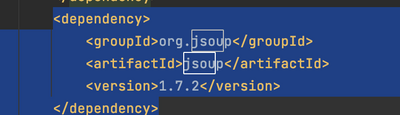
 

Please someone advise me, what could be the reason.

P.S: I am using settings.xml as used by all other team-members. 


Thank you,

This post is no longer active and is closed to new replies. Need help? Start a new post to ask your question.
Best answer by Kishore_Kumar_

Hi @lavanya_pejjayi ,


PFB similar question and reply to it.


https://stackoverflow.com/questions/30158628/aem-6-osgi-package-dependencies-not-getting-resolved 

4 replies

arunpatidar
Community Advisor
Community Advisor
November 8, 2021

Hi,

Can you check if this bundle is present in AEM or not?

http://localhost:4504/system/console/depfinder


If not then you have to deploy this bundle as well in order to resolved dependency 

Arun Patidar
Kishore_Kumar_
Kishore_Kumar_Accepted solution
Level 9
November 8, 2021
VeenaVikraman
Community Advisor
Community Advisor
November 8, 2021

@lavanya_pejjayi As @arunpatidar mentioned, the reason the bundles are not resolved is because it is not able to find the dependency jars in the Console. If you are adding dependency , make sure you first check it in the depfinder and add them accordingly. In your case if you find it empty , then add the bundles which have the dependency (org.jsoup) jars first to Felix console and restart your bundle.


Lavanya_Pejjayi
Adobe Employee
Adobe Employee
November 8, 2021

The issue is resolved. Thank You so much Arun_Patidar,Veena_Vikram and kishorekumar14




