
Solved
AEM 6.4.x:hide/show in AEM component dialog not showing/hiding
so this is what I see from the dialog (using XML from 2nd tutorial). I tried selecting both options several times and nothing is showing and hiding. (The results is the same for my own XML and all tutorials)
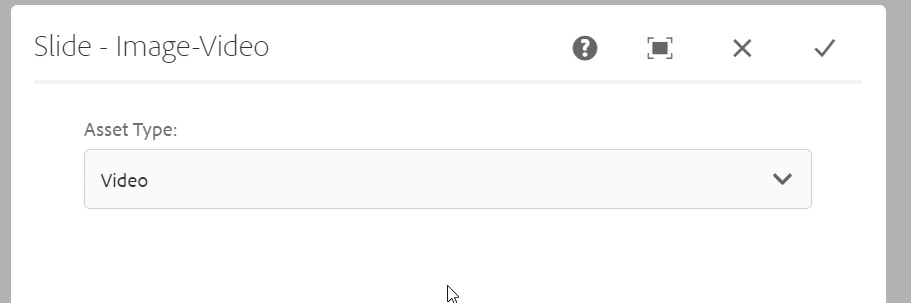
I also tried the one from these links and same resuilts. Any ideas on where to look?
- first tutorial from Adobe AEM community
- second tutorial from aemhints.com
This is my own XML
<?xml version="1.0" encoding="UTF-8"?>
<jcr:root xmlns:sling="http://sling.apache.org/jcr/sling/1.0"
          xmlns:granite="http://www.adobe.com/jcr/granite/1.0"
          xmlns:cq="http://www.day.com/jcr/cq/1.0"
          xmlns:jcr="http://www.jcp.org/jcr/1.0"
          xmlns:nt="http://www.jcp.org/jcr/nt/1.0"
          jcr:primaryType="nt:unstructured"
          jcr:title="Test dialog"
          sling:resourceType="cq/gui/components/authoring/dialog">
    <content
            jcr:primaryType="nt:unstructured"
            sling:resourceType="granite/ui/components/coral/foundation/container">
        <items jcr:primaryType="nt:unstructured">
            <tooltiptype
                    granite:class="cq-dialog-dropdown-showhide"
                    jcr:primaryType="nt:unstructured"
                    sling:resourceType="granite/ui/components/coral/foundation/form/select"
                    emptyOption="{Boolean}false"
                    fieldDescription="Tooltip type selection"
                    fieldLabel="Tooltip type"
                    multiple="{Boolean}false"
                    name="./data/tooltip/type">
                <granite:data
                        jcr:primaryType="nt:unstructured"
                        cq-dialog-dropdown-showhide-target=".tooltip-path-showhide-target"/>
                <items jcr:primaryType="nt:unstructured">
                    <typetext
                            jcr:primaryType="nt:unstructured"
                            selected="{Boolean}true"
                            text="Text"
                            value="text"/>
                    <typerichtext
                            jcr:primaryType="nt:unstructured"
                            text="Richtext"
                            value="richtext"/>
                </items>
            </tooltiptype>
            <textContainer
                    jcr:primaryType="nt:unstructured"
                    granite:class="hide tooltip-path-showhide-target"
                    sling:resourceType="granite/ui/components/foundation/container">
                <granite:data
                        jcr:primaryType="nt:unstructured"
                        showhidetargetvalue="text"/>
                <tooltiptexttype
                        jcr:primaryType="nt:unstructured"
                        sling:resourceType="granite/ui/components/coral/foundation/form/textfield"
                        fieldLabel="Text Tooltip"
                        name="./data/tooltip/type-text">
                </tooltiptexttype>
            </textContainer>
            <richTextContainer
                    jcr:primaryType="nt:unstructured"
                    granite:class="hide tooltip-path-showhide-target"
                    sling:resourceType="granite/ui/components/foundation/container">
                <granite:data
                        jcr:primaryType="nt:unstructured"
                        showhidetargetvalue="richtext"/>
                <tooltiprichtexttype
                        jcr:primaryType="nt:unstructured"
                        sling:resourceType="granite/ui/components/coral/foundation/form/textfield"
                        fieldLabel="Richtext Tooltip"
                        id="./data/tooltip/type-richtext"
                        name="./data/tooltip/type-richtext"
                        renderReadOnly="{Boolean}false">
                </tooltiprichtexttype>
            </richTextContainer>
        </items>
    </content>
</jcr:root>