AEM 6.4 - Style tab is empty in dialog | Community
Skip to main content
Level 3
February 20, 2019
Solved

AEM 6.4 - Style tab is empty in dialog

  • February 20, 2019
  • 9 replies
  • 3031 views

I am trying to setup styles for text component. Created a required design configuration and dialog changes but I could not see anything in Styles tab. It is just empty

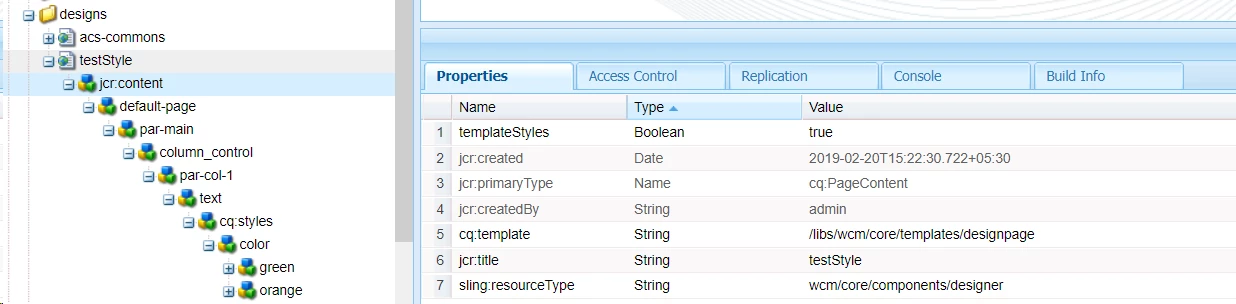
Design configuration :- /etc/designs/testStyle
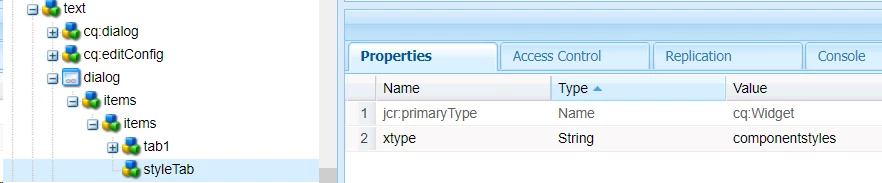
Dialog Changes
Added cq:designPah with value /etc/designs/testStyle in content(jcr:content)

Is there any additional configuration that we need to do to bring the styles tab?

This post is no longer active and is closed to new replies. Need help? Start a new post to ask your question.
Best answer by Gaurav-Behl

You should plan to convert static templates to editable templates. Classic UI is deprecated per official docs.

Static template would work in both Classic/Touch UI in AEM 6.4 but not sure about AEM 6.5 until its formally announced/released. However, per official documentation, you should use Editable templates for any new projects and plan to migrate existing static templates to editable templates and completely switch over to Touch UI (Standard UI).

HTH

9 replies

smacdonald2008
Level 10
February 20, 2019

Are you working with Classic UI dialog?

Level 3
February 21, 2019

Scott MacDonald, Working on both classic and touch UI. Styles tab is empty in both case.

smacdonald2008
Level 10
February 21, 2019

Please consult this document - we cover styling here - Getting Started with AEM Sites - WKND Tutorial

arunpatidar
Community Advisor
Community Advisor
February 21, 2019

Hi,

For touch UI you can check Adobe Experience Manager Help | Style System

Arun Patidar
Level 3
March 1, 2019

Thanks Scott MacDonald and Arun Patidat for sharing the references.

Created a page with editable template and achieved the style design in touch UI mode, able to see multiple visual variation as well. But the issue is when I open the page in classic mode, I am not seeing anything no parsys, no sidekick and can not edit the component. Is this expected one? Will editable template work only in touch UI mode?

Should we convert my exiting static template into editable template or

Should we keep both static and editable template ?

As per my understanding, at last the page should map anyone one not both of them, cq:template property should either point to editable or static template.

which one to use If we want to support both classic and touch UI. Please suggest.

Gaurav-Behl
Gaurav-BehlAccepted solution
Level 10
March 1, 2019

You should plan to convert static templates to editable templates. Classic UI is deprecated per official docs.

Static template would work in both Classic/Touch UI in AEM 6.4 but not sure about AEM 6.5 until its formally announced/released. However, per official documentation, you should use Editable templates for any new projects and plan to migrate existing static templates to editable templates and completely switch over to Touch UI (Standard UI).

HTH

Level 3
March 2, 2019

Thanks Gaurav for your reply.

I agree with you on static template would work in both Classic/Touch UI in AEM 6.4 but not in all cases. for example static template would not work if the component contains any style in it's dialog(for multiple visual variation). we have to go for editable template in order to have style system. Mainly the design is stored in different location.

For static template, design is stored at /etc/designs/<my-site>/jcr:content

For editable template, design is stored at /conf/<your-project>/settings/wcm/policies

The conclusion is, 1. We can not achieve style design with static template in touch UI. 2. Editable template would not support classic UI.(may be because of Classic UI is deprecated per official docs.)

Is this correct?

Gaurav-Behl
Level 10
March 2, 2019

correct, assuming you meant "style system" feature when you say "style design"

Level 3
March 2, 2019

Thanks Gaurav, yes, I meant "style system". Cheers