AEM 6.4 DAM Update Asset Workflow: Thumbnails Not Generated For application/octet-stream MIME Type | Community
Skip to main content
Praveen_Kasaraj
Level 2
August 16, 2019
Solved

AEM 6.4 DAM Update Asset Workflow: Thumbnails Not Generated For application/octet-stream MIME Type

  • August 16, 2019
  • 3 replies
  • 4054 views

#DearAEM Experts,

We are migrating DAM content from 6.1 to 6.4 and most of the existing DAM images in 6.1 have jcr:mimeType as application/octet-stream.
(Ex: /content/dam/projects/we-retail/cover/jcr:content/renditions/original/jcr:content)
Issue: AEM6.4 DAM Asset Update Workflow does not generate thumbnails for images having jcr:mimeType (application/octet-stream) but AEM 6.1 does.

Expected: AEM6.4 DAM Asset Update Workflow should generate thumbnails for 'application/octet-stream' mime type images.

Please refer to "jcr:mimeType" property, if you change from application/octet-stream to image/png and re-run the Update Asset workflow the thumbnail images are generated.
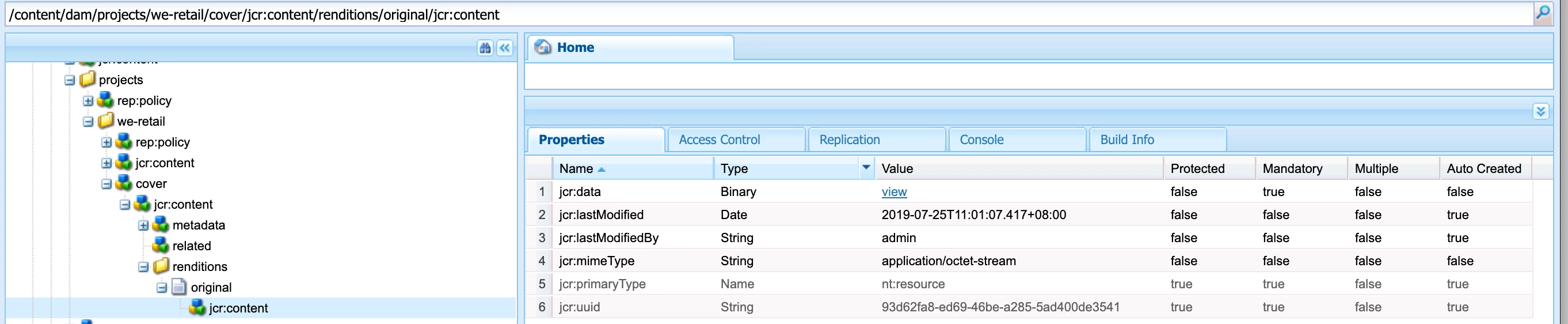
Note: Applied AEM 6.4.3 service pack.

Any workaround would be helpful, apart from writing script to update jcr:mimeType from 'application/octet-stream' to 'image/jpeg' (image/jpeg, image/jpg, image/png, image/gif, tiff, etc.,).

This post is no longer active and is closed to new replies. Need help? Start a new post to ask your question.
Best answer by joerghoh

Seems you already contacted Adobe support and are waiting for a solution. I am not aware of any other workaround than to write a script to change the mimeType.

3 replies

Adobe Employee
August 16, 2019

Can you test in AEM6.5?  I found an issue was resolved in AEM6.5 which may be the same.  If you still have issues in 6.5 it will be good to setup debug for workflow and perhaps open a Daycare ticket. 

Praveen_Kasaraj
Level 2
August 19, 2019

Thanks for your response.

Yes, AEM 6.5 it works and I am aware of that. We are using AEM 6.4 version and seeking a solution or a workaround till DayCare resolves this issue.

Jörg Hoh​ can you please help me on this?

joerghoh
Adobe Employee
joerghohAdobe EmployeeAccepted solution
Adobe Employee
August 19, 2019

Seems you already contacted Adobe support and are waiting for a solution. I am not aware of any other workaround than to write a script to change the mimeType.

Praveen_Kasaraj
Level 2
February 24, 2020
Yes, we have contacted Adobe and got reply from them.
