AEM 6.4: Creating own filter | Community
Skip to main content
Magicr
Level 6
August 3, 2020
Solved

AEM 6.4: Creating own filter

  • August 3, 2020
  • 3 replies
  • 2539 views

In Author mode an author can choose some stored assests from assests finder, former content finder. To reduce the size of all founded assests some filters has being added by default (images, documents and so far). For one of our application there is a wish to provide zip and executables files. The upload into the DAM is not the problem. The problem is to find them into the assest finder. The provied filters do not cover .zip and .exe files.

The idea is now to create an own filter. How can I achieve this? Where is the placed to store it?


Thanks in advanced.
This post is no longer active and is closed to new replies. Need help? Start a new post to ask your question.
Best answer by narendragandhi

You can navigate to http://localhost:4502/libs/cq/core/content/tools/customsearch.html/conf/global/settings/dam/search/facets/assets/jcr:content to customize the assets search form.


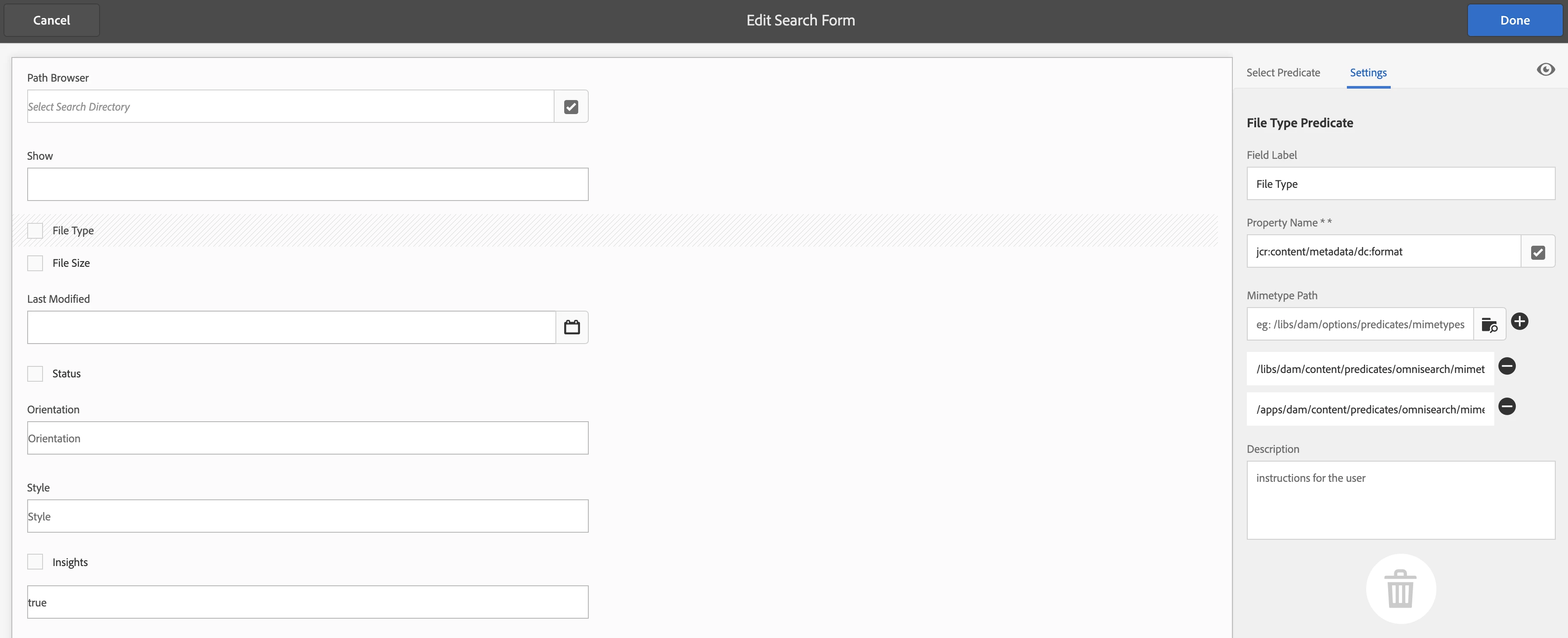
Upon selecting the File Type element you can see the datasource from where it's being populated. Refer the screenshot -

You can then overlay that node and add another datasource with your list of mime types.


Note - I see zip file type is already in the list so you may only need to add exe.

3 replies

August 3, 2020

Hi @magicr ,


In addition to using pre-existing predicates, Experience Manager developers can also create their own predicates using the Query Builder API .


This might help , please refer to : https://docs.adobe.com/content/help/en/experience-manager-65/assets/extending/searchx.html 


narendragandhi
Community Advisor
narendragandhiCommunity AdvisorAccepted solution
Community Advisor
August 3, 2020

You can navigate to http://localhost:4502/libs/cq/core/content/tools/customsearch.html/conf/global/settings/dam/search/facets/assets/jcr:content to customize the assets search form.


Upon selecting the File Type element you can see the datasource from where it's being populated. Refer the screenshot -

You can then overlay that node and add another datasource with your list of mime types.


Note - I see zip file type is already in the list so you may only need to add exe.

Magicr
MagicrAuthor
Level 6
August 31, 2020

@narendragandhiDue to holiedays I was unable to reply. The suggested folder "/mnt/overlay/..." does not exists. So I don't know what I have to do. However, an external advisor found a site at the Internet for a working solution. I've posted a link as an answer to my question.

Magicr
MagicrAuthor
Level 6
August 31, 2020

An external advisor found a working solution for this issue. http://experience-aem.blogspot.com/2019/06/aem-65-show-approved-assets-in-asset-finder.html shows an example for AEM 6.5 wich is working for 6.4 either. To create an additional filter is using this provided script and label it as you need. The add your own collection of mimetypes to ii.