AEM 6.3 with Hybris 6.5 integration | Community
Skip to main content
Level 2
November 10, 2017
Solved

AEM 6.3 with Hybris 6.5 integration

  • November 10, 2017
  • 13 replies
  • 5103 views

Hi,

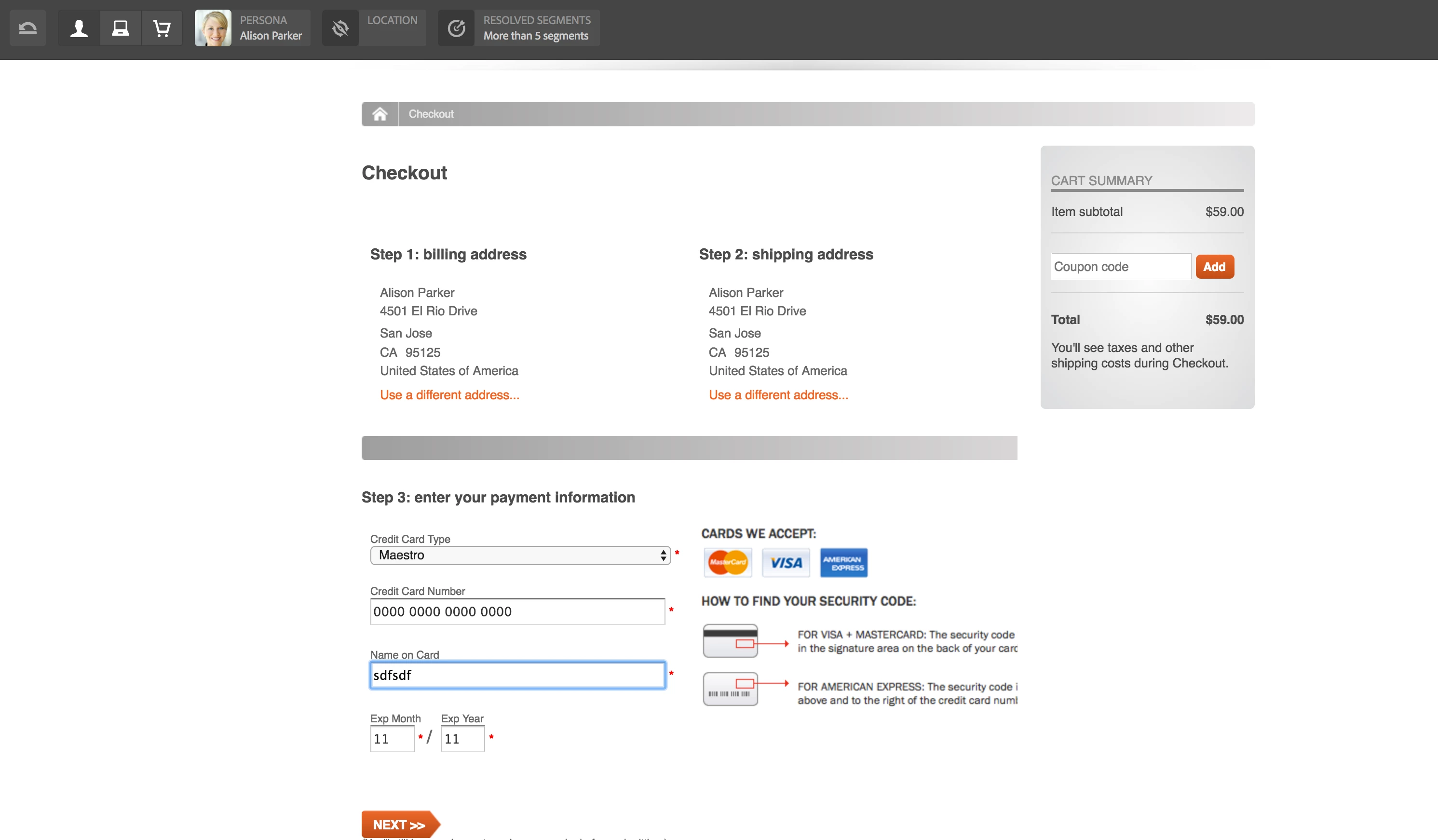
I am facing below issues when trying to check out the products after giving all the details like billing, shopping addresses and card details. Please help me if anybody has an idea on this.

Checkout issue #1

com.adobe.cq.commerce.hybris.common.HybrisException: error executing command: AddDeliveryAddressCommand; hybris response status: [400], body: [{

   "errors" : [ {

      "message" : "This field is required and must to be between 1 and 2 characters long.",

      "reason" : "missing",

      "subject" : "country.isocode",

      "subjectType" : "parameter",

      "type" : "ValidationError"

   } ]

}]

I guess here AEM is not passing the country ISO code to the Hybris.

Checkout issue #2

09.11.2017 10:29:16.137 *ERROR* [0:0:0:0:0:0:0:1 [1510219754837] POST /content/geometrixx-outdoors/en_US/user/checkout.html HTTP/1.1] com.adobe.cq.commerce.hybris.common.DefaultHybrisConnection execute: hybris response status: [400], body: [{

   "errors" : [ {

      "message" : "Payment details [8796093055018] not found.",

      "reason" : "unknownIdentifier",

      "subject" : "paymentDetailsId",

      "subjectType" : "parameter",

      "type" : "ValidationError"

   } ]

}]

09.11.2017 10:29:16.137 *ERROR* [0:0:0:0:0:0:0:1 [1510219754837] POST /content/geometrixx-outdoors/en_US/user/checkout.html HTTP/1.1] com.adobe.cq.commerce.hybris.common.DefaultHybrisSession Command execution failed:

com.adobe.cq.commerce.hybris.common.HybrisException: error executing command: UpdatePaymentInfoCommand; hybris response status: [400], body: [{

   "errors" : [ {

      "message" : "Payment details [8796093055018] not found.",

      "reason" : "unknownIdentifier",

      "subject" : "paymentDetailsId",

      "subjectType" : "parameter",

      "type" : "ValidationError"

   } ]

}]

Thanks,

Srini.
This post is no longer active and is closed to new replies. Need help? Start a new post to ask your question.
Best answer by Martin_Buergi_Adobe

Did you use this Geometrixx package: https://www.adobeaemcloud.com/content/marketplace/marketplaceProxy.html?packagePath=/content/companies/public/adobe/pack…

AEM: I installed the above mentioned Geometrixx package ad both 6.3.2 hybris packages.

hybris: I installed hybris 6.5 and setup the Geometrixx store

Demo: I went to http://localhost:4502/editor.html/content/geometrixx-outdoors/en_US/men/shirts/ashanti-nomad.htm, added shirt to the cart, and did a regular checkout.

13 replies

kautuk_sahni
Community Manager
Community Manager
November 10, 2017

I have asked internal team to have a look at this

~kautuk

Kautuk Sahni
Level 2
November 10, 2017

Thanks Kautuk.

Level 2
November 15, 2017

Hi Kautuk,

Do you have any update on this issue?

Thanks,

Srini.

kautuk_sahni
Community Manager
Community Manager
November 16, 2017

Waiting for their response here. Would get back to you once I have the information!!

Kautuk Sahni
Adobe Employee
November 16, 2017

Hi Srini,

Can you describe us the steps to reproduce this issue (including what packages you have used). When using the ootb demo, I could not reproduce the errors.

Thank you.

Martin

Level 2
November 16, 2017

Hi Martin,

Hope you have installed both Hybris (6.5) and AEM (6.3) latest versions and checked the Geometrixx demo. I am using "cq-hybris-content-6.3.2.zip" and "cq-geometrixx-hybris-content-6.3.2.zip".

and also installed all Geometrixx related code and content packages from AEM 6.1 as Geometrixx is not available in AEM 6.3

Please let me know if you need more info.

Thanks,

Srini.

Martin_Buergi_AdobeAdobe EmployeeAccepted solution
Adobe Employee
November 16, 2017

Did you use this Geometrixx package: https://www.adobeaemcloud.com/content/marketplace/marketplaceProxy.html?packagePath=/content/companies/public/adobe/pack…

AEM: I installed the above mentioned Geometrixx package ad both 6.3.2 hybris packages.

hybris: I installed hybris 6.5 and setup the Geometrixx store

Demo: I went to http://localhost:4502/editor.html/content/geometrixx-outdoors/en_US/men/shirts/ashanti-nomad.htm, added shirt to the cart, and did a regular checkout.

Level 2
November 16, 2017

Hi Martin,

That looks great. I installed Hybris in a different way but not as mentioned in hybris may be that could be the problem.

And also can you tell me how did you upload the csv files in Hybris? because hmc is deprecated and backoffice is not allowing me to upload the csv file.

Thanks,

Srini.

Level 2
November 16, 2017

Hi Martin,

Forgot to ask you one more question did the order ID generated for you after you complete the checkout?

Thanks,

Srini.

Adobe Employee
November 16, 2017