AEM 6.3 Touch UI: Is image editing like crop and rotate available for multiple images? | Community
Skip to main content
Level 2
November 28, 2017
Solved

AEM 6.3 Touch UI: Is image editing like crop and rotate available for multiple images?

  • November 28, 2017
  • 4 replies
  • 2911 views

I want to crop or rotate an image of my component. The component I have is having more than one image and different images are shown based on different scenarios.

How can I provide crop and rotate functionality for individual images in touch UI authoring?

My classic UI dialog looks like below  -
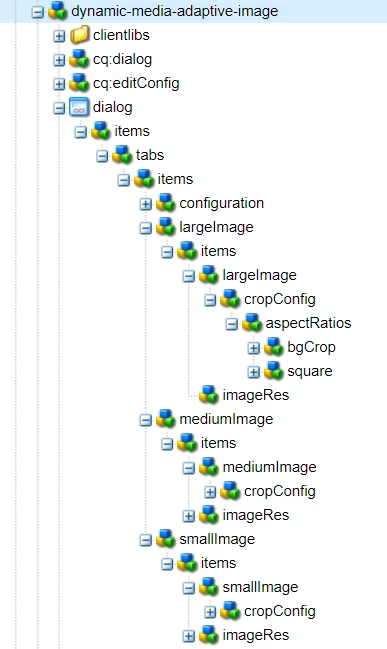
Now I'm trying to create equivalent in touch UI.

Thanks in advance.
This post is no longer active and is closed to new replies. Need help? Start a new post to ask your question.
Best answer by Ratna_Kumar

Hi Hemanth,

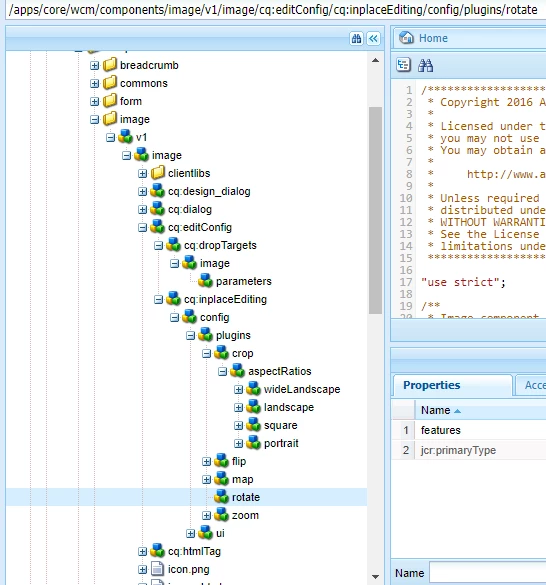
In Touch UI, you can configure the crop and rotate options under inplaceEditing of the image component.

See the core components of image component more details and also see the below screenshot for the same.

Hope this helps!!

Thanks,

Ratna.

4 replies

Ratna_Kumar
Ratna_KumarAccepted solution
Level 10
November 29, 2017

Hi Hemanth,

In Touch UI, you can configure the crop and rotate options under inplaceEditing of the image component.

See the core components of image component more details and also see the below screenshot for the same.

Hope this helps!!

Thanks,

Ratna.

Level 2
November 30, 2017

The inplace editing option works if there is only one image in the component. But, the question is more towards authoring multiple images with crop/rotate functionality.

In classic UI, these features work for individual images. So, looking for replicating the same in touch UI.

smacdonald2008
Level 10
November 30, 2017

Ratna response is correct and this is how it works in AEM Touch UI.

GaneshM
Level 3
February 5, 2018

Hi Hemanth,

I'm having similar requirements, would you please tell me how did you achieve multiple image crop in single comp dialog?

Thanks in Advance!