AEM 6.3 - not add component to parsys | Community
Skip to main content
dangl95641558
Level 2
March 26, 2018
Solved

AEM 6.3 - not add component to parsys

  • March 26, 2018
  • 8 replies
  • 9559 views

Hi All,

I am creating a parsys template that permits to add my some custom components so we can make changes from the front end interface.

This is my code

...

<body class="${currentPage.template.name}">

   <p>Parsys here</p>

   <sly data-sly-resource="${'par_1' @ resourceType='wcm/foundation/components/parsys'}"/>

   <sly data-sly-include="customfooterlibs.html" data-sly-unwrap/>

   <p>end - page</p>

</body>

...

I do not know the reason why it is neither able to drag nor drop any components to this parsys in edit mode. The symbol of adding does not exist and no components available.
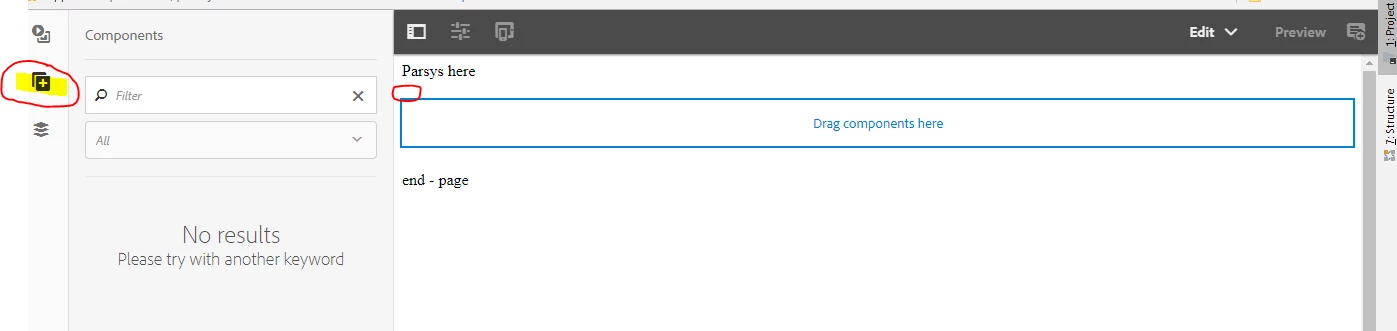
Please help me point out the reasons of error and solutions to fix this.

Thanks

-Dan

This post is no longer active and is closed to new replies. Need help? Start a new post to ask your question.
Best answer by dylanr72808383

No, you do not need to add it to the template, but to the design.

/etc/designs/<your-site>

<jcr:content

  jcr:primaryType="nt:unstructured"

  jcr:title="Your custom Design"

  sling:resourceType="wcm/core/components/designer">

  <your-template-name jcr:primaryType="nt:unstructured">

  <par

   jcr:primaryType="nt:unstructured"

   components="[group:<your-component-group>]">

  <section jcr:primaryType="nt:unstructured"/>

  </par>

  </your-template-name>

8 replies

edubey
Level 10
March 26, 2018

I am assuming, it's not editable templates.

Make sure:-

1. your component does have a component group assigned

2. your template does allow those components from design mode.

Level 2
March 26, 2018

Probably because AEM doesn't know which components to allow on your parsys. Please check the following links on how to do it in design mode and how to do it in xml format in the design of your project

Configuring Components in Design Mode

cq5 - Restrict the components in AEM 5.6.1 - Stack Overflow

dangl95641558
Level 2
March 26, 2018

The components to drag all have component group name. But my page does not have design mode too. So I am considering if AEM 6.3 still supports design mode or not.

<jcr:root xmlns:cq="http://www.day.com/jcr/cq/1.0" xmlns:jcr="http://www.jcp.org/jcr/1.0"
   jcr:primaryType="cq:Component"
   jcr:title="Hello World Component"
   componentGroup="seconddemo63"/>

Level 2
March 26, 2018

Is the template you're using an editable template? Because if so, you can simply edit the template itself to allow components to be added

dangl95641558
Level 2
March 26, 2018

No, it's not editable template. I am trying to create basic template of AEM 6.3 having parsys allowing to drag components in either Touch UI or Classic UI. In previous versions of AEM, there was no problems like this with me.

Level 2
March 26, 2018

Try adding component groups as allowed components, like in the second like I've provided to you.

dangl95641558
Level 2
March 27, 2018

Is this correct:

<jcr:content
   jcr:primaryType="cq:PageContent"
   sling:resourceType="seconddemo63/components/structure/page">

   <par
   jcr:primaryType="nt:unstructured"
   sling:resourceType="foundation/components/parsys"
   components="[seconddemo63/components/content/helloworld]">

   </par>

</jcr:content>

I put the code "components="...">" above in template but it does not work.

dylanr72808383Accepted solution
Level 2
March 27, 2018

No, you do not need to add it to the template, but to the design.

/etc/designs/<your-site>

<jcr:content

  jcr:primaryType="nt:unstructured"

  jcr:title="Your custom Design"

  sling:resourceType="wcm/core/components/designer">

  <your-template-name jcr:primaryType="nt:unstructured">

  <par

   jcr:primaryType="nt:unstructured"

   components="[group:<your-component-group>]">

  <section jcr:primaryType="nt:unstructured"/>

  </par>

  </your-template-name>