
[AEM 6.2 <-> Campaign V6.1 Integration] Failed to load images
Environment Information:
AEM version : 6.2
Adobe Campaign version : 6.1
Adobe campaign Hybrid Model
Adobe campaign Mid sourcing deployment model
Adobe campaign on premise marketing wfserver build number: 8861
Adobe campaign client console build number: 886
Case:
Below steps were followed to create an email delivery:
1. Created campaign email
2. Published page
3. Started workflow : Approve for Campaign
4. Approved content
5. Started workflow : Publish to Campaign
6. On the Campaign Delivery console when Sync button is pressed, the image is not loaded. However when I open the delivery already created by the "Publish to Campaign" workflow in AEM, the same image loads in the delivery console.
SYNC BUTTON:
When the sync button is pressed the image path is a relative one. So the image is not loaded without the domain name or IP address.
PUBLISHED FROM "Publish to Campaign" WORKFLOW:
In the delivery which is auto created by the "Publish to Campaign" workflow in AEM, the image has the complete URL including the domain name or IP address of my publisher. So the image is displayed.
I have configured my externalizer as per the documentation Integrating with Adobe Campaign 6.1
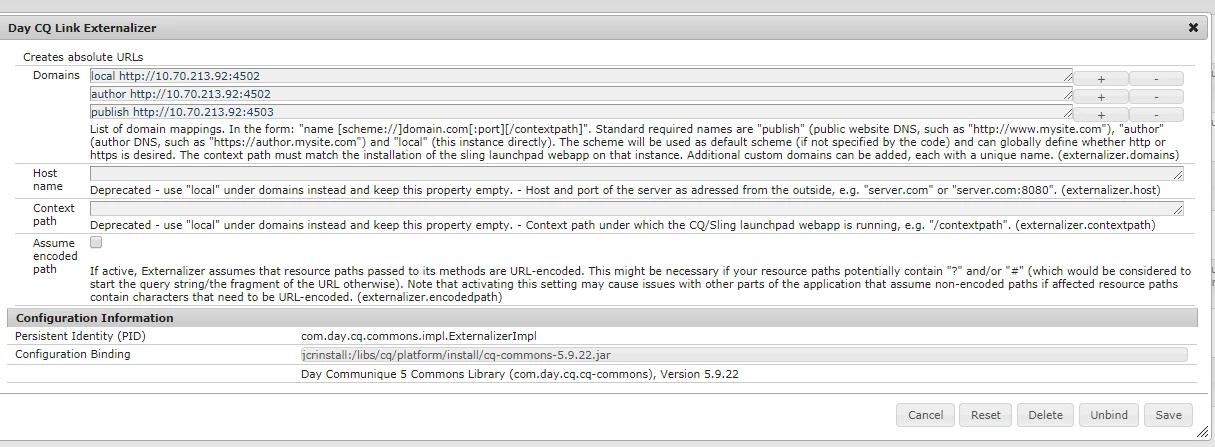
Is there some config which I am missing, Please help me to understand.